Solved
[FIXED] Sims 4 Packs not showing as downloaded after April patch
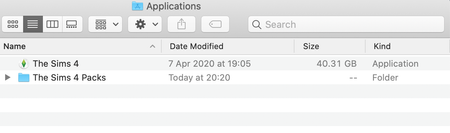

This issue has now been fixed in patch 1.62.69.1220 https://answers.ea.com/t5/Technical-Issues-Mac/Mac-April-14th-2020-Patch-Notes/m-p/8965382#M31601

Here's what happened. For some reason, the packs were re-downloaded and I noticed a dramatic reduction in disc space. After some investigation, I noticed that there were identical copies of the EP, SP, and GPs subfolders in the new TS4 packs folder and the old bundle.
So you have the packs showing directly in the Contents folder in the Sims 4 app, like they were originally, AND in the Sims 4 Packs folder? Just remove them from the Contents folder and it should be fine. Your folders must look like mine in the screenshots in points 5 and 6, depending on how many packs you have purchased.
This issue has now been fixed in patch 1.62.69.1220 https://answers.ea.com/t5/Technical-Issues-Mac/Mac-April-14th-2020-Patch-Notes/m-p/8965382#M31601



