Forum Discussion

12 Replies
I just realized I had typed PC, instead of Mac, whoops. Sorry for the confusion. I saved the DxDiag but this says it's an unsupported file type, any idea how to change it so I can post it?
Please can you provide more information about your Mac. Instructions on how to do so and what to provide here - http://answers.ea.com/t5/The-Sims-Mac/READ-FIRST-Sims-4-Mac-Help-Guides-and-Troubleshooting/m-p/4612396/highlight/true#M162
Hi, here is the additional information.
Operating System (Version/macOS): Sonoma 14.3
Mac model: 13” 2020 Macbook Pro
Processor/Chip: 2 GHz Quad-Core Intel Core i5
Memory (RAM): 16 GB
Graphics (if shown): Intel Iris Plus Graphics 1536 MB
Are you attempting to play the normal version of the game or the Legacy Edition? Normal
Are you running any antivirus? No.
Have you tried to repair the game in Origin? Right click on the game in My Games and select Repair Game. Yes.
Do you use CC/Mods? If so, have you tried removing them and seeing if that fixes your problem? I do, but I’ve removed them all and the problem is not fixed.
How much storage is available on your internal drive? 311 GB
- @emgraced33
Thanks. Do you play in windowed mode or fullscreen? If it happens in windowed mode, are there any glitches outside of the game window on the desktop for example? Can you play around with resizing the game window and see if it makes a difference. Simply grab and drag like you would any app window.
When you tried a clean Sims 4 folder you should not have moved any of the content of your usual Sims 4 folder into the new one the game created. Please move the Sims 4 folder again so none of your current user data is loaded, repair the game in Origin and launch the game so a new TS4 folder is created again. You will have to create a sim and move them into a Lot. Does the problem still occur?
When you say you deleted cache files, what files are you referring to?
Does toggling laptop mode on/off make any difference? I play in fullscreen. I just tried windowed mode. For some reason, entering windowed mode in the main menu, entering live mode in a save, and exiting the save mostly fixed the problem, and the visual glitches I saw before weren't there after entering fullscreen again. However, new black bars in the map appeared similar to the previous ones in other areas of the game.
I followed your instructions to make a clean Sims 4 folder, repaired the game, and moved a new household into a lot in the new Sims 4 folder with none of my old content in it. The problem did not still occur.
I believe I deleted houseDescription-client.package, localthumbcache.package, and avatarcache.package.
I tried toggling laptop mode, it did not make a difference.
- @emgraced33
Could you post a screenshot of the black bars in the map screen? I vaguely remember this being a reported CC issue a few years ago.
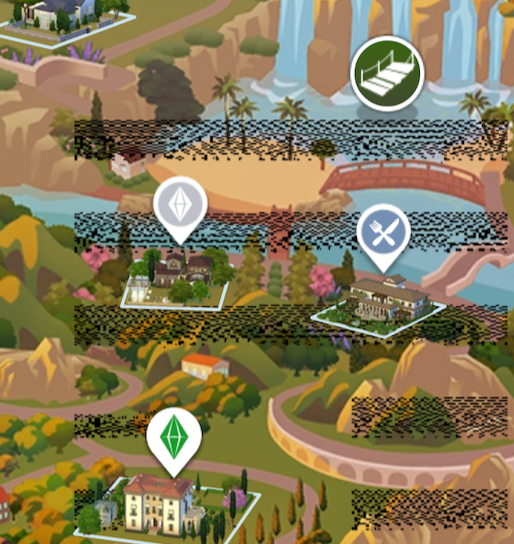
Before moving your thread over to the CC/Mods forum, because a clean game folder resolves the issue, could you copy one of your saves into the new Sims 4 > saves folder and load it up to see if it still happens? Don't copy or move any other content over, just one save. Make sure you have repaired the game as this should fix any Mod related changes to game installation files/folders. Here is a screenshot of the black bars! It seems to only happen where those firefly things on the Tartosa map are. I added in a relatively new save to my repaired fresh Sims 4 file and everything was good! Then I exited and added a copy of my legacy challenge save and the bars were back on the Tartosa map. No cc or mods have been added back in.
- @emgraced33
Thanks! I wonder if your save has corrupted. Is it only in Tartosa in that save that it happens? No other worlds?
Could you upload your save to a file sharing site and PM me the link so I can download and test in my game? Yea, it's only in Tartosa in that world. The previous glitches happened across all saves (or at least three that I checked), but this one is only this save and only in Tartosa, the eco footprint effects in other worlds show up normally.
Thanks for the save!
I loaded it fine in my game, no black lines:
I would suggest that you repair your game again in Origin then load it and see if they are still there. If so, quit Origin and the game, go into the Sims 4 Packs folder (same location as your installed base game) and trash the GP11 folder. Empty the trash, restart your Mac, open Origin and re-download Wedding Stories then launch the game..... 🤞
Repairing my game again worked! Thank you so much for your help!


Featured Places