5 years ago
error message
Hi, I´m getting this Error message when i´m trying to play sims 4 on my PC. i have re-install the game several times but i still get the error message. Can someone help me? Error: "There is a pro...

@carromedc You need to run the version of PowerShell with (Administrator) in the name. It's not enough that you're using an admin account; PowerShell itself needs to be running with admin rights.

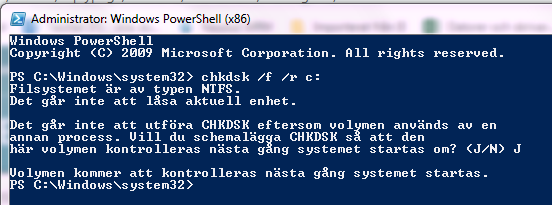
I managed to make it work but now I get this message. I pressed J to run it the next time the system restarts, hope it was correct. I tried restarting the computer but got the same result. Should I just leave the computer on or what do you think I should do?
"The file system is of the NTFS type.
The current device cannot be locked.
CHKDSK cannot be performed because the volume is used by one
another process. Do you want to schedule CHKDSK so that it
here the volume is checked the next time the system is restarted? (Y / N) J
The volume will be checked the next time the system is started."
@carromedc Yes, you're supposed to input J (or Y if it were in English) and restart to let chkdsk run. Do you have a chkdsk log now? If not, shut down the computer and turn it back on, then input the chkdsk command and restart again.
@carromedc Are you still getting the same error? If so, please do a clean uninstall and reinstall of both Origin and Sims 4. Start by uninstalling Sims 4:
Next, uninstall Origin:
Next, download the full Origin installer and run it. Here's the direct download link:
http://download.dm.origin.com/origin/live/OriginSetup.exe
Be sure to run both the installer and Origin itself as an admin: right-click on each and select "Run as Administrator." Install Sims 4, but don't put the old Sims 4 folder back in Documents\Electronic Arts yet. Just see whether you can play at all.