Invalid license message upon launch?
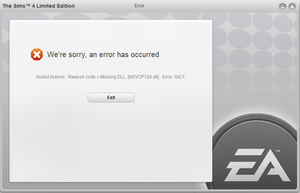

@Simologist Did you specifically uninstall and reinstall both the x86 and x64 versions of the 2013 VC++ runtimes? If not, or if you're not sure what you did, please try it now.
Hit Windows key-i, select Apps, scroll down to the Microsoft Visual C++ Redistributables, click on each of the versions from 2013, and select Uninstall. Don't touch the ones from any other year. Then download new versions directly from Microsoft:
https://www.microsoft.com/en-us/download/details.aspx?id=40784
You can skip the _arm version, which is for a different class of device, but definitely install both x86 and x64, even though you have a 64-bit OS.
If that doesn't help, please clear Origin's cache and repair Sims 4 again, just to be thorough.
https://help.ea.com/en-us/help/faq/clear-cache-to-fix-problems-with-your-games/
I've tried both methods, still no luck ☹️
@Simologist Try playing in a clean boot:
https://www.windowscentral.com/how-clean-boot-windows-10
After rebooting, please go through the Task Manager looking for any apps that don't need to be running, anything from RGB control software to MSI Afterburner or similar. Some of these programs don't respond to a clean boot, for whatever reason, but they need to be disabled as well.
If that doesn't help, please run a dxdiag and attach it to a post.
https://help.ea.com/en-us/help/pc/how-to-gather-dxdiag-information/
The clean boot was also an unsuccess