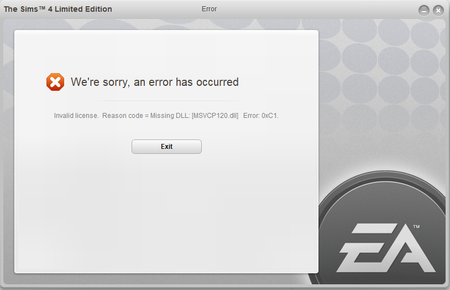
Invalid license message upon launch?

@Simologist Try playing in a clean boot:
https://www.windowscentral.com/how-clean-boot-windows-10
After rebooting, please go through the Task Manager looking for any apps that don't need to be running, anything from RGB control software to MSI Afterburner or similar. Some of these programs don't respond to a clean boot, for whatever reason, but they need to be disabled as well.
If that doesn't help, please run a dxdiag and attach it to a post.
https://help.ea.com/en-us/help/pc/how-to-gather-dxdiag-information/
The clean boot was also an unsuccess
@Simologist Your dxdiag lists a few different kinds of system errors, which may or may not be related to Sims 4 but are worth addressing regardless. Please run a couple of basic checks of your Windows system files. Here's how:
Restart your computer, hit Windows key-i, select Update & Security, and click the box to check for updates.
Please also run the .NET repair tool, which you can download directly from Microsoft:
https://www.microsoft.com/en-us/download/details.aspx?id=30135
If you get an error at any point, please take a screenshot and attach it to a post. Hit Windows key-shift-S and drag your cursor over the section of screen you want to capture. Then open Paint and crtl-V to paste the image.
These are the messages I got from DISM and sfc/scannow
Also not sure if this is an error but I received this from the repair tool:
:
And the logs I received back are attached below
@Simologist The list of logs is what was sent to Microsoft; there's no real information in that list, although the individual logs might be helpful. As for DISM, it ran to completion on the first try, and on the second, it errored out because the command was pasted twice, so that's nothing to worry about.
When you try to launch Sims 4, do you get exactly the same error as before, as in it mentions MSVCP120.dll? If it now mentions a different .dll, please let me know which one.
Please also take a screenshot of the list of VC++ redistributables that are installed on your computer, under Settings > Apps, and post it here.


