Invalid license message upon launch?
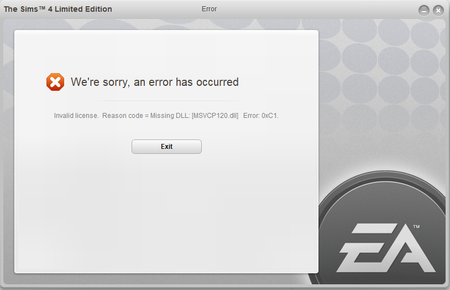


@Simologist Try running the VC++ 2013 installers inside Origin's program files. Unless you changed the default location for Origin, the full file path will simply be Program Files (x86)\Origin. Inside the folder, there are six vcredist entries, two each labeled 2010 and 2015. The other two are for the 2013 runtimes.
For each of the 2013 versions, please right-click on the installer and select "Run as administrator." If you get an error with either one, let me know. Otherwise, restart your computer and try to launch the game again.
For the 2013 runtimes, do I select repair? Or should I uninstall and reinstall them?
@Simologist Try repairing first, and if that doesn't help, uninstall and reinstall. There's no harm in trying a few different approaches; just be sure to use the installers from the Origin folder.
Apologies for the very late response, however this method did not resolve my issue either ☹️ I tried repairing and uninstalling/reinstalling as administrator but still no luck
@Simologist Don't worry about the late response. Do you have a third-party antivirus installed? If so, please disable it, then uninstall and reinstall the runtimes (from the Origin folder) again.
If that doesn't help, or you don't have an outside antivirus, please create a new admin user account on your computer and try uninstalling and reinstalling the runtimes from that account. You shouldn't need to reinstall Origin or Sims 4 in order to launch the game from the new account, although your existing content won't be usable. You can fix that later; for now, the question is whether the game will launch at all.
I've tried both methods, still no luck. I'm able to load Origin but whenever I try launching The Sims 4 from my library that message appears.

Thanks for tagging @puzzlezaddict
Lets try the update for VC++ 2013.
https://support.microsoft.com/en-us/help/4032938/update-for-visual-c-2013-redistributable-package
Still doesn't work, I've done it step by step; even repairing the game after my laptop finished booting up
If not > activate > restart PC > Test.
If they are set this way > Disable ".NetFramwork 3.5" > OK > wait until the uninstall is finished > restart the Computer.
After the restart, enable ".NetFramwork 3.5" > wait until the installation is done > restart the Computer > Test.

@Simologist I know this might sound stupid but when I had this error I download the VS C++2015 after I installed the 2013 package




