Re: Saves Files Not Reading In Game
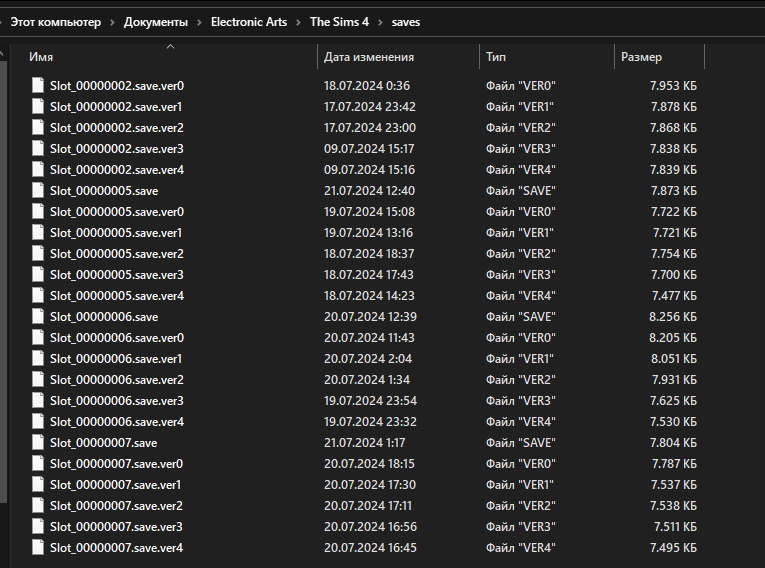
@Shanti16015 Thanks for the screenshot, which shows your saves are here:
C: > Users > your username > OneDrive > Documents > Electronic Arts > The Sims 4 > saves
Is the game reading that folder too, specifically the OneDrive Documents folder? Here's how to check:
https://sims4.crinrict.com/eng/2018/07/how-to-find-your-user-folder/
If the game is reading the OneDrive folder, and not the Documents folder that isn't in OneDrive, then the problem might be that OneDrive itself is syncing your files. Your screenshot shows that most of your save files have been synced, but what I can't tell is whether the synced files have been removed from your computer and stored only in OneDrive. The only files not synced are backups that won't show on their own, although they can be used if necessary.
At any rate, if you want to change your OneDrive settings, here's how:
https://answers.ea.com/t5/PC/CURRENT-ISSUE-Sims-4-saves-user-content-disappearing-PC/m-p/12475370
Finally, the first save in your screenshot is Slot_00000001.save , which Sims 4 can't read. (It starts counting with 2.) If you'd like to use this particular save, renumber it to something not already used, for example 00000005. It needs to have eight digits.