Forum Discussion

Re: [CURRENT ISSUE] Sims 4 Unable to Start, Initialization Error

Thanks for offering the help.

So far I'm working through the trouble-shooting.

The OneDrive fix hasn't worked. I tried with OneDrive not even open and the game crashes when I try and start a new family, or do anything entailing running the actual game.

I moved the Electronic Arts file onto the desktop and now the game won't even open, giving an error message that there is not enough memory to run the game. I moved the files back and now I get an initialisation error when I try and run the Sims.

I'm not sure how to proceed further at this point as it seems worse than before.

10 Replies

  • puzzlezaddict's avatar
    puzzlezaddict
    Hero+
    2 years ago

    @lorelei5  Where is your Documents folder located?  If it's inside OneDrive's folder, disabling OneDrive entirely, rather than simply pausing syncing, will in fact make it impossible to launch Sims 4.  The workarounds are to pause syncing only, or to move Documents out of OneDrive.

    To find the full path to your Documents folder, search in Windows for Command Prompt, open it, and enter this command:

    reg query "HKCU\Software\Microsoft\Windows\CurrentVersion\Explorer\Shell Folders" /v "Personal"

    Please list the result for me.  You can write [username] instead of your actual username if you want, but leave the rest intact.

  • lorelei5's avatar
    lorelei5
    2 years ago

    Hi,

    Thanks again for your help. I never use OneDrive to install programs, so I doubt that might be the problem. The result to posting that command in Command Prompt is below:

    HKEY_CURRENT_USER\Software\Microsoft\Windows\CurrentVersion\Explorer\Shell Folders
    Personal REG_SZ C:\Users\USERNAME\Documents

    I did update all my Dell drivers etc. That was so far the least problem so far trying to get Sims 4 to run.

  • puzzlezaddict's avatar
    puzzlezaddict
    Hero+
    2 years ago

    @lorelei5  Let's find out whether your user account is the problem here.  Please create a new admin Windows account, specifically a local one, as in, don't link it to your Microsoft account.  Try to play there and let me know what happens.  If you get another crash, or the game won't open at all, please post a new dxdiag.

  • lorelei5's avatar
    lorelei5
    2 years ago

    Hi!

    Looks like creating another Windows account fixed it. I managed to get the game running just fine with all expansions present and no repairs required!

  • lorelei5's avatar
    lorelei5
    2 years ago

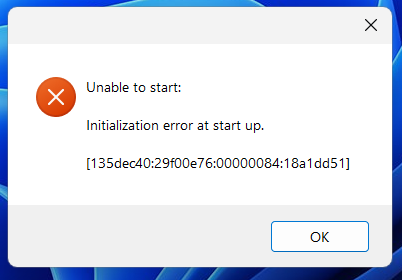
    Spoke too soon. Just went back to the new account to play some more and got an error message: 

  • puzzlezaddict's avatar
    puzzlezaddict
    Hero+
    2 years ago

    @lorelei5  I would suggest running a malware scan.  I'm not saying your computer definitely has a virus, only that it's a reasonable possibility when a new Windows account works at first and then doesn't.  And it's best to find out either way.  Please download Malwarebytes (the free trial is fine) from here:

    https://www.malwarebytes.com/mwb-download

    Open it, click Scan > Custom Scan > Configure Scan, check all the boxes both for all scan types and for all your drives, and let it do its job.  This could take anywhere from a few minutes to several hours, depending on the amount of data and whether the scan finds anything., so you may want to set it to run while you're doing something else.  Please attach its report so I can take a look.

    Whatever Malwarebytes finds, please run a couple of basic checks of your Windows system files next.

    • Hit Windows key-X
    • Choose either “PowerShell (Administrator)” or “Windows Terminal (Administrator),” whichever option is offered
    • Inside the window that appears, copy and paste “DISM.exe /Online /Cleanup-image /Restorehealth” without quotes, and enter
    • The system will start validating soon. If it throws an error, please list it here
    • After it reaches 100%, hit Windows key-X again
    • Again, choose “PowerShell (Administrator)” or “Windows Terminal (Administrator)”
    • Inside the window, copy and paste “sfc /scannow” without quotes, and enter
    • Post the message you receive here

    Restart your computer, hit Windows key-i, select Update & Security, and click the box to check for updates.  If any install, restart again afterwards.

  • lorelei5's avatar
    lorelei5
    1 year ago

    Beginning verification phase of system scan.
    Verification 100% complete.

    Windows Resource Protection did not find any integrity violations.
    PS C:\Users\katem>

  • puzzlezaddict's avatar
    puzzlezaddict
    Hero+
    1 year ago

    @lorelei5  As it's been a while since your previous post, let's review everything here.  Are you still getting the same error message?  Are you still not using OneDrive?  (Make sure it hasn't enabled itself after a Windows update.)  Please also post a new dxdiag.

  • lorelei5's avatar
    lorelei5
    1 year ago

    I've followed these instructions and installed all updates for Windows and still get the error message...

  • puzzlezaddict's avatar
    puzzlezaddict
    Hero+
    1 year ago

    @lorelei5  I'd still like a new dxdiag.  Please also let me know what antivirus you're using at the moment.  And please test in another new admin Windows account, a local one, just to be thorough.  It would be a shame to miss an easy fix now because it didn't work before.