Sims 4: repair changes language; missing text strings
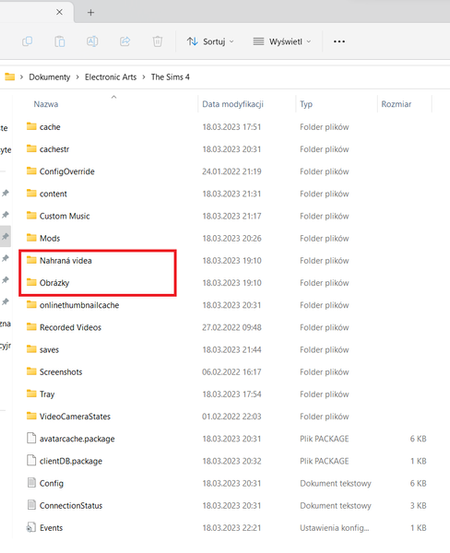

@Sylmos I see both a Recorded Videos and a Screenshots folder in your screenshot. Are your new screenshots and videos in those folders, or are they going into the folders in the red box, or neither?
You can delete any file or folder inside this Sims 4 folder, and the game will regenerate it as necessary. You'd lose the contents of the files or folders, at least as far as the game itself is concerned, but screenshots and videos don't need to be stored inside the user folder in order for you to view them.
@Sylmos I'm glad it's fixed. The EA App doesn't handle language-related questions well right now. In addition to lacking the option to switch languages, the App sometimes installs in the language of the App itself instead of the player's chosen language, which can be even more of a problem when the App doesn't even support certain languages that Sims 4 does.
As for the user folder, all but four of the game's languages place user files in "The Sims 4," even if the folder might logically be called something else in that language. (Exceptions are Spanish, French, German, and Dutch.) Some subfolders have the same names too, while other folder names are localized, and all these subfolders end up in the same Sims 4 folder, as you can see in your screenshot.





