Forum Discussion


HarleyQuinn2922
7 years agoNot applicable
Hi there! Happy new year :eahigh_file:!
I can totally understand how you feel considering the fact that you really love the game and you are not able to, due to some errors ☹️. Let's fix this together!
Basically, the 0xc000012d Windows error is usually related to an incompatible driver update, usually a graphic driver.
Firstly, thank you for sharing so many details which help us eliminate some possibilities :3. And Congrats on trying some fixes yourself!
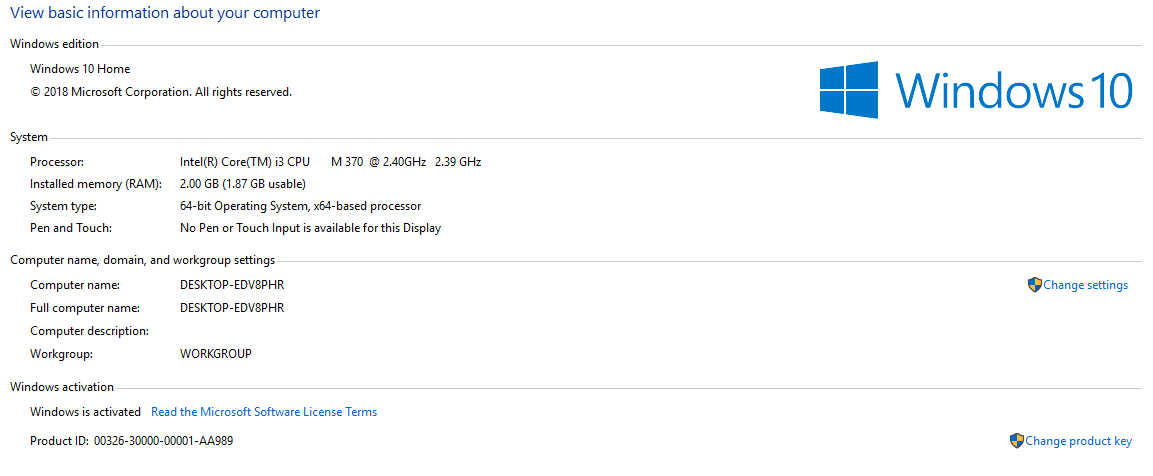
I agree that your CPU is quite old and the game will surely run pretty slowly or not at all. We can however troubleshoot this and maybe there will be a positive result, let's attract it ^_^.
If you haven't updated your graphics card yet, I strongly advise you to.
In case you still can not run the game, even with the GPU updated ☹️, please let us know and provide the DxDiag requested above. The DxDiag will guide us on the path to finding the real cause of that error ^_^!
Looking forward to hearing from you.
Have a lovely rest of your week ❤️

kreatora
7 years agoHero (Retired)
@5566332200
@jpkarlsenwas right and this diagnose confirms his opinions
I really feel sorry for you but you have a computer that can barely handle the game. You have 2 GB and this is sufficient for the base game, but not if you have installed packs. Your card is too weak. Windows 7 is OK if you have Windows7 Home Premium and more RAM - at last 4
Minimum requirements for the game
OS: 64 Bit Required. Windows 7 (SP1), Windows 8, Windows 8.1, or Windows 10
CPU: 1.8 GHz Intel Core 2 Duo, AMD Athlon 64 Dual-Core 4000+ or equivalent (For computers using built-in graphics chipsets, the game requires 2.0 GHz Intel Core 2 Duo, 2.0 GHz AMD Turion 64 X2 TL-62 or equivalent)
RAM: At least 4 GB RAM ---!!!!!!
HARD DRIVE: At least 3 GB of free space (15 GB if installing with The Sims™ 4) with at least 1 GB additional space for custom content and saved games
VIDEO: 128 MB of Video RAM and support for Pixel Shader 3.0. Supported Video Cards: NVIDIA GeForce 6600 or better, ATI Radeon X1300 or better, Intel GMA X4500 or better.
With what you have you can play base game plus "Get to work" for example. Nothing more.
I don't work for EA
- 55663322007 years agoNot applicable
I installed windows 10 and i don't have any lag with it, Plus the game works really well i mean like when the loading screen it dosen't lag and the main menu and create a sim i said that when i created two sims and a pet before it closes itself and this error blocks the way to EVEN enter the game and wait for the loading screen it was less lag like 60 FPS i think i have something to fix then it can start back and play it because it dosen't lag but it doesn't start because of the error message below, Can you please help? At least a try!!! 😢 😢 😢 😢
- 55663322007 years agoNot applicable
Come on guys please help me i feel like i threw 139.94$ in a trash bin!
 jpkarlsen7 years agoHero (Retired)
I would recommend you try to see if you can get a refund. You need to contact Support. https://help.ea.com/en/contact-us/?product=the-sims-4&platform=pc&category=technical-support
- jpkarlsen7 years agoHero (Retired)
I'm sorry but the news has not gotten better. There is no way you will be able to play the game with your PC. Particularly not with any of the newer Expansions as they are more demanding on the hardware.
- kreatora7 years agoHero (Retired)The graphics card is too weak for the game to start. The game is trying turn on but not it can't with this card.
Featured Places