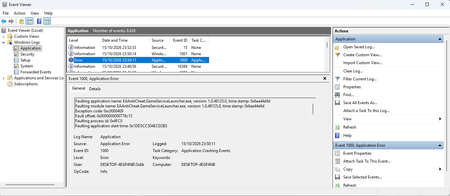
EA Javelin anticheat: repeated BSOD (6/7 same fault) + launcher crash 0xC0000005
Product: Apex Legends Platform: Steam-PC Windows: 11 24H2 (26100.6584) and 25H2 (26200.6584) — reproducible on BOTH CPU/GPU: RTX 4060 Laptop, 16GB RAM, single NVMe (YMTC PC300-1TB-B) CRASHES A — KERNEL BSOD (7 times between Oct 15-16, ALL while Apex was running): #1 10-15 13:05 0x0000000A (0x00007fffffff0000, 0xff, 0xea, 0xfffff80680e597ac) 25H2 #2 10-15 15:35 0x0000000A (0x00007fffffff0000, 0xff, 0x8a, 0xfffff803768597ac) 25H2 #3 10-15 17:24 0x0000003B (0x00000000c0000005, ...) WER bucket: AV_eaanticheat!DriverEntry #4 10-15 18:06 0x0000000A (0x00007fffffff0000, 0xff, 0x2a, 0xfffff800822597ac) 25H2 #5 10-15 19:42 0x0000000A (0x00007fffffff0000, 0xff, 0x4a, 0xfffff804d44597ac) 25H2 #6 10-16 07:57 0x0000000A (0x00007fffffff0000, 0xff, 0x8a, 0xfffff800868597ac) 25H2 #7 10-16 14:47 0x0000000A (0x00007fffffff0000, 0xff, 0xea, 0xfffff805cbe597ac) 24H2 (after rolling back) Key point: in all 6 of the 0x0000000A crashes - parameter 1 is exactly 0x00007fffffff0000 - parameter 2 (IRQL) is exactly 0xff — outside the legal IRQL range of 0-15 - parameter 3 is an abnormal value (0xea / 0x8a / 0x2a / 0x4a) instead of 0 or 1 (read/write) - the faulting instruction address ends with 0x97ac every single time (high bits differ only by ASLR) Random hardware memory errors cannot land on the identical instruction 6 times in a row. This is the same code path inside the EA driver crashing repeatedly, with a corrupted exception context. CRASHES B — USER-MODE LAUNCHER (during game launch, still happening after the rollback to 24H2): EAAntiCheat.GameServiceLauncher.dll (v3.10.1.0, timestamp 0xeafd060e) -> 0xC0000005, offset 0x183E430 EAAntiCheat.GameServiceLauncher.exe (v1.0.48125.0) -> 0xC0000409 (fail-fast) Dumps: C:\ProgramData\eaanticheat\Crashdumps\PACKER_*.dmp My own minidump analysis of the PACKER dumps: every single 0xC0000005 has the faulting address inside EA's own modules (never a third-party DLL): EAAntiCheat.GameServiceLauncher.dll + 0x9B9331 -> read 0x0 EAAntiCheat.GameServiceLauncher.dll + 0x2EA5411 -> read 0xFFFFFFFFFFFFFFFF EAAntiCheat.GameServiceLauncher.dll + 0x2A6EB77 -> read 0xFFFFFFFFFFFFFFFF EAAntiCheat.GameServiceLauncher.dll + 0x24C49B9 -> read 0xFFFFFFFFFFFFFFFF EA\AC\EAAntiCheat.GameService.dll + 0x2B5D014 -> read 0xA0CE44F290 The dumps only load system DLLs + GameServiceLauncher.dll + preloader_l.dll, so the crash happens in the very first milliseconds, before the game executable is even loaded. Digital signatures are valid. ALREADY TRIED (all had no effect): 1. Full game reinstall (deleted via Steam, re-downloaded) 2. Deleted C:\Program Files\EA\AC and reinstalled with the official installer shipped in the game folder: EAAntiCheat.Installer.exe --noui --install --read-cfg (exit code 0, components updated to the latest build) 3. Verified with PE compile timestamps that the running launcher dll/exe ARE the newest files (no stale-file issue) 4. Rolled Windows back from 25H2 to 24H2 (uninstalled enablement package KB5054156) — crashes persisted on 24H2 5. Removed Tencent ACE anti-cheat completely; exited all accelerator kernel drivers (NetEase UU, Xunyou) 6. Secure Boot enabled; VBS/HVCI disabled; clean reboots after each step (checked PendingFileRenameOperations) 7. Disk SMART healthy, chkdsk clean, no Code Integrity driver blocks, PCIe ASPM disabled 8. Removed -dev launch option, disabled Steam overlay, removed Nahimic injection components WHAT I'M ASKING: Please have the anti-cheat team check whether there is a known defect in the eaanticheat kernel driver and in EAAntiCheat.GameServiceLauncher.dll, or whether a specific newer build is required. If you need further logs/dumps (raw .dmp files, full MEMORY.DMP, WER reports), tell me how to upload them and I will provide them. The crash points are consistently INSIDE EA's own modules, so please don't ask me to repeat the local troubleshooting steps listed above.Apex PC|Javelin 反作弊致反复蓝屏(6/7 次同一指令)+ 启动器崩溃 0xC0000005
【游戏】Apex Legends(Steam / PC)。EA Javelin 反作弊导致系统反复蓝屏。 【系统】Windows 11 24H2(26100.6584) 与 25H2(26200.6584) 双版本均复现。 【现象A|内核蓝屏】10-15至10-16共7次蓝屏,全部发生在Apex运行期,其中6次为同一处代码: 0x0000000A (0x7fffffff0000, 0xff, 0xea/0x8a/0x2a/0x4a, 0xfffff8xxxxxxxx97ac) 虚拟地址恒为0x7fffffff0000、IRQL参数恒为0xff(合法范围0-15之外的非法值)、出错指令低16位恒为0x97ac(仅ASLR导致高位不同)、第3参数均为读/写之外的异常值。随机硬件错误不可能每次都落在同一条指令上,说明是驱动内部同一处固定代码路径反复崩溃,且异常上下文已被破坏。 另1次 0x3B,WER 故障存储段为 AV_eaanticheat!DriverEntry。 最后两次分别发生在25H2与回退后的24H2上,反作弊组件均为最新版且已干净重启,故障依旧——与Windows版本无关。 【现象B|用户态崩溃】EAAntiCheat.GameServiceLauncher.dll 反复以 0xC0000005 崩溃,错误偏移恒为 0x183E430;GameServiceLauncher.exe 以 0xC0000409(fail-fast) 崩溃。转储均为 PACKER_*.dmp,加载模块仅系统DLL+该dll+preloader_l.dll,崩在启动极早期。 【已排查】游戏完整重装;C:\Program Files\EA\AC 删除后用官方 EAAntiCheat.Installer.exe --noui --install --read-cfg 重装至最新版;腾讯ACE彻底移除;加速器内核驱动退出测试;Secure Boot已开;VBS/HVCI关闭;磁盘SMART与chkdsk正常;PCIe ASPM已关闭。 【诉求】请反作弊团队核查 eaanticheat 驱动与 GameServiceLauncher 是否存在已知缺陷、是否需要更新版本;若需进一步日志/转储请告知获取方式。12Views0likes1Comment
Apex Legends on Steam Stuck at Starting EA Javelin AntiCheat – Error 87
Title: Apex Legends on Steam Stuck at “Starting EA Javelin AntiCheat” – Error 87 Hi EA Support, I'm playing Apex Legends through Steam, but the game gets stuck on the loading screen and never reaches the main lobby. The loading messages include “Validating game environment,” “Starting EA Javelin AntiCheat,” and “Launching game.” I've already tried: Verifying the integrity of Apex Legends game files through Steam. Disabling Steam Overlay. Checking Task Manager, where r5apex.exe does not appear. Opening EAAntiCheat.Installer.exe, but Apex Legends does not appear in the game selection dropdown. Starting EAAntiCheatService through Windows Services, which results in Error 87: The parameter is incorrect. Dota 2 and Valorant work normally on the same PC. Could you please help me fix the EA Javelin AntiCheat installation for the Steam version of Apex Legends? I would prefer not to reinstall the entire game again. Thank you.
Security Violation error: Aster Ibik blocked by Javelin Anticheat
Hello EA Support Team and Community, After the recent EA Javelin Anticheat update, I am completely unable to launch Apex Legends on my PC. The game immediately crashes with a "Security Violation" error pop-up: "This software cannot be used at the same time as the game. Please make sure it's not running, or restart your PC.: Aster Ibik" Session ID: jCs3VXHnu7rxiYvrvM3KG3dVZvrLNiigKMS4mV6t//rEfDtE ASTER (by IBIK) is a legitimate multiseat software used only to create separate desktop workspaces for multiple monitors/users on a single PC, not a cheat or injection tool. Prior to this update, the game ran fine without conflict. Could the EA Anticheat team please investigate this conflict and consider whitelisting legitimate multiseat drivers in upcoming patches? Thank you for your assistance.130Views4likes2Comments
Apex crashes on launch (Steam and EA app)
Apex Legends crashes a few seconds after launch with the following error (In steam and in EA app): An unexpected game shutdown was detected (0xC0000409) Windows Event Viewer logs the following under EA Javelin Anticheat, Event ID 1000: The game r5apex_dx12.exe exited unexpectedly, exit code: 0xC0000409 The issue occurs when launching Apex Legends through both Steam and the EA app. I had not played Apex Legends for several months, so I cannot confirm whether the issue started exactly with the September 29, 2026, Javelin transition. However, the game did not have this problem the last time I played it. System specifications OS: Windows 11 26H2, build 26300.9550 CPU: AMD Ryzen 7 5700X GPU: NVIDIA GeForce RTX 5060 Ti 16 GB RAM: 32 GB DDR4 Platform: Steam and EA app Additional Event Viewer errors I also found an EA Javelin Anticheat error, Event ID 1000, with the message: Failed retrieving service path. This event was recorded on October 8, 2026, at 12:54 PM. I checked the EA AntiCheat service: Service name: EAAntiCheatService Executable path: C:\Program Files\EA\AC\eaanticheat.gameservice.exe The executable exists. Its digital signature is valid and verified, issued to Electronic Arts, Inc. The service is configured for demand start and is stopped when checked while the game is not running. Troubleshooting already attempted -Verified Apex Legends game files through Steam. -Updated Windows to build 26300.9550 and restarted. -Updated NVIDIA graphics drivers and Windows. -Repaired/reinstalled EA AntiCheat/Javelin. (Even removing the anticheat and letting the game update it by itself) -Ran the game and anticheat as administrator + Firewall is not blocking them. -Disabled overlays and background applications. -Performed a clean boot; the issue persisted. -Cleared the Steam download cache. -Reset network settings. -Checked other anti-cheat services, including Riot Vanguard, Easy Anti-Cheat, and BattlEye. Stopping the Vanguard service did not resolve the issue. -Checked the EA AntiCheat service executable path and digital signature. -Moved Apex Legends from the F: drive to the C: drive and tested again. The same 0xC0000409 crash persisted. None of these steps resolved the crash. I also have the issue that Apex Legends does not appear as an option when I try to install it manually using the EA Javelin Installer. (I also tried installing one of the other options, but neither worked)125Views0likes2Comments
Apex silently close and won't let me in to the game since javelin update
i have a problem with my apex legends, since javelin updates it keep closing without any notification and its disturb my gaming experience with apex. i've tried to reinstall apex, reinstalling javelin, repair the game, updating my windows & drivers. it's not helping at all, i'm still facing the issue. please investigate this because many players experience it too.Apex Legends – EA Javelin Error (2)(1052) – Launcher Crash
Since Apex Legends transitioned to EA Javelin Anti-Cheat, I have been completely unable to launch the game through Steam. Every launch fails during Javelin startup with: EAAntiCheat.GameService.exe (2) (1052) System: Windows 11 Home, 26H2, build 26300.9550 (problem started before the 26H2 upgrade) AMD Radeon RX 6800 AMD Adrenalin 26.8.1 Apex installed through Steam on A: (NTFS) EA anti-cheat installed on C: (NTFS) Windows crash diagnostics: Application: EAAntiCheat.GameServiceLauncher.exe Version: 1.0.59063.0 Event: BEX64 Exception: 0xc0000409 Exception data: 0x7 Fault offset: 0x76bdf5 Digital signature: Valid (Electronic Arts) Anti-cheat driver reaches RUNNING; service observed in START_PENDING Windows Error Reporting consistently records the identical crash signature Troubleshooting already completed without success: Reinstalled Apex and EA Javelin Verified Steam game files Tested running as administrator Clean boot Disabled Steam Overlay Reset Windows network settings Tested with a new Windows administrator profile Ran DISM and SFC repairs Repaired Microsoft Visual C++ x64 and x86 Checked Windows Code Integrity logs and executable signature Checked background software and drive configuration The error is completely reproducible. Apex never reaches the game window. Latest Javelin Session ID: jHgyAyDl7rPxi9i6483KH9a95htJqjWg92oicCxqb7Udk3cD Please escalate this to the Javelin Anti-Cheat engineering team and investigate the crash signature and session ID. Is this a known compatibility issue, and is there an available fix or upcoming update? I can provide the Windows Error Reporting Report.wer file and a crash dump through a secure support channel if required.319Views2likes11CommentsEA Javelin AntiCheat error [4] persists
Hello, I am unable to play Apex Legends because EA Javelin AntiCheat consistently returns error [4] (“The client is not running the anti-cheat, or has failed anti-cheat authentication [4]”) whenever I attempt to enter the Firing Range. I have performed extensive troubleshooting, but the issue persists. I would appreciate escalation to the EA AntiCheat technical team rather than another generic troubleshooting checklist. System Information Operating system: Windows 11, version 10.0.26200.9711 EA AntiCheat installer file version: 1.0.48125.0 EA AntiCheat product version: 1.0.15973373 Troubleshooting Performed Game Installation Tested Apex Legends through both Steam and the EA app. Initially tested both installations on drive M:, in separate folders. Uninstalled and reinstalled the Steam version on drive C:. The error persists. AntiCheat Service Ran the EA AntiCheat installer and attempted to repair the installation. Confirmed that EAAntiCheatService is running. Verified that its executable exists at C:\Program Files\EA\AC\eaanticheat.gameservice.exe. Checked its configuration using sc.exe qc EAAntiCheatService. The service is configured for demand start and runs under LocalSystem. Confirmed that the Windows DNS Client service is running. Tested disabling IPv6. Logs and Errors Windows Event Viewer recorded an Application event from EA Javelin Anticheat: Event ID: 1000 Message: Failed retrieving service path. Timestamp: 2026-10-15 13:17:17 UTC The event XML contains no additional diagnostic details identifying the missing path. During an earlier repair attempt, the following message appeared: Security Violation — EA Javelin Anticheat encountered an error. Please restart your PC. (ERROR_FILE_NOT_FOUND : DEBUG_FLAGS) After restarting the PC, the usual error [4] returned. No relevant Windows CodeIntegrity events were found. The %ProgramData%\EAanticheat\crashdumps folder is empty. No new Javelin event was recorded following the latest failed launch. Request The issue persists across Steam and EA app installations and after reinstalling the game on a different drive. The anti-cheat service is registered, running, and its executable is present. I WOULD LIKE TO PLAY THE GAME Thank you for your assistance.21Views0likes0Comments