USB DAC Disconnect + DirectX Crash when launching EA Games (BF/Madden/EAFC)
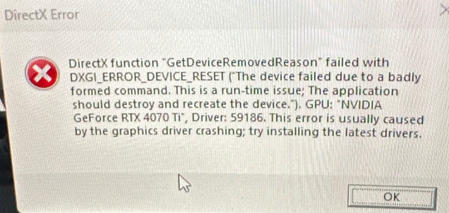
Hi everyone, I have a very specific and extremely annoying audio issue with EA games, and I would like to know if anyone else has experienced something similar. My setup: Windows 11 Intel i5-14600 KF MSI B660 Pro-A NVIDIA RTX 4070 Ti GPU HyperX Cloud II headset Sharkoon Gaming DAC Pro S V2 I also own a second Sharkoon DAC Pro S V2, and both behave exactly the same The issue: Whenever I start EA titles like Madden 26, EA FC or Battlefield, my Sharkoon USB DAC completely disconnects from Windows for a few seconds and then reconnects. It is not just a short audio dropout. The device actually disappears and comes back, like it was unplugged and plugged in again. This usually happens right when the game starts or shortly after the game becomes visible. Sometimes it also happens randomly in the middle of a match. Additional problem: Whenever I try to switch to windowed mode (or sometimes borderless), the game crashes with a DirectX error. In some cases, it even freezes the entire PC for a few seconds before recovering or crashing completely. Important details: This only happens with EA games. YouTube, Spotify, Discord, FurMark, stress tests and other games are completely stable. Other USB devices do not disconnect. A HyperX USB sound card stays connected and does not have this issue. The Sharkoon DAC works normally outside EA games. I tested two identical Sharkoon DAC Pro S V2 units and both have the exact same problem. Things I already tried: Full Windows clean install Windows 11 Pro / Pro N testing Media Feature Pack installed DirectX repaired/reinstalled NVIDIA drivers tested, including older drivers DDU clean install BIOS reset/defaults Latest BIOS Different USB ports, including rear USB 2.0 USB power saving disabled Exclusive audio mode disabled 48 kHz fixed in Windows Onboard audio disabled NVIDIA audio disabled Different refresh rates and fullscreen/windowed testing CPU undervolt/stock settings tested XMP considered/tested No Discord, no Spotify, no overlays, no extra tools Tested games with zero problems: Overwatch Marathon Counter-Strike Starfield Dead by Daylight ARC Raiders Metro 2033 The strange part: The problem started suddenly. Before that, the same DAC and same PC worked fine with EA games. After that point (2 weeks ago), the issue became worse: at first the sound disconnected randomly during gameplay, and now it happens almost every time an EA game starts. Sharkoon support told me that some games can reinitialize USB sound cards and drivers when they start, and that this is caused by the game and cannot be changed by them. So my question is: Can EA / EA AntiCheat / Javelin or the EA game audio initialization cause certain USB audio devices to reset or disconnect completely? Also, were there any major updates or changes to EA AntiCheat (Javelin) or the EA App/Launcher in the last 2/3 or 4 weeks that could be related to this behavior? This really looks like EA games are triggering a USB audio reinitialization that some DACs cannot handle properly. Again: this does not happen in any non-EA game or normal desktop use. Only EA titles trigger it. Would appreciate any help, similar experiences or confirmation if this is a known issue. For reference, here is an example screenshot of the DirectX error I am getting when the issue occurs:EA App keeps kicking me to Offline Mode / EC: 10007 (EA FC 26)
Hello EA Support / Community, I am constantly getting disconnected from my EA FC 26 matches (specifically in Rush / Ultimate Team) on PC via Steam. During gameplay, the game suddenly kicks me out with the error message: "You're in offline mode. It looks like you're logged in on another device... Error code: EC:10007" followed by "Unable to connect to the EA servers. Please check your internet connection, make sure the Platform Client is online". Things I have already tried without success: Re-installed EA App and did a clean login ("Keep me signed in" checked). Cleared EA App Cache & deleted temporary AppData folders. Untrusted all devices from my EA Account settings and reset my login session. Added EADesktop.exe, EALauncher.exe, and FC26.exe to Windows Defender / Firewall exclusions. Running both Steam and EA App as Administrator. The EA App keeps randomly dropping its background connection and switching to Offline mode by itself while playing, ruining matches and giving DNF penalties. Please investigate this issue, as it is clearly a bug with the EA App background session sync with Steam. System details: Platform: PC (Steam + EA App) Game: EA FC 26252Views0likes3CommentsEa app acting really weirdly
Just got a microsoft acc with gamepass 1 month to play fc26,i open the ea app,i login,it gives me a blank screen for 30 seconds then gives a server error,if i stay idle after some minutes it opens the ea app,i try to launch the game,game says launching ac and then launcing game,it closes blinks and opens ea app once again .Battlefield 1 Revolution crashes shortly after launch
Hello, I purchased Battlefield 1 Revolution through the EA App. The game worked only for the first 10 minutes or less after I bought it. After that, it started crashing every time I tried to launch it. When I click Play, the game opens for a few seconds and then closes, returning me to the EA App without any error message. I have already Reinstalled the game. Repaired the game. Updated my graphics driver. Restarted my PC. Unfortunately, the issue still persists, and I am unable to use the product I purchased. Please help me resolve this issue. If it cannot be resolved, I would like to request a refund. Thank youSolved33Views0likes1Comment
SWGOH PC client connection error after EA App update
Hi. I have a critical problem connecting to the game through the EA App on PC. Previously, everything worked, and I could switch between my accounts. I used to click the game shortcut directly without waiting for the EA App to fully load, and it synced my profile in the background. Now, after the recent EA App update, the launcher itself loads perfectly, but the game won't start. It gives a connection error and says there is no internet, even though my internet works fine. The game downloads and reinstalls without issues, but it refuses to launch. No network fixes help. Because of this EA App bug, I cannot play and am losing my progress in the current events. Will this be fixed soon, and will there be any compensation? Please help.FC 26 failed to launch after EA Javelin Anti Cheat pop up
Hi, I'm trying to launch FC 26 from Steam. The EA AntiCheat window appears and loads for about a minute, then closes. The game never starts, and I don't receive any error message. I've already tried everything I could find — every tutorial and forum suggestion online — but none of these steps have fixed the problem. I've attached my DxDiag report and Event Viewer log from when FC 26 crashed. I'd really appreciate it if someone could take a look and help me figure out what's causing this issue. Thank you🙏351Views0likes3Comments
issues restarting/rebooting ea app
I'm having issues resetting/rebooting my ea app on my iMac I been googling help on the issue but it keeps telling to click the help option on the ea menu but its literally no help option to click on top allow me to reboot the app. in the past it did but with this new update/interface of the ea app its no longer there which is making me upset I'm trying to play my sims 4 but for some reason it doesn't load and pop comes ups to reboot my ea app (which I can't do) I even tired repairing my sims 4 game but the repair keeps glitching saying something is wrong and to rebooting the ea app (WHICH I CANT DO!!). I even logged out and logged back in to my ea app twice same issue also even uninstalled and reinstalled the app too same issue which is pissing me off I really need some help on this it doesn't make since that the literal map helps is telling me to click the help option to reboot the app which it not one there it makes me feel like they don't rally know what the actual ea app interface looks like any moreNFS Undercover crashing when launching save game
Im on Windows 11, whenever I try to launch NFS Undercover from the ea app it crashes when loading into the save game profile. Ive tried I think evreything I could do to fix the game. It still crashes at the same save game loading screen. Does anybody have a fix for this?SolvedEA app make my games crash
HI, each time I play an EA Game on my PC (Win11), the EA app erraticaly launch during my play and make the games crash... I'don't know how to disable and eventually suppress this app and keep my game functionals. Or, Is there a solution for making this app work? Many thanks.30Views0likes1CommentGame remains offline
I’m on a 2017 Mac air and I’ve been having this problem for a couple of months now. Half the time when I boot up the game, it says I’m offline and won’t connect no matter how long I wait. I can only see it’s offline once I get into the main screen, which in itself takes awhile. I’ve tried connecting to my hotspot and that stopped working too. I’ve restarted my computer and repaired the app numerous times. Not sure what else to do!31Views0likes0Comments