Visual glitches on 9070 XT on gravel
The black flickering is still a problem. AMD customer support notices that if it is a problem that only occurs on one game, they demand the developer to fix it. You blocked my workaround with DXVK with your anti-cheat as reported in EA Javelin Anti Cheat crashes with DXVK | EA Forums - 13582778 so there is now nothing I can do. :( Please fix both the crash and the visual glitch.
This game is unplayable for us AMD Radeon RX 9070 (XT) players!
I can't believe that textures on the gravel issue is still not fixed after such a long time, reported it also X times to AMD, EA please do something and fix that issue I know that game support is over but this issue is critical and have to be fixed as soon as possible. It is so anoyying. :(
Certain cars with distracting interior windshield reflection bug
On some cars, there is a bug with the windscreen reflections where the bottom part of the windscreen reflects the road surface in very low resolution on the inside of the windscreen. This is very off-putting and is made worse in snowy or night conditions as it creates a glow effect. I found the attached video on YouTube of this happening on the Ford Focus RS Rally 2001. I've experienced this with the following cars but am not sure if this is all of them: Ford Focus WRC '99, Ford Focus RS Rally 2001, Peugeot 206 Rally, Lancia Stratos. It was also there on the Citroen C3 WRC but I believe it has been somewhat rectified. The best way to reproduce this is to choose a snowy night stage in Monte Carlo, Sweden or Norway and drive in first person mode. This is particularly bad on the two Ford Focus' as the headlights illuminate the reflection.416Views4likes6CommentsTerrible textures
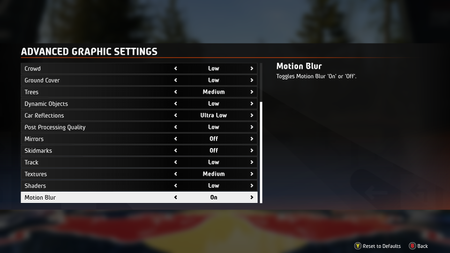
Hello, EA. I bought EA WRC yesterday and have a problem. My laptop is about a minimum system requirements for the game. I watched a gameplay video on YouTube played on a laptop exactly like mine and was sure I’d get nice graphics with a comfortable FPS, but it’s not quite what I expected. On low settings with DLSS, I get 70–80 FPS, but the textures look terrible. The very low, low and medium texture settings all look equally terrible, and the VRAM usage is less than 3 GB. If I set the textures to high, the VRAM usage goes up to 3.5 GB, and the textures look good. Even on the Ultra preset, where are definitely issues with insufficient VRAM, the textures look great. So the problem with low textures definitely isn’t due to insufficient VRAM! I’d be happy to set textures to medium in order to bump other settings to medium, my GPU’s power allows for that with DLSS enabled, but then I get a not-enough video memory issue and a ton of freezes and stutters. Here are the settings and what the game looks like. Here are the same settings, except high textures. Here's the Ultra preset for comparison.
Visual bug
Hi, I got wrong colors in some areas which are red instead of black or grey. Everything was fine with my 4090 but after upgrading to a 5090 this visual glitch appeared. Got the newest driver 576.52 and I tested some older one with the same result. Cleared the shader cache and reinstalled the game and also veryfied the game files. The glitch appears in hdr and sdr and I also checked the accessibility options which are all off. Any ideas?Renault Megane Kit Car rear lights incorrectly modeled
Hello EA Sports WRC Team, I would like to report a visual inaccuracy regarding the Renault Megane Kit Car in EA SPORTS WRC. In the current game version, the rear lights are not modeled correctly. On the real Renault Megane Kit Car, the rear lights consist of distinct circular tail lamps, but in the game these appear incorrectly positioned and shaped, resembling standard brake lights rather than the correct circular design. This issue affects visual authenticity and historical accuracy of the vehicle, especially for players familiar with the real car or classic rally models. Platform: (PC / PS5 / Xbox – complete as applicable) Game version: Latest available update Mode tested: (e.g. Time Trial, Rally, Replay) I kindly ask the development team to review this and consider correcting the rear light model in a future update. Thank you for your work on EA SPORTS WRC and for supporting the community.