[LD] Rebirthed sim is not added to an existing household
This is my first time trying the Rebirth thing so maybe I'm doing something wrong?? But when I try to Rebirth my sim into an existing household, it doesn't add a new sim. It brings me into CAS, and the first sim in the list has the Rebirth icon, but they aren't actually the Rebirthed sim - they are the same sim that was already there. If I exit CAS, I get sent back to Manage Worlds with the Rebirthing process no longer active. Only if I pick an empty household does my Rebirthed sim appear in CAS as an infant.1.6KViews126likes35Comments
Unable To Load Other Lots / Households
I have removed my mods but even then, I'll go to manage worlds and click on a household that isn't my last played household to play in. An error message will show up and tell me to reload the game. I do it 20 odd times and nothing happens. I waited for the new update, thinking it would fix the bug. It did not. I tried to access the household by switching in live mode but an error came up again, so my sim couldn't even visit that household's home lot and then suddenly, I was not playing in my last played household anymore. Whenever I tried to build, nothing would load, so I was stuck on the loading screen for an hour once. Only Create-A-Sim is working correctly. Otherwise, the game is pretty much unplayable. To make matters worse, every time I try to close the game, Steam says "stopping" but the game never actually closes. I have to turn off my laptop completely to force the game to close.8Views0likes0CommentsNo married Sims in pre-made households
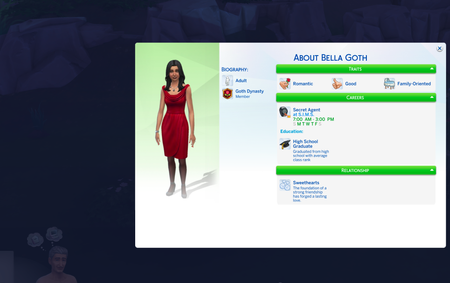
Except for the one household that I created, marriage status in all pre-existing households are messed up, across all the worlds I own. Not a single couple is married. One of my Sims had the Villainous Valentine aspiration, but there was not a single couple in town to break; everyone kept saying they are single. So, I switched control to other households to see what's up. Married couples are not showing as married nor divorced, just has a romantic relation (usually Sweethearts or Hot and Cold, or just a romantic bar). Example of the Goths: This is happening in households across all the worlds I have: Willow Creek, Oasis Springs, Tartosa, Ondarion, Ravenwood. No mods or cheats; I only bought the game and it's expansion packs a couple of weeks ago and there's too many relationship-related bugs like this.26Views0likes1Comment
Cannot propose even with full friendship/romance bar
I have a Sim who is seeing a townie. Even though they are compatible, have full friendship and romance bar, are best friends and soulmates, I cannot progress their relationship. I'm not getting the 'make them a boyfriend/girlfriend' option either. Not sure if this is a bug or if there's a work around but I'd like to marry this Sim off to free up space in my household.23Views0likes1Comment
worlds not working, everything is glitching or frozen
Several of my words are not working, anytime I click on them I cannot access any of the lands on the map, cannot visit any lot, it shows there is nothing there and will not let me click on anything. My fairy will glitch and not show wings, when I try fair interactions they are unable to do the request. Taking forever to try and have my sim do anything, they just stand in place unmoving. I tried to troubleshoot, debug, etc and nothing works. As of 7/21/26 the last three updates has seriously messed up my sims play and nothing seems to be getting fixed. This last update made things much worse and it is at the point where I cant even play sims because the game freezes or the worlds wont work, PLEASE GET THIS FIXED :(30Views0likes1Comment
[LD] Sims watch only static TV/Multiple Ediths spawn
I built a motel as a business and one of the activities that customers can do is "Watch TV". Somehow they only watch static TV and Edith keeps showing up, making my Sims customers faint. It's relentless and really annoying for the gameplay. It would be funny if it would happen once in a while, but why are the "customers" only watching static TV? Edit By crinrict: Added pack tag to title, adjusted title1.6KViews61likes32CommentsNo married Sims, relationships are messed up even without entering CAS.
Except for the one household that I created, relationships in all pre-existing households are messed up, across all the worlds I own. Not a single couple is married, and some have romantic relations with their child??? One of my Sims had the Villainous Valentine aspiration, but there was not a single couple in town to break; everyone kept saying they are single. So, I switched control to other households to see what's up and their relationships are all messed up. Previously married couples are not showing as married nor divorced, just has a romantic relation (usually Sweethearts or Hot and Cold, or just a romantic bar). Some even have romantic relation with their child. Which is a serous glitch... This is across all the worlds I have: Willow Creek, Oasis Springs, Tartosa, Ondarion, Ravenwood. So much money spent on a a buggy game that's becoming almost unplayable....If you could kindly fix this. Looking at the number of players facing similar issues, hopefully these types of glitches are top priority.24Views0likes1CommentExisting sim not playable
I created a sim, but as soon as I go to a lot to play they aren't playable. They will show up (whether there's two characters or just one), but you can't play as them. It is as if they were a npc in the game.I have tried making new worlds with the character just for him to not show up as playable as well. I am not using mods, and only have the packs, Vampire Pack, Bust the Dust (which still isn't working), and Seasons (which works just fine).18Views0likes1Comment[HP] [PS] Sims become invisible when wearing clothing from pack
I’ve clear cache, restore license and I’ve uninstalled and reinstalled the game nothing has worked. I’m having an issue with the Holiday Celebration pack. When i use clothing pieces from the pack my sim doesn’t appear in my household nor can I add the sim the household. Everything else works fine it’s only when I create a sim. Edit By crinrict: Added Tag to Title, Adjusted Title34Views0likes3Comments