Co-op career desync and blocked: FIX URGENTLY!
Me (F1_gtFisichella) and my friend pippo100799 had recently started a co-op career with 16 races for the first season and last time we played until the 8th race at Silverstone. Today we login for starting the 9th race at Spa-Francorchamps, but we couldn't move forward because, since last time he logged out while in the silly season cutscene of midseason, it went back to his personal QG while i'm at the circuit on race weekend. The problem is that we can't advance to the sessions because he's stuck on QG and can't advance to the race weekend since in his interface there is no X button to advance (therefore, we can't race anymore). We tried everything from changing host to even expel my friend and inviting him back to career, but he still returns to QG without possibility to advance on race weekend. Looks like is a server problem since last time he logged out in the middle of cutscene while i went through all of it until the arrival on the track. Please fix it ASAP since we both want to continue the career since we're home for the holiday season. Thanks in advance
Not allowing to continue new season
The game will not let me go past the screen where you choose a engine supplier and continue, one of the boxes for drivers is empty but red and if I exit it says I have both drivers but still won’t let me continue, I already tried restarting and loading a new career save but nothing works, I am on the 5th season so maybe that has something to do with it?Game keeps f'ing crashing. Lost data
Trying to play this game at the moment (at least to me) seems to be like trying to go up a white water rapid stream with no boat with the sheer amount of crashes that I get. In 10 hours of gameplay (as reported by steam), the game has crashed 39 times and resulted in roughly 26 hours of troubleshooting, reinstalling drivers, the game and even Windows itself, all to no prevail. The worst crash was the latest one, in which, despite auto save being enabled, when I reloaded the save for the career mode, to my horror, I was back at P3 at Suzuka, despite having just completed the qualifying session at Miami, resulting in 2 hours of data being lost and a total waste of my time. I have tried to use the live chat feature (which is useless btw) and it kept forwarding me to an article about multiplayer connectivity issues (might as well show me pictures of cheese) and when I go back, the chat completely reset and I have to go through the whole 15 minute loop again, and again and again, with nothing useful actually being done. Would like help with this ASAP (preferably within the next 30 minutes or so)
No Force Feedback on SIMAGIC Alpha EVO Pro / “simpro_1.dll” Untrusted File Error
I am experiencing an issue with Force Feedback in F1 25 while using a SIMAGIC Alpha EVO Pro wheelbase. When I launch the game, I get the following error message: “This untrusted file was not able to be loaded: C:\Program Files (x86)\simagic\simpro3\bin\simpro_1.dll” After this message appears, the game launches normally, and my wheel, pedals, and buttons are all detected and work correctly. However, Force Feedback does not work at all. There is absolutely no FFB from the wheelbase while driving. Other racing games work normally with Force Feedback, so the problem seems to be specific to F1 25. I have also tried reinstalling SIMPro Manager and F1 25, but the issue still remains. Could this simpro_1.dll untrusted file error be preventing F1 25 from using Force Feedback? Is there any way to allow this DLL, fix the compatibility issue, or restore Force Feedback? I have attached a screenshot of the error message.Load Failed bug
I'm experiencing a persistent "LOAD FAILED - Failed to load, do you want to retry?" error every time I launch F1 25 on Steam (PC). What I have already tried, without success: 1. Verified the integrity of game files via Steam 2. Disabled Steam Cloud synchronization for F1 25 3. Deleted the local save/cache folders (Documents\My Games\F1 25 and AppData\Local\F1_25) 4. Relaunched the game after a clean reinstall of the local files 5. Reinstalled the game Despite these steps, the "Load Failed" error still appears on launch. If I select "Continue Without Saving", I can reach the main menu, but my progress (career mode, settings) is lost again the next time I start the game. This suggests the issue may be related to a corrupted cloud save profile on EA's servers rather than a local file problem.
No.1 Not Giving Option ?
Hi unsure if this is actually a bug or if I’m missing something, but iv just finished a season where I won the world championship with Oliver Bearman (87) so went through the normal stuff started new season ect and never got a prompt to ether use No.1 or to keep drivers current Number like you did on the base game of F1 25, loaded up Australia and he’s still got the No.87 on the car is this a bug or do you have to do something different on the DLC ? I am on PS5 and in Season 3. Thanks.Lost all progress and dlc content in f1 26 on ps5
Hello EA Support, I am experiencing a serious issue with F1 26 on PlayStation 5. When I launched the game, it started as if I was playing for the first time. Since then, I have lost all of my game data, including: All custom car setups for every track. All customized items I purchased or unlocked. Cars, suits, helmets, gloves, and other customization items. Game progress and personal settings. My PlayStation Network account and EA account are the same accounts I have always used. I have not changed accounts, and my save data appears to have been overwritten after the game reset. I have already checked my PS5 console storage and cloud saves, but I cannot recover my previous data. Could you please investigate whether my EA profile or cloud data can be restored? If this is a known issue, I would appreciate any assistance in recovering my progress and purchased content. Thank you for your time. I look forward to your reply. Kind regards, EmersonCost cap bug still present
I started a new save just about a week ago. I simulated through the first season to qyuickly get to back to about where I was. Then I checked the finances and found that the visual bug with the cost cap is still present. Have it noted that this is not from the 2026 season pack. As the pictures shows season two begins to calculate from the amount that was spent in season 1. I thought this was supposed to be fixed in patch 1.04 over a year ago?
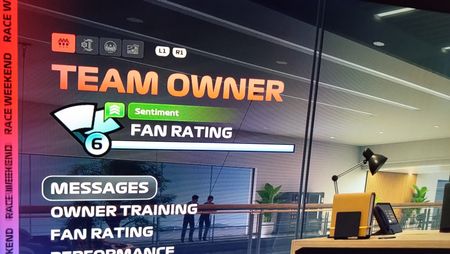
[MyTeam] Fan Rating won't level up on 2025 saves
Since the 2026 Season Pack update, Fan Rating is not leveling up anymore on 2025 saves in MyTeam mode. See the attached picture! My Fan Rating was on level 6, the bar is filled, but it doesn't level up to level 7. It has been like this for 5(!) races now, I even completed an accolade, but my Fan Rating stays the same. After every race, the results screen shows the bar filling up, but it never changes to level 7. It is a game breaking bug, since you can't increase the number of available spots for sponsor decals on the car! The bug is present on all 3 of my 2025 saves! The issue doesn't effect 2026 saves. EA_cuervo With respect, please forward this to the devs, and have them fix this ASAP! The 2026 DLC has caused several new bugs in the main game. This us unacceptable!