[AA] Sims try to cook for themselves in hotels even when a chef is assigned
I built a hotel in the game and assigned a head chef to it. I set it up so the chef should be cooking, and the guests should just eat the meals. The issue is that the three separate interactions — Cook, Serve Food, and Eat — all trigger cooking. Because of this, a crowd gathers in the kitchen, and the chef can’t reach the counters to start cooking. I would like the Eat interaction not to involve cooking. It would also be great if serving food worked more like a service action. Or add a separate interaction for bringing prepared food. I don’t use mods or CC, and I have all the expansion packs installed.1.2KViews106likes21CommentsPlant Sim: No option to absorb solar energy
I'm trying the plant-a-sim quest for the first time, and my plant Sims (I tried with 2) don't have the option to absorb solar energy from plants. I've tried on many different plants at different times of day, but they don't have the button for the interaction. At first I thought it was the genius trait on the first sim I tried, and that the "collect microscope sample" option was replacing it, but this is not the case, as tested by the other sim. I also tried removing all of my mods, and restarting the game(separately). I'm not sure what's causing the issue but I can't complete the quest without this interaction and can't find any record of anyone else having the same issue online. Edit By Crinrict: Adjusted Title6.8KViews55likes52Comments
Stuck In Their Shadow: Promotion skips to Level 6
During this scenario, when you need to be promoted to level 5 of the Tech Guru Career, it automatically skips to level 6. This means you can't complete the scenario step/goal to move forward with the story. I tried to use "testingcheats true" and then "careers.demote TechGuru" but it just automatically fires you, you can't be at level 5, which renders the scenario impossible to complete. Edit By Crinrict: Adjusted Title3.1KViews33likes51Comments
UI Exception 1069: UI Corruption while playing Scenario
I recently encountered an issue with UI disappearing after loading from any screen to LIve Mode. So far, I have encountered this when taking a photo, leaving Build Mode, and loading a lot from traveling. Some things to note: I play on PC and own every piece of DLC. My game is updated to the recent version. This is a fresh install of The Sims 4. I even deleted the game file in which Mods, Screenshots, Saves, etc. are held. The only thing I kept were tray files and accountDataDB.package. I have already repaired my game. I have tested this in several ways. I can only replicate the bug in a household currently in a Scenario. I can even play a household in the same save as a Scenario household and it seems to be unaffected. When this bug occurs, I have to refresh the game. Occasionally, I can exit to the main menu and it will be fine. Other times, exiting to the main menu causes a black screen and I have to force close the game. I would say this bug occurs 25%-50% of the time. I've included a screenshot of what the bug looks like as well as a lastUIException.txt of the bug.2.5KViews30likes73CommentsGame freezes when Moving in
After the latest update I have tried multiple times to have my sims marry or move in together and every time they start the interaction then freeze just before the action completes then the whole game needs to be force shut down this happens with and without any mods Edit By crinrict: Adjusted Title, merged threads.1.1KViews23likes36Comments
Can't travel with more than 1 or 2 Sims
When I select travel on the phone a window pops up so I could select up to 7 sims to travel with. However I can only select one. I am playing the scenario with the Martínez family. There is the optional task of traveling to the park with the kids. I wanted to take both kids to the park with the mother, but I could select only one. It does not matter which parent I am on. I can select only one sim to travel with. The others are not greyed out, they are available for selecting, but I can not select them if I already selected one. I play on windows, I have all packs and almost all kits. ( I do not have the last two). I do not have any mods or cc. Edit By crinrict: Adjusted Title to fit old bug report.824Views22likes15CommentsUnlucky Chef Scenario - No Fires
Version 1.113.,291.1020 DX11 I was trying the Unlucky Chef challenge once again, and wasn't seeing any fires (except for one not associated with cooking) after a couple weeks of play. Restarted the scenario in a fresh save with mods disabled, and cooked 3 meals on the stove without fires, which based on previous experience should have been enough time for a fire to have broken out on the stove. Edit By crinrict: Adjusted Title to fit old bug report.368Views15likes3Comments
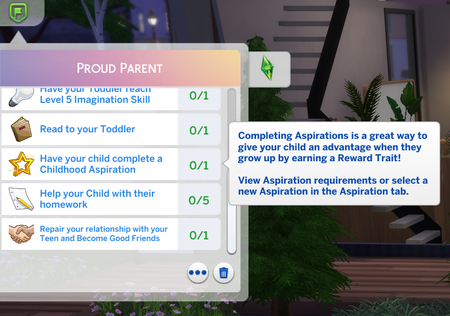
[GRO] Proud Parent: New child aspirations not fulfilling goal
Proud Parent Scenario does not recognize the Growing Together Childhood aspirations for "Have a Child complete aspiration" goal. To fix this, maxis just needs to add the Growing Together aspiration tracks IDs to the goal list. <?xml version="1.0" encoding="utf-8"?> <I c="SituationGoalActor" i="situation_goal" m="situations.situation_goal_actor" n="scenarioGoal_Actor_ProudParent_ChildhoodAspiration" s="300621"> <T n="_cooldown">0</T> <V n="_display_data" t="enabled"> <U n="enabled"> <V n="instance_display_icon" t="enabled"> <T n="enabled" p="InGame\UI\Icons\Headlines\Final\headline_Aspirational.png">2f7d0004:00000000:51b9f5a1618c2fc7</T> </V> <V n="instance_display_name" t="enabled"> <T n="enabled">0xF2BA33AD<!--Have your child complete a Childhood Aspiration--></T> </V> <V n="instance_display_tooltip" t="enabled"> <T n="enabled">0xFF950D47<!--Completing Aspirations is a great way to give your child an advantage when they grow up by earning a Reward Trait!\n\nView Aspiration requirements or select a new Aspiration in the Aspiration tab.--></T> </V> </U> </V> <V n="_goal_test" t="aspiration_track_completed"> <U n="aspiration_track_completed"> <L n="aspiration_tracks"> <T>25691<!--AspirationTrack: Track_Creativity--></T> <T>25693<!--AspirationTrack: Track_Mental--></T> <T>25690<!--AspirationTrack: Track_Motor--></T> <T>25692<!--AspirationTrack: Track_Social--></T> <!--THE ONES BELOW ARE THE ONES NEEDING TO BE ADDED TO BE FIXED--> <T>308417<!--Track_CreativeGenius--></T> <T>308415<!--Track_MindAndBody--></T> <T>308416<!--Track_PlaytimeCaptain--></T> <T>308414<!--Track_SlumberPartyAnimal--></T> </L> </U> </V> <T n="_score">0</T> <T n="audio_sting_on_complete" p="" /> <T n="use_numeric_test_results">True</T> </I> Edit By Crinrict: Adjusted Title fit migrated bug report: [GRO] Proud Parent: New child aspirations not fulfilling goal | EA Forums - 11592072 Archived thread had around 12 me toos259Views8likes2CommentsParenting Predicaments: Send Kids to School While Focused fails to resolve
I'm trying to do the parenting predicaments scenario, but for some reason it won't check off that the kids are going to school in a focused mood. I got the tea brewer to make sure they were going to school focused literally every day, but it never checked off the list item. Now both kids are young adults, so they don't go to school anymore and have no way to complete the list item. I'm not sure why it wouldn't work when the kids were going to school, but now there's no way for me to complete the scenario at all. Edit By crinrict: Adjusted Title fit old bug report. Added missing thread tags from old report.171Views5likes4Comments
Sims not moving/NPCs T-Posing
Since playing the royalty pack and geting the update the sims arent moving ..Im currently on the Darong Beginnings and at the Willow Library and everytime i go introduce my sims to the royal envoy all the surronding sims and my sims included are either t-posed or completely non-moving and its irrating . plus i cant complete this darn quest and now the 3rd week quest is up and i cant start it. also Im playing a complete new save and mods and also reinstall the sims 4 but still have the same problem ..Im about to stop playing but i want all the items during these quest and its not fair. also i keep getting this last exception error .... <?xml version="1.0" ?><root> <report><version>2</version><sessionid>a67882b7c3666f769937b14</sessionid><type>desync</type><sku>ea.maxis.sims4_64.15.pc</sku><createtime>2026-02-16 14:17:48</createtime><buildsignature>Local.Unknown.Unknown.1.121.361.1020-1.300.000.233.Release</buildsignature><categoryid>constraints.py:1588</categoryid><desyncid>a67882b7c3666f769937b14</desyncid><systemconfig/><screenshot/><desyncdata>[manus] Error during initialization of service tuning_instance_manager. This will likely cause additional errors in the future. (AttributeError: 'Somewhere' object has no attribute '_require_carried') Traceback (most recent call last): File "T:\InGame\Gameplay\Scripts\Core\sims4\tuning\instance_manager.py", line 283, in _execute_gen File "T:\InGame\Gameplay\Scripts\Core\sims4\tuning\instance_manager.py", line 304, in _execute_func_and_calculate_time File "T:\InGame\Gameplay\Scripts\Server\interactions\interaction_instance_manager.py", line 50, in on_start File "T:\InGame\Gameplay\Scripts\Server\interactions\interaction_instance_manager.py", line 105, in _use_animation_constraint_cache File "T:\InGame\Gameplay\Scripts\Server\animation\animation_ac_cache.py", line 160, in read_ac_cache_from_resource File "T:\InGame\Gameplay\Scripts\Server\animation\animation_ac_cache.py", line 188, in _merge_cached_constraints File "interactions\constraints.py", line 1588, in interactions.constraints.Constraint._intersect_kwargs AttributeError: 'Somewhere' object has no attribute '_require_carried'rtim=0 Client Session Time: 27.62 Num Save Errors: 0 Num Load Errors: 0 Current Game State: 0x96d01090 LoadingScreenActiveFlag: 1 Origin Version: 13,639,0,6152 Modded: False SystemInfo: Windows 11 10.0.26200 GPU: Intel(R) Iris(R) Xe Graphics igdumdim64.dll 32.0.101.7084, GUID: D7B78E66-E4E1-11CF-3468-602CABC2ED35 </desyncdata></report> </root> I actually have nothing but the vanilla game install so i dont understand this I have pictures of 2 my sims trying to talk to envoy and nothing Please help! Im desperate! Edit By crinrict: Adjusted Title to better reflect the issue Note from EA_Solaire: Hello all, If any of you are still encountering this on the latest game version (without mods), would you be willing to share your save file(s)? If so, please send me a private message with a link to the file. Instructions can be found here: https://forums.ea.com/idea/the-sims-4-bug-reports-en/information-how-to-send-user-files-to-the-sims-4-team/5048472 Please also let me know if mods have been used or not in your shared save files. Thanks!809Views4likes24Comments