Settings reset everyday, double product boxes.
Skate Devs, Hey so whenever I relaunch the game in the morning none of my basic settings save and I have to redo my general, audio, and graphic settings over again. It's becoming kinda annoying redoing it although I am getting good at speed running switching them back. Also my product boxes. I had a bug where all my locations reset to 0 a few times, now I have double of each product box and some that are supposed to be LOCKED are appearing unlocked but wont let me buy them. I feel like my account is bugged. Whoever is making the Gullcrest community parks you are a BOSS and I demand this man get a raise. Also randomly crashing daily to a DirectX ERROR10Views0likes0Comments
General Feedback
1.Would be nice if the game was more mature like if npc's would cuss at you or something if you run into them etc and if the tutorial & the missions were more mature aswell and didn't treat us like we were 4 year's old lol 2.Not sure if i just suck or what but doing late 360 flips & laserflips on flat ground is impossible aswell as late inward heels & late hard flips aswell sometimes even late impossibles are annoying aswell ... on ps5 slim btw 3. Would be nice too have some big hills too bomb & gap in San van similar too the observatory and quarry & the industrial district etc also something like Rob Dyrdek's fantasy factory would be cool i just think the new map is too flat atm we need more variety & verticality too the san van map.QOL things you should & could add into skate.
Homeless npc's sitting or walking around san van Npc's wearing backpacks and carrying around duffel bags maybe have them listening too music while walking around with there phone in there hands or without, some of these things could be in the game but most aren't or I haven't seen them doing any of this I noticed some Npc's are just standing in the middle of nowhere just doing nothing , it feels unnatural maybe have them film the player skating, they could be interacting with the environment like they could sit on ledges, lean against walls , use vending machines, also throwing away trash picking up trash for community service or have them walking a dog or playing fetch with a Frisbee ... or letting the player pet the npc's dog... also you could add groups of npc's talking , laughing or high fiving or reacting too the player bail or hit a line or land a trick with oohs and ahhs also security guards could chase skaters out of no skating zones, creating funny spontaneous moments in game and for content creation ... also more npc's should be walking with a clear destination in mind rather than idling also having npc's sit on the benches or sitting on the stairs would immediately make the city feel less like a ghost town and more like a functioning community ... most of these changes would imo .
Infinite black screen
Yesterday me and a random were out exploring the isle of grom, my game bugged out (no issue there) restated the game and after being greeted with the NikeSB event pop up I am stuck in a black screen with what sounds like world ambient audio playing. I have no access to menus, options, anything at all. Just a pure black screen. (Xbox one btw) I've left it to time out, hard reset, cache and game deleting, reinstalling. I have not found a solution, any chance at all you know about this and have a fix?QOL Features we need in the game
1.We should be able too skip a song so basically a skip song feature/Next Song. 2. We should be able too have a setting in the menu/game settings too mute the music playing on the radios in the parks & around the game world it kinda gets annoying if your listening too Spotify etc and have too turn the music volume in the sound settings down everytime and back up again next session... and you should still be able too collect the music playing on the radios around the game world it would just be muted but if that is too complicated just make a sound slider setting for The Radio's in the game world obviously you should still be able too collect the tracks playing on the radio it would just be muted and it would be nice if this feature would include the vehicle radios aswell 👌Need some new hats and durags need to be added
“We’d love to see a broader range of headwear styles to better reflect real-world fashion and player identity. Adding different types of hats, durags, and bomber-style caps would give players more freedom to customize their look and represent their style. This kind of variety makes characters feel more unique and keeps the experience fresh.” And if y'all do decide to add this plz have different versions of drags and colors some that's rolled up at the back and some that are not would be really nice
My top frustrations/complaints/suggestions for skate.
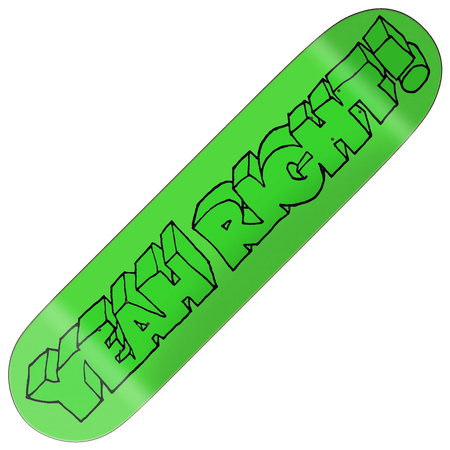
idk if any dev is actually going to bother reading all this, but if so then thanks and sorry for it being so much. I tried to order each list from most to least important for each category (in my opinion, of course) (EDIT: Added categories and moved everything I listed later in the comments up to Dec. 11th into the OP instead) I'm going to first start with my #1 complaint that I didn't know which category to put it under, so instead I'll just leave it under no category at the top: The game is online-only and there's no way to play offline or preferably host a P2P/LAN server. I don't like spending money on online-only games knowing that inevitably one day they'll be shut down. Please plan for the future and make sure all the work you guys have put into this game will be preserved. Visuals: Because the game uses Lumen lighting, a lot of the dynamic lighting is very splotchy and looks poor. Even more annoying is the ghosting around any moving object/character when Lumen lighting is behind said object/character. A great example of this is if you go to the stage in Hedgemont where all the TV screens are and run around against those screens, you'll immediately see major ghosting all around your character. It'd be a nice detail if the bottom of our skateboards got scratched up when used enough, like in other games such as Session. I think even a few of the THPS' had this. Also include an option to reset the board damage, or disable the feature entirely since I'm sure some people out there will complain otherwise. I'd like to see more of the lighter bail animations where you don't completely fall to the ground but instead stumble off your board and barely regain composure. There were a lot of really good ones in skate 3, while so far I think there's only two or maybe three in the new game? Audio/Music Player: Disabling the "Vee's comments" audio setting doesn't affect her repetitive dialogue at the start/end of every challenge. Please Vee, I know what a "pig challenge" is already! The only current workaround is to turn VO volume all the way to zero, but then I can't hear my own character, nor Shingo, Slappy, and Lizzy, who I like the voices of. Please let us disable how the music player automatically starts playing a song every time you begin a challenge. I like the in-world music, I don't want to get blasted by a song for 45 seconds until the challenge ends and it cuts off. Currently I have to open up the music player and pause it every time I start a challenge, which sucks. I'd like a way to block/dislike songs so they stop playing in the open world and during challenges. Alternatively only play songs that I've favorited. There are certain songs I hate hearing so much, please! Could we get a "skip" button on the music player to skip forward to the next song? Settings: There's no gameplay assist setting to disable/tone down the vert magnitization. I'll often be trying to grind a rail or just ollie over something but instead magnetize to some far away ramp and my whole character goes sideways. Please add DLAA. This would also help with the Lumen ghosting issue I mentioned under Visuals. Please add a graphic setting to disable the chromatic aberration effect. The "low camera" setting isn't quite accurate to the original skate's low camera view. I want it to be a bit lower and closer to the board. Please either replicate that camera view from the original, or just let me manually adjust the camera position and angle in settings? UI: The map could really use some icon filters so we can hide/view specific mission types, or hide them all so we can just see fast travel locations and other players. Please let me hide the "2/4 players in party" HUD element that's always on the right side of my screen. It's very unnecessary imo, why would I need to constantly see that? It's one of the only HUD elements I currently can't remove, and I want as little HUD as possible in skate. When a party member is in the pause menu or using the replay feature their little triangle icon above them should change to either a paused icon or camcorder to represent either of those, that way you know they're busy and don't try to start a challenge while they're in there (which annoyingly just starts it by yourself). I can understand why the social menu was moved to its own tab with the S2 update, but it feels weird that its the only tab that uses RT/LT to navigate. I think the social menu being under the main home menu tab previously was perfectly fine, and easier to access. Object Dropper: The object dropper only allowing a measly FIVE objects is so limiting, you can't do much with that. Please increase it quite a bit so we can create cool stuff! Please let us save the objects we've placed so they load back into the map the next time we launch the game. This would be so cool with a drastically increased limit as well. I'd love to build cool skate spots and shortcuts all over the whole map. Before Season 2 we could remove objects holding others up and it'd let them float. This was necessary for some builds because of the limit of only 5 objects. After the S2 update if you delete the object that's holding something up, the entire thing just disappears instantly with no way to revert. Please either let objects float once more, or, better yet, just increase the object dropper limit! Then I can afford to leave objects holding others up for "structural support." Controls/Tricks: Bailing is so finicky in this game, it feels like the detection for it is a bit broken. I very often get thrown off a grind for seemingly no reason. Bring back grind grabs (grabbing the board while in a grind). Similarly, bring back the ability to grab the board while powersliding! Currently 360 hardflips and inward flips are the only ones we can't hold. Are those planned to be added in the future? Does the setting to enable sideways ollies not currently work? My friend and I can't figure out how you're supposed to do them once you've enabled it. I expected them to work the same way directional pops do in Session (example of that here: https://www.youtube.com/watch?v=_-e1e0bdugg). Map/World: Add some interiors! The lack of any indoor locations (except the S2 tunnel) is disappointing. For example, I'd absolutely love if there was an indoor mall to skate around. I hope suburban areas are planned for a future map expansion. Those have always been my favorite areas in the series, the first game especially had a phenomenal suburban area with plenty of nice spots to find all around the neighborhoods and alleyways. Missions: When doing a line challenge if you complete an attempt but only finish half of the goals it'll cross them out even though you need to do the whole thing in one attempt. After it crosses a goal out you can no longer tell your current progress on that goal in your next attempt. Already completed goals should still count toward daily/weekly/seasonal tasks so we can replay completed missions instead of having to rely entirely on the daily rotations that get old very fast. There are so many missions that should be getting reused for the daily challenge rotations to add more variety. Currently there's only two days' worth of daily challenges that switch in and out. Add all those other missions that were one-and-done to it, I'd love to have a reason to replay them and earn XP/Rip Chips/Tix! I'd like to see more missions that actually require using the Object Dropper. Currently there's very, very few (less than 5 maybe?) that do, and they're very basic like, "place one ramp in this exact spot and you're done." I want some open-ended missions that are almost like puzzles, "find the right pieces to make it across this gap," that kind of thing. I really like the new Own the Lot challenges, I love how many different objectives you've made for each area and that they're randomly chosen for replayability (not that there's a reason to replay them once you earn the Tix...), but the balance for solo or two players needs looked at. It is extremely difficult to reach the highest reward with two players, and practically impossible if you're solo. I don't think you should be forcing people to play in full parties just to be able to complete them. Please either have it dynamically adjust the amount of time given based on number of players, or just bump up the time gained when completing goals a bit? Progression: The grind for Rip Chips and Tix is miserable ever since they were nerfed in Season 1. It's so slow! It took me just under 85 hours to reach level 10 across the current three districts, and I still need a ridiculous amount of Rip Chips to buy all the boxes. Please, fans are more likely to return to the game and buy the battle passes when they're easier to finish, not harder and grindier! I wish battle passes were permanent. Please look at games like Helldivers 2 for how much better a consumer-friendly permanent battle pass system can be. It leads to more sales in the long term than FOMO does! Multiplayer/Social: Get rid of the mission countdown timer entirely as it currently functions in co-op. As the host I would much rather choose a mission, then it shows up for other party members and requires them to hold a button to accept/vote to start it. That way it only starts when everyone is ready, rather than the current 10 second timer before yanking everyone away from what they were doing. There's no text chat! This is so disappointing for an MMO-like game with a big focus on the social aspect. Text chat would let me meet up with randoms, skate some lines, chat with them, etc. without needing to form a party and use voice chat. Emotes: It is baffling to me that emotes can't be heard by others. You just silently, awkwardly dance on everyone else's end. Please add it so everyone can hear each others' emotes, or at the very least other party members! Add a customizable emote wheel, rather than the current system of only having four emote slots that use LB + one of the four directions on the D-Pad. It's very limited and there's a TON of emotes I want to be able to use more often! Please gimme more than 4 emote slots! Quite a few emotes can't be done while you're on your board. I really love the ones that let you do that, can we get that for all of them? For example, the Running Man and Moonwalk emotes would be hilarious while on your board. Currently when doing emotes it'll mute the music whether it be from your music player or the open world, I'd rather it not do that, at least the open world music, and play them both at the same time. Cosmetics/Customization/Store: Clothes are way, way too baggy and massive, especially shirts. It makes my character look like they gained 100 pounds! I really hope you'll either revert the new Season 2 face complexions, or let us adjust them back to how they used to look. My character looks much worse now, the shading around the eyes and nose is so much darker than before! We should be able to freely place stickers on our board, including resizing them, rather than the current 3-sticker system that's very limited. Let us buy things from store bundles individually! The incentive to buying a bundle instead should be that the combined price is discounted while individual items aren't, just like how Fortnite or other successful live service games do it. I guarantee there's a lot of people out there who have zero interest in spending $20+ on a bundle but would drop a few bucks here and there for one or two items out of the bundles. This is really low on the scale of importance (hence me putting it near the bottom), but I'm not a fan of how every costume so far either looks like it was made of paper mache or cardboard. I was really hopeful that Isaac Clarke would return to this game, he was my favorite character to use in skate 3! I kept asking if he'd return on skate's social media leading up to release lol. I was very disappointed that what we instead got was an unappealing cardboard box costume version of him. I would gladly have given you guys some money if you had just ported over the skate 3 model (aka the OG Dead Space model). Could we get the original green "Yeah Right!" deck? I saw the new 20th anniversary version was in the store a few weeks back, but the OG is a classic.781Views16likes18Comments
audio bugged out after export
When in the replay editor the audio sounds fine but after export (in this example) the grind sound effect is dragging well passed leaving the grind and sometimes at the very start of a clip there is a portion of audio that does not belong like a sound effect that comes later in the clip. Attached are two tricks, a normal speed and slow motion of each trick to better understand what im referring to. The audio setting was set to camera not skater at 100% volume.