High School Years Prom - Never Gold Tier Glitch
No matter what I do, and I HAVE tried. I always get Silver Tier. I cancel other actions, and b-line it for every objective - not even enjoying Prom, it never works when I do. Even if I'm casual about it, barely get Silver. If the ability to complete the needed requirements for Prom allowed an extra 30 seconds at least, there is a higher chance I could. Even with a Prom invite. Just wanted to get gold once. Once. Now it's become a post. Maybe also allow quicker cancellations of tasks and the object actions take precendence over all other queued actions for the active sim. Otherwise, no idea...
[CLOSED] [LBMBLE] Gnomes trying to fix message
I play on my PlayStation 5 and the new event is not letting me claim anything. On the home event screen it says next reward in 4 days 19 hours and then on the gameplay screen it says please wait and try again as the gnomes try to fix the failure. Is anyone else having this same issue? I’ve been waiting and have been sooo excited for this event to come out 😭 Anything helps!! Edit By crinrict: Adjusted Title
why cant i download event rewards from thee gallery anymore?
i play on console and my game wont let me download event rewards from the gallery anymore. if i try to place a room with the items in it my game acts like im placing it from a pack i dont own and deletes all the items. it used to work so did something break? i havent played in ages but i remember this working before.
Started the Masquerade event late — impossible to finish? ⏰
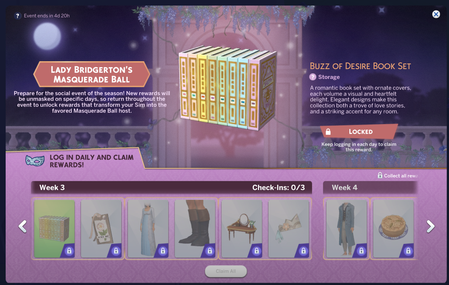
The game only lets you unlock rewards with ONE daily check-in. Right now my UI says 4d 20h left, but I'm sitting at Week 3 check-in 0/3, plus all of Week 4 (3 more check-ins). I already got my check-in for today. So the math is: I need 6 more days, but the event ends in under 5. 🤔 I even tried closing and restarting my game to see if it would count another check-in — no luck. That means it's literally impossible for me to finish. There's no catch-up mechanic and no in-game activities to earn extra progress — it's login-only. I get why EA picked this style. Daily logins = more players in the game = more chances to sell DLC. 💸 But a reward structure where late starters are mathematically locked out of finishing is not cool. I already mentioned this in the survey, but I'm asking here b/c... am I missing something? Is there ANY way to get more than one check-in per day? B/c right now this is making me want to rage quit again. 😤 Thanks for any feedback! 🙏 PS I've already added that mod to my game that just unlocks the Event Rewards. I just really dislike this, late players should be able to finish the event, this is not cool.Solved
Bridgerton items not showing up in game.
Hi. I logged in to the event, claimed the items and got an error message, can't remember the exact wording but it was to the effect of "request can't be completed at this time". Now it's showing that the items have been claimed but they're nowhere in my game. I've searched by name, by event rewards, and by just visually searching for them. I've tried repairing the game, removing cache files, and even resetting accountDataDB.package, none of it worked. Can you help me, please?
Bridgerton Event Issue
The Bridgerton event looks like it's stuck on week 3 for me. All of the rewards have been claimed for weeks 1-3. However, it hasn't updated and I can no longer use the right scroll arrow to look at the rewards for future weeks like I could before. I do not have CC nor do I use mods. I have cleared the EA cache, signed in and out and then back in again through the EA app. I have "repaired" my game through the EA app and restarted my computer. I have, of course, also checked my internet status to ensure I am online.