Banned Battlefield 2042 looking for help

Hi pey676767,
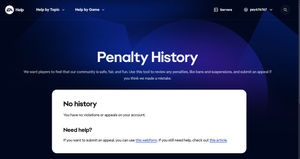
Bans and suspensions don't always appear in the penalty history for some reason, but cases can still usually be raised via EA Help agents.
Have you checked https://help.ea.com/en/help-my-cases/ to see if the case you show in one of your screenshots is there? Also, have you tried playing the game recently in case the ban was revoked in the meantime?
yes I tried playing this morning on my Xbox it says that my account is still disabled for this game. As for when you say check my cases to see if the case I show in my screenshots are there, Can I get a bit more clarity on what you mean there.
Thanks for the help I really appreciate someone taking time out of there day to respond
Thank you for confirming that you're still unable to play. Most likely, the ban is still in place then, unfortunately.
You mentioned in your initial post that you had submitted a case (second image), so you should be able to see it via the link I shared if it was sent correctly. I should be able to give you the steps to open a case with EA Help that they can send to ToS on your behalf, but if you do already have one raised, then opening a second one will move you to the back of the queue, so it's best to double-check there first.
Ah I see thanks for the clarification. So essentially ATM I have no Case opened on the matter as when I click on in the second image submit it brings me to the third image where it does not start a case rather it wants me to open one through my Penalty History to resolve the issue. The problem being that there is no penalty's to appeal that appeal on that page thus I'm not able to submit an appeal through that. Even though I do know I have an active ban for Competitive advantage.
Thanks again for the help
OK, give these steps a try. Hopefully they'll let you submit a case.
If the email option doesn't appear, sign out of your account and go through the steps again as a guest. That usually makes it show up.