After replacing the motherboard, there was an issue with Battlefield 2042.
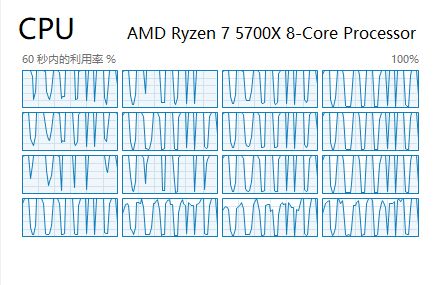


There might be a VRM overheating issue causing the motherboard to downclock the CPU.
Download HWiNFO and check the motherboard's VRM temperature.
Although I didn't see the VRM temperature sensor, the overall temperature of the motherboard seems fine. I'm planning to try replacing the PSU.
ZksptR VRM temperature would be under motherboard data, not CPU data. It's probably further down the HWiNFO list.
I made sure to check all the sensors, and there is no separate VRM temperature option.It's possible that my motherboard doesn't list the VRM temperature sensor separately, or it might be hidden among the few uncertain temperature readings above.Someone on the AMD forum suggested that I replace my PSU. I've already ordered a new 850W ATX 3.1-compatible power supply online. Maybe it's time for my current 1050W PSU to retire after over a decade of use.

Yeah I'm thinking its something specific to the board itself given OP says the old board was perfectly fine but the new models are having issues. ZksptR what about chipset drivers did you update those at all perhaps?
Of course, AMD's driver package includes a chipset installation option, and I’ve made sure it’s up to date. I also updated ASUS Armoury Crate, so the chipset drivers are the latest version.




