Forum Discussion

Rokebo73
2 years agoSeasoned Ace
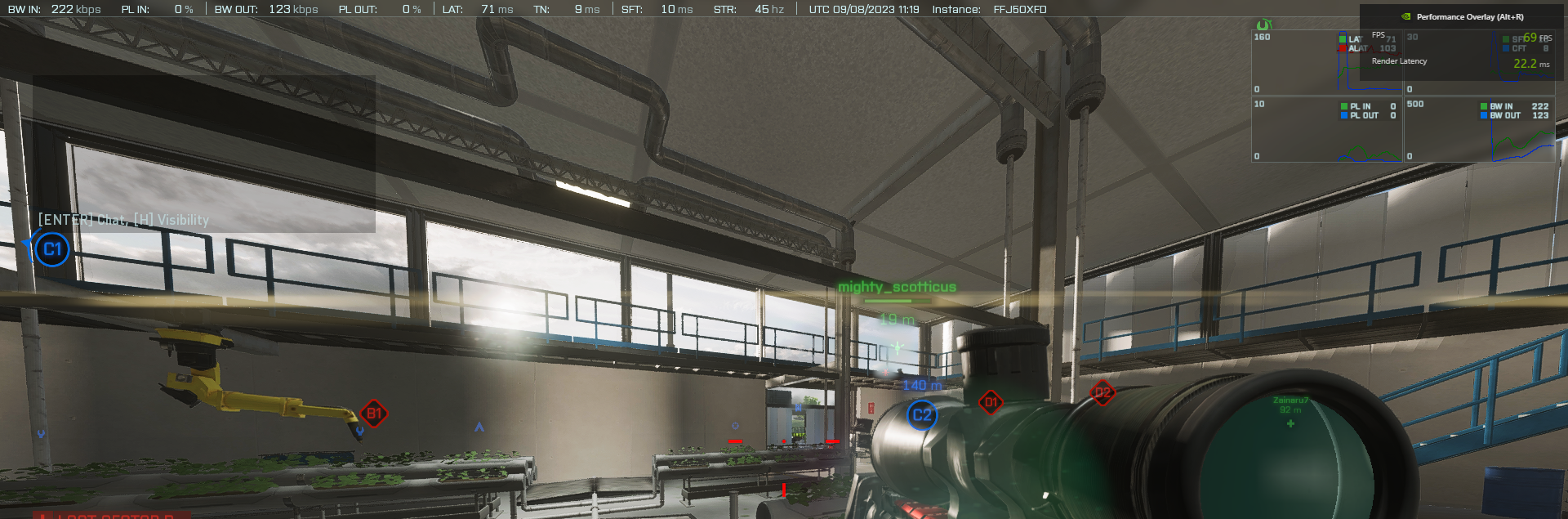
@xX_EMPHA_Xx enable ingame network bar , Options / General / Network , SHOW
Make a screenshot of it while ingame and post it please !
Make a screenshot of it while ingame and post it please !
 OskooI_0072 years agoLegend
Check if the update changed your video settings.
 xX_EMPHA_Xx2 years agoNew Novice
@OskooI_007it didnot change anything its on lowest graphic settings and it gives me 60 to 70 fps.. i dont know what is happening..!! ☹️ here is some screenshots
- OskooI_0072 years agoLegend@xX_EMPHA_Xx Your screenshot shows a Client Frame Time (CFT) of 8ms which is 125fps. (1,000ms ÷ 8ms = 125fps)
So it appears the game is outputting 125fps so I'm not sure what's going on. Very strange.
Try typing this in the game's console.
PerfOverlay.DrawGraph 1
- xX_EMPHA_Xx2 years agoNew Novice
@Rokebo73i here it is.. please help me if you have any suggestions..??
- Rokebo732 years agoSeasoned Ace
Youre LAT is high , ya got a latency of 71.
Anything downloading/update in the background ?
Torrents in the backgroiund ?
Are ya cable or wireless ?
ps post also dxdiag please.
- xX_EMPHA_Xx2 years agoNew Novice
@Rokebo73no apps are running in the background,, its just the vanguard nivida driver and the windows diffender,, and i am using cable.. i dont use torrent... my other games are just running well like apex legends and valorent, no lag or latency there.
Featured Places