Solved
Forum Discussion

LlamaWithKatana
5 years agoSeasoned Ace
@h0lck that aslo didn't help XD

5 years ago
OMG 7 Days he dont fix this error. EA games .....
 EA_Atic5 years ago
DICE Team
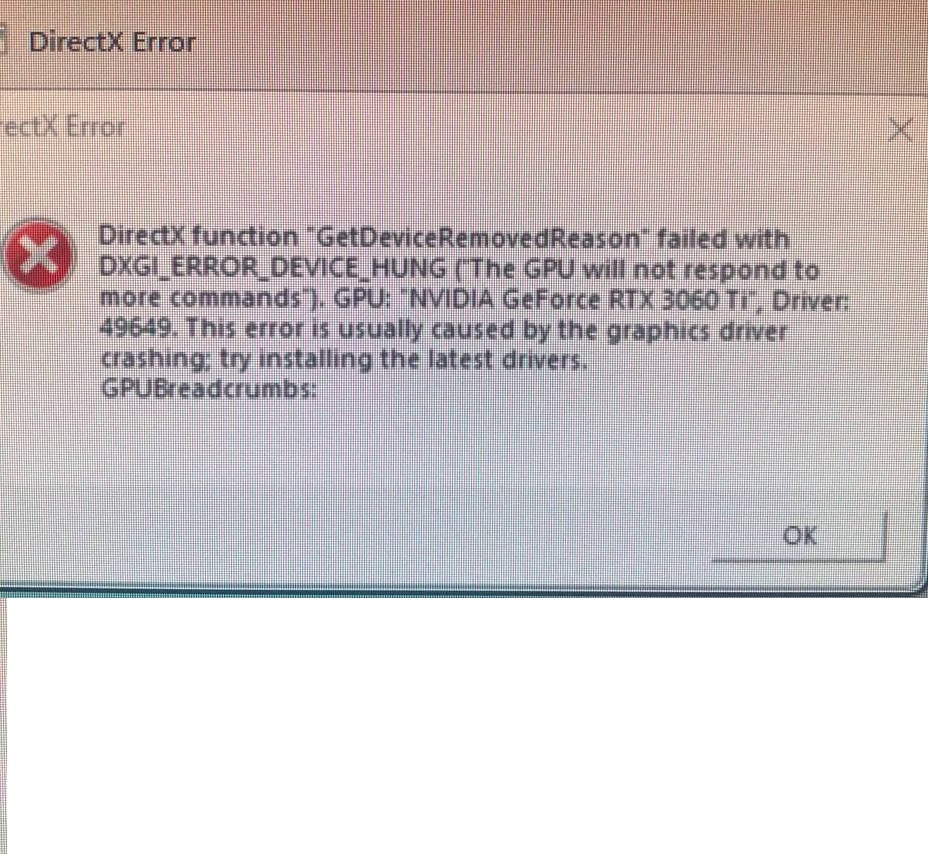
Hey everyone, I hope you are all well!No new update with me today on when it will be fixed, but I have a few questions from our investigations.We have seen a lot of players having older Windows versions experiencing the error, for everyone that is still experiencing the issue could you try to update to the latest windows version preferably 21H1.After you have done that can you start the game and do you get the same error, if you do get the same error where are you getting it? Is it on startup and can you take a screenshot of the error code.Thank you for your patience./Atic 5 years ago
Praise jeebus a response. Thanks atic
Update windows ay. urgh. Every time I do its bluescreens or the black screen of death.... loathing the thought of a clean install. Guess that's the fun exciting task for tomorrow. *.
ETA: This is the least frustrated I can sound. Pretty annoying hearing this after it worked fine in the beta.
 5 years ago
Same error, I cannot play for week, I'm old users more than 10 years with EA, but this is situation truly annoying
I updated windows 10 to windows 11
updated all drivers, reinstalled gpu drivers many times
nothing helps
old driver new driver same problem
 5 years ago
So I said earlier I refunded the game, I couldn't cause I had played too long via game pass on steam. So whatever, I tested more. Believe it or not, I made slight progress. Know that I am dealing with the directx errors Device Hung and Device Disconnected, which are not the directx error this thread is about. I just saw a lot of people posting about the hung and disconnected ones too, so I share my progress here.
I tried A LOT of things, at least 25-30 different things. Nothing has made any difference at all, but I have been playing somewhat steadily the last 2 days with my new fix here. It still crashes, but it is rare now. I can play several games in a row usually, whereas I was crashing every 1-5 minutes before. The game was completely unplayable, it is not anymore, though still very problematic.
What I did is annoyingly simple, though I have not seen it mentioned elsewhere. I increased the voltage on my GPU (a standard gtx 2070) by 25, and underclocked it by 185. I used EVGA Precision X1 to do it, but MSI afterburner should be fine too. Why those numbers? Couldn't say. Just tried them out randomly, and they make a very significant difference. I can actually play the game. Probably there are better settings, but I am so tired of trying different things that I just live with it for now. But * this whole situation EA created. I hope this helps someone else, because you know EA isnt gonna help.
 5 years ago
@EA_Atic Hi, I have Windows Server 2019 last Version, have same issue.
I Hope this helps somehow.- 5 years ago
Yesterday i tried to start a game and guess what? I was able to see MAIN MENU! Game simply let me see main menu for few seconds! It was beautiful. That 3 seconds of seeing that beauty changed my life! Then it crashed without any error. And that made me sad.
Today:
After last "update" of the BF (1.6GB or do), game is freezing at ship screen. Error 2:2600J still persists.
Progress is stable, game is not closing itself without warning, now just freezes. In that pace maybe i will be able to play it next summer?
Latest GPU drivers, W10 21H1 - no new updates in windows update. Every other game, including older BF works just fine.
Featured Places