Hey, everyone.
I want to first go ahead and highlight all the players in this thread that provided solutions that worked for them so far. These may not work for everyone, but I figure this is a good opportunity to list off what's been helpful to the community thus far.
@TheCapri wrote:
Try this:
1. Open Explorer and go to your Documents.
2. Open the Battlefield 2042 folder, than the settings folder.
3. Click on PROFSAVE_profile. (i used Notepad).
4. search for this command "GstRender.Dx12Enabled 0"
then change the zero/0 to an one/1.
5. Save this file and you're done.
Hope its helps.
@P-Sigh-Co wrote:
I dont know if this is gonna work for everyone, but with a little help form a friend I was able to resolve this DIrectX error.
I got a Nvidia GTX1080Ti and apparantly an older power supply
My friend told me to download and install this: EVGA_PrecisionX_OC_Setup_v6.2.7.exe
After installing I set power target to 90% end GPU to -50MHz - pressed apply - and game works without constant crashes.
Hope this helps for some of u.
@TAW_STRYKER wrote:
i have an RX6900XT Red Devil this driver seemed to solve the crash for me, played three hours in a row:
https://www.powercolor.com/download?type=1492658578&id=1607485306
the built is 21.4.1
@BadGanja59 wrote:
Hi all,
i have the same issue since the beta and i fix it.
i have aorus 3080 xtrem.
To fix it, i just decrease the clock of gpu.
Aorus prépare the 3080 at 1905mhz boost. I decrease to 1800mhz with aorus engine.
i have no crash since 3 days.
You can decrease your gpu boost with your suppliers software or a spécifique software to them.
good luck
@-SA-GunnMasstter wrote:
Hello - after reinstalling windows and drivers with no luck... I did a few other things. Turned off future frame rates - and turned off the below window settings - and boom. just played three games no problems. hopefully it may work for you.
@Alex_1652 wrote:
I turned down my OC settings from +230 Mhz to +170 Mhz, and that solved the problem, maybe this can help.
@R3TacX wrote:
Seems the lates Nvidia driver that came out yesterday fixed it for me ive had no crashes since then
@lutchero wrote:
https://www.youtube.com/watch?v=aa95moHasdo&t=2s work for me
@RedOctober47 wrote:
I dropped my underclock down a bit. For my 3080, I was originally doing 875mv @ 1920mhz but dropped the clock down to 1860mhz (same voltage) and so far so good after several matches. At the least, even if it crashes again it will be much less often. I will try to up the voltage a bit though if it does crash, still more headroom there.
@Ventades wrote:
Having same issue and seems this help to solve it, so far 1 hour and i still able to play...
Thanks for the update Lutchero!!
@tavkian wrote:
I disabled XMP and Rebar in my BIOS, this at least allowed me to play without a DirectX error, although I wouldn't call it a permanent solution.
Secondly, we want to let you all know we've raised this to the Battlefield team and it's being looked into. When we hear any updates from them we'll provide them here.
Nvidia did release a hotfix driver on the 16th. It can be downloaded here.
We have basic PC troubleshooting in the link below, althoguh I'm confident most or if not all have already ran through those steps. Posting here for visibility for others coming across this thread that could find it helpful.
PC Troubleshooting
https://help.ea.com/en-us/help/pc/pc-graphics-troubleshooting/
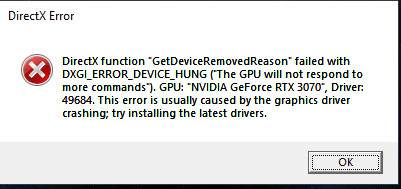
What we'll want to do now is gather DxDiags from players to pass along to the team. Please reply with it attached, image of the error, and let us know where you're getting that error (ex: launching the game, during a specific mode, etc.).
How to gather DxDiag information
https://help.ea.com/en-us/help/pc/how-to-gather-dxdiag-information/
Thank you for taking time out to help us.

 3 years ago