Forum Discussion


3 years ago
heyo @EA_Leeuw
I did a test to check that hypothesis yesterday and here is what i found after switching between AI matches and real ones:
AI matches work flawlessly, with and without discord/browser open actively playing viodeos or in a VC
PVP matches had a small difference in performance when using discord or the browser in the same capacity.
As per usual, high player density areas got a lot of rubber banding, whilst AI breakthrough (the fastest way to simulate the same player density) didnt have that issue at all.

Rokebo73
3 years agoSeasoned Ace
@LiveShavaaa Did ya check youre TN ?
Go to options , General , Network
See picture , enable the SHOW NETWORK PERFORMANCE BAR to ALWAYS>
Post a movie / screenshot during ingame !
Cheers
- 3 years ago
heyo mate, TN vid is already up earlyer in the thread. can get some new screens easily, posting some TN skyscrapers from normal pvp in a second
- 3 years ago
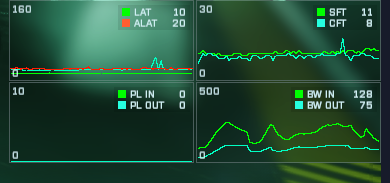
Versus bots; spike when joining and once shortly and slightly noticable during a big gunfight
- 3 years ago
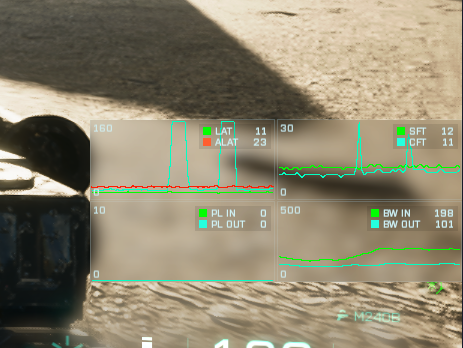
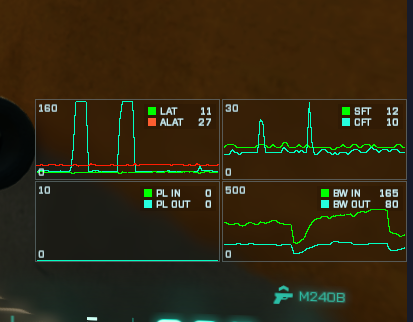
Here ya go, some samples from 10 minutes of playin pvp on flashpoint, one of the better lobbies tbh
- 3 years ago
and the other ones
- 3 years ago
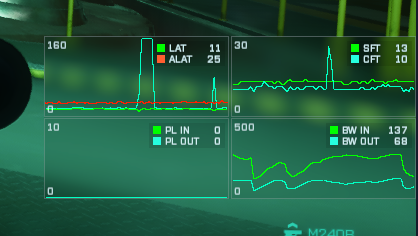
confirmed its on every enemy encounter/enemy vicinity
edit: added another one where it got really bad, enemy vicinity w.o visual
- 3 years ago
Is there any other way to see whats wrong to fix this issue? @EA_Leeuw
- Rokebo733 years agoSeasoned Ace@LiveShavaaa youre tn is spiking.
This is an issue at youre system with software and/or hardware !
Try a cleanboot and disable evrything.
Only keep services from gameplatform you did buy bf2042 at running
Cleanboot / Msconfig
reboot pc by a clean boot:
https://support.microsoft.com/en-us/topic/how-to-perform-a-clean-boot-in-windows-da2f9573-6eec-00ad-2f8a-a97a1807f3dd
Hide all Microsoft services, DISABLE (uncheck) ALL other processes, apps and services !
Cleanboot is just a one time clean boot ! Next reboot all will be reset and a normal boot will be occure.
Use msconfig to disable apps permanent each for new reboot.
- In the search box on the taskbar, type msconfig and select System Configuration from the results.
- On the Services tab of System Configuration, select Hide all Microsoft services, and then select Disable all.
- On the Startup tab of System Configuration, select Open Task Manager.
- Under Startup in Task Manager, for each startup item, select the item and then select Disable.
- Close Task Manager.
- On the Startup tab of System Configuration, select OK. When you restart the computer, it's in a clean boot environment.
update us after test game.
Cheers - 3 years ago
did the clean boot earlier on in the thread already to no result, can try again though. also DL an update for the game rq
- 3 years ago@Rokebo73 yeah no. game freezes and moves my character in one direction without my input, for some reason my graphics also are very janky and the TN spikes are still throwing waves like its some kind of festival
- Rokebo733 years agoSeasoned Ace
@LiveShavaaa could you post dxdiag please !
IN google (and other apps) there is an option to disable hardware acceleration, disable it , also in discord and all other programs ya got running.
Download revouninstaller , launch/run it as an admin.
In revouninstaller click in in top bar at TOOLS.
Then at the left side there is AUTO RUN MANAGER , click at it.
Now UNCHECK everything, only keep gaameplatform ya did buy NF2042 at checked.
Now reboot pc and test game, update us please !!! - 3 years ago@Rokebo73 is there anything in dxdiag that would contain personal information? not really used to this kinda stuff, so just to be safe.
- 3 years ago@Rokebo73 the EA app doesnt show up in the autorun manager
 EA_Leeuw3 years ago
Community Manager
@LiveShavaaa wrote:
@Rokebo73 is there anything in dxdiag that would contain personal information? not really used to this kinda stuff, so just to be safe.@LiveShavaaa, no. DxDiags don't contain any Personally identifiable information (PII).
- 3 years ago
alrighty! here is the dxdiag then
- Rokebo733 years agoSeasoned Ace
@LiveShavaaa hey !
I see errors with all youre adobe software ! Uninstall ALL
Also i see a lot of wave link sound redirections/routers !!!!!! Disable it
Did ya uncheck everything with revouninstaller ?
Cheersps i see 3 monmitors connected, boot windows only with 1 monitor also , and disconnect all hardware.
Only keep mouse / headset /keyboard and 1 monitor connected <<<-- test game
Also some system drivers are "outdated", they need to be updated !
SYSTEM DRIVERS AND CHIPSET UPDATE
Check the Youtube movie how to install , download and update ALL drivers.
https://youtu.be/6UpzenfVOAA
Open the web browser and enter url: https:\\www.drivereasy.com
Click at Driver Update Tool in the upper bar and select Download Free Version.
Click at the green button with the text DOWNLOAD DRIVER EASY NOW.
When tool is downloaded select the file and run.
Install Driver Easy Tool.Some drivers updates need to reboot your system, reboot system when needed,
continue using Driver Easy untill 'ALL' drivers are updated.
This free version allows only 1 download and 1 update at once - 3 years ago@Rokebo73 neat, thanks, most of the stuff, except the realtek driver is intel, so i'll do it via theirs, also because i cant find the ones mentioned in my device manager
- 3 years ago@Rokebo73 alright, the intel driver check said everything is up to date, whilst the driver easy want me to install drivers that arent even on my pc. im thoroughly confused now
- Rokebo733 years agoSeasoned Ace
@LiveShavaaa This means there are still drivers ya need to update.
Made a 2nd movie how to install drivers , downloaded with Driver Easy
https://youtu.be/G85JX8PTf00 - 3 years ago@Rokebo73 alrighty, thank ye
- 3 years ago
Small issue, i dont have the option to add drivers
- Rokebo733 years agoSeasoned Ace
@LiveShavaaaClick the INF file in the folder , as soon file explorer did open with youre driver files !
Cheers - 3 years ago@Rokebo73 alright, that has an install option, probs gonna need to restart a couple times, lets hope it boots after all these new drivers xD
- Rokebo733 years agoSeasoned Ace
Right click INF file and select INSTALL
Cheers
- 3 years ago@Rokebo73 all installed, doin a clean boot and trying again with single monitor +mnk
- 3 years ago@Rokebo73 alright, results are in, tn not as spikey anymore, same old boot twice to actually get in the game, but stutters and such still around
Featured Places