Solved
Why do I get Easy Anti Cheat Policy Violated - Player Removed From Game?
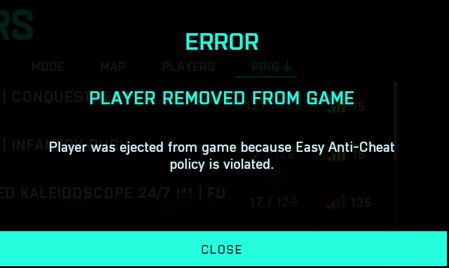

FYI i figured out how to fix it, verify your game files. i had 22 files fail to validate and redownload and now i dont have the issue.

This has become a huge issue for me, can't play and enjoy the game at all anymore due to constantly getting kicked from the game. What I have done:
- Repaired the game via Origin
- Repaired EAC
- Uninstalled and re-installed BF2042
- Set EAC to always run as administrator
- Set Origin to always run as administrator
- Set Origin to not boot with Windows
- I have tried to play the game without Logitech G-hub running
- I have tried playing the game without NVidia geforce experience (Overlay is not on)
What else can I do? How is this even an issue?
Product: Battlefield 2042
Platform:PC
Please specify your platform model. PC
AMD or Nvidia Model Number Nvidia 1070
Enter RAM memory size in GB 32 gb
Are you using any software with an overlay? No
Which part of the game is the issue happening in? Multiplayer
Which part of the mode? Conquest
Please select your region Europe
On which server did this happen? EU Servers
When did this happen? (dd.mm.yy hh:mm) 04.10.22.21:47
Summarize your bug I keep getting kicked out of the game due to easy anti cheat failing. This started after the patch that released on 22-09-20
How often does the bug occur? Every time (100%)
Steps: How can we find the bug ourselves? 1. Launch BF2042 via Origin 2. Start any multiplayer match (I was playing conquest 64) 3. Play the game. First error occurs within the 15 first minutes of playing, sometimes directly when the deploy screen is loaded. Results: Loading menu appears > player returns to main menu with error message stating that player was removed from game
What happens when the bug occurs? Loading menu appears > player returns to main menu with error message
What should be happening instead? Easy anti-cheat does not kick player out of match when not cheating.

same problem here for last 2 weeks

I know it didn't worked for everybody.
Bur, as i mentionned in this thread:
The solution for me was to uninstall the game (using CCleaner for clean uninstall) and re install it. Maybe (i have no idea i try to help) the uninstall part was not done properly by Origin when you did it and could try my way.
It solved the problem for me.
Hope it will help some of you 😉
PC game is broke



