Solved
Why do I get Easy Anti Cheat Policy Violated - Player Removed From Game?
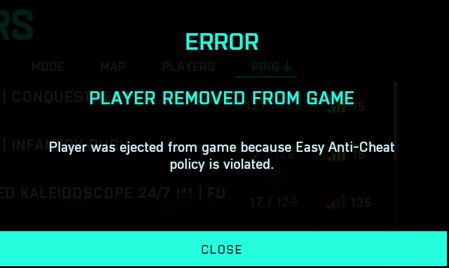

FYI i figured out how to fix it, verify your game files. i had 22 files fail to validate and redownload and now i dont have the issue.

Same here. Re-Installing the Easy Anti-Cheat does not help. So DICE and EA messed it up again. Maybe they enlarged the game host servers, but forgot to book additional Anti-Cheat Servers or it's just their way to limit access to the game today to save money for servers on first day of season 5.
Beside the Easy Anti-Cheat do not re-install anything - it's a host issue, not a client issue.

I know, so I'll just wait, as usual
Update: I did a local file verification in Steam and it showed three damaged files. After they were fixed no more issues with Anti-Cheat.
Now just the Battle Pass Progress is broken... Yeah - that is what I call a quality product....

@100pudOFF_UA If eac kicks ya, then there is software or any config that kicks eac.
Its not the game !
Repair / verify Game files in gameplatform
Didnt fix issues? then check below !
Rename the old EAC folder (location C:\Program Files (x86)) into something else or delete the complete folder !
also delete all content from EAC at C:\Users\YOUR_USER_NAME\AppData\Roaming
its a hidden folder, so make sure to enable view for hidden folders/files and drives !
Now to make sure there isnt any issue with some netwirk software/settings , do this:
Press Windows key + 'R' ,typ CMD, Press and hold down CTRL + SHIFT and press ENTER.
When User Account Control shows up, click Yes.
copy and paste the following commands by pressing enter at the end of each command line:
netsh winsock reset
netsh int ip reset
netsh advfirewall reset
netsh winhttp reset proxy
ipconfig /release
ipconfig /flushdns
Now Shut down the PC.
Unplug power cables from PC and modem/router for about 1 minute
Hold down the power button from computer for about 10 seconds..
Plugin power cable from the router/modem and wait till it's back online.
Plugin power cable from the PC.
Boot your system
If ya launch game platform / game or any other program, firewall could popup and ask you to grant acces again, CHOOSE PUBL:IC.
Now launch game and test it
Update us please !
PS if ya got a controller connected , please try game without any controller connected !
Just to check if EAC gets kicked by youre controller 😉 🙂
REMEMBER , BATTLEPASS ENDED, YA NEED TO BUY NEW BATTLEPASS OR EARN IT IN GAME !!!
@Rokebo73are you kidding me... i've been at this for over an hour. I've run into this issue with just about every season. Usually uninstalling EAC fixes this. Not this time. I was basically done... read this and was like what the hell... might as well disable my OG Microsoft Xbox 360 Wireless Receiver (which i still use for Kodi) and the it f-ennn worked? are you kidding me?I don't even turn the controller on when i play BF. WTFTake that back, it was just EAC letting me go while the rest of the system was still rebooting. It would have kicked me.
Windows 11 - So tried everything above and no luck. My sons Windows 10 is working just fine.
It just started after the update. Before that, the gamepad was connected all the time, and nothing new was installed on the PC from applications. So it can't be that something suddenly "breaks" in my PC. I'll check with the gamepad disabled, but I don't think it's the case



