4:3 Resolution Options Not Scaling FOV Properly
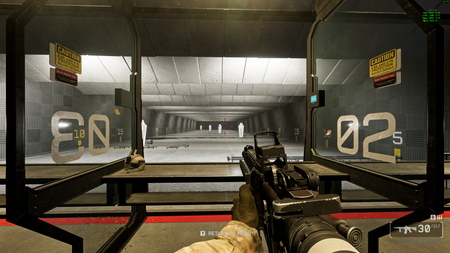

I usually play on 16:9, 2560x1440 but wanted to try 4:3 out, using 1920x1440. I noticed that when you change the resolution to the 4:3 option, the game asks "would you like to keep these settings", and the FOV is accurate only during this 15 second screen. Pressing "Yes", sets your FOV back to what you were using before. This doesn't change the actual FOV value, but it visually changes the FOV instead. Below are examples. Notice the small gaps I have on the sides to illustrate the FOV changes.
2560x1440 @ 105 FOV:
1920x1440 @ 105 FOV (notice how I can see less to my peripheral, as intended with 4:3 aspect ratio)
After hitting "Keep", still 1920x1440 @ 105 FOV (notice the gaps are back)
Anyone figure out what is causing this? I made sure my display scaling is set to Aspect Ratio, so it is stretching the game properly at less-than-max resolutions.
I tested this in an actual match, same results. Changing from 1920x1440 back to 2560x1440 also fails to apply the proper peripherals. The user interface is scaling properly which means the resolution is actually changing too. This seems to purely be a FOV issue.
1920x1440 @ 105 FOV:
2560x1440 @105 FOV before hitting Yes, Keep:
2560x1440 @ 105 FOV after hitting Keep: