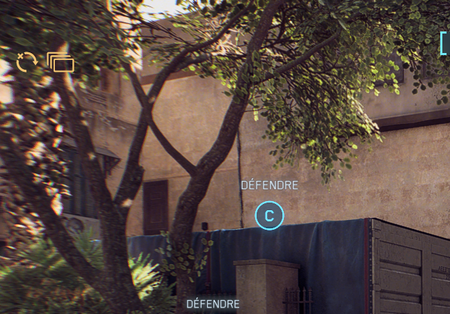
Hello, I cant play the game since I have almost permanent packet loss while playing as you can see on that picture : My computer is quite good with an amd ryzen 9 and a 4070 TI with 32 GO r...
This picture explains what the yellow icons in the top left corner of the screen mean.
The 3 rectangles mean the computer framerate is below 60fps.
You can verify this by pressing the tilde key ~ and type this command into BF6 command line console.
PerfOverlay.DrawFps 1
A framerate counter will appear in the top right corner of the screen. CPU fps is your actual framerate.
If the CPU framerate drops below 60fps the game will start network lagging.
Low framerate is usually caused by low CPU performance. If CPU performance is low, the CPU fps counter in the top right corner of the screen will turn red.
Click the link below for steps on troubleshooting low CPU performance.
Having issues with Battlefield 6? Join here to find help with connectivity, performance issues, crashes and more.Latest Activity: 9 minutes ago8,106 Posts