Forum Discussion

Anonymous's avatar
Anonymous
13 years ago
Solved

missing msvcp110.dll in battlefield 4 pc

I struggle to get this game to either download or install from disks. Finally when it completes the install I get the above error message. I uninstall and try to reinstall but after an age of trying to get it to install I keep getting the same error message - missing freaking dll file. EA what the F**K is going on ? I Need an answer, why did I buy this pile of junk if I cant get something I 've paid my hard earned for to bloody well work, its really poor.

Response required on [edit: email address removed]

  • Anonymous's avatar
    Anonymous
    13 years ago

    Just install x:\Battlefield 4\__Installer\vc\vc2012Update3\redist\vcredist_x64.exe and it will work again...

50 Replies

  • Anonymous's avatar
    Anonymous
    10 years ago

    Hey @Carbonic

    do you have an idea why this would happen all the time? 


    Cheers, 
    Val

  • Carbonic's avatar
    Carbonic
    Hero+
    10 years ago

    Well @EA_Valgard, one reason could be continuous hard drive errors causing file corruption effecting the areas of the hard drive where the VC++ runtime is located. I would do the following:

    Possible long term solution:

    Possible short term solution:

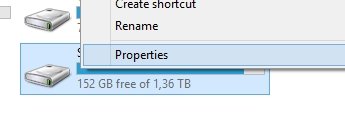
    1. Go to "This PC" in Windows and right click the hard drive and click "properties"
      Rightclick harddrive
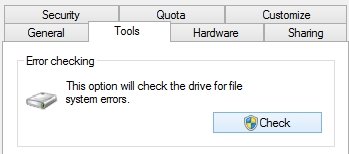
    2. Go to "Tools" and and press "Check"
      tools then scan drive
    3. Click "Scan Drive" and let it scan for errors.
    4. If it finds errors let the program fix them
      (If there are errors it could mean nothing, but it can also suggest that it might be time to format your computer and/or replace the hard drive)
    5. Reboot your computer
    6. Run the scan again
    7. Keep repeating step 3-5 until no errors are found
    8. Reinstall VC yet again
  • Found the problem. It was Origin. I reinstalled it and everything worked.

  • Anonymous's avatar
    Anonymous
    8 years ago

    I faced the same MSVCR110.dll is Missing error. Installing MSVCR110 FILE didnt help me. I had to fresh Installation. If the above replies didnt help anyone facing it rightnow then walk through these steps.

    1. Reinstall The Program that you installed before this issue occired.
    2. Download & Install The MSVCR110 FILE.
    3. Update The Antivirus.
    4. Clean Registery - I used Ccleaner.
    5. Fresh Installation

  • Anonymous's avatar
    Anonymous
    8 years ago
    still no work
  • Anonymous's avatar
    Anonymous
    8 years ago

     I was getting an error message on startup that says 'The program can't start becauseMSVCP100.dll is missing from your computer.Try reinstalling the program to fix this problem. i have found the solution of this at below links hope this will help 

    https://answers.microsoft.com/en-us/windows/forum/windows_other-performance/msvcp100dll-missing/9a687c31-0619-4ee9-b511-020985e29b5f

    http://www.tomshardware.com/answers/id-3426011/msvcp100-dll-missing.html

    https://techboxs.org/

  • I recently tried installing BF4 using the EA Desktop beta app and got "missing msvcp120.dll".

    The default folder path for installation was "C:/Program Files/EA Games/Battlefield 4".

    I uninstalled and tried again, but changed the path to "C:/Program files (x86)/EA Games/Battlefield 4" and everything worked as expected.

  • EA_Atic's avatar
    EA_Atic
    Icon for DICE Team rankDICE Team
    5 years ago
    I'm closing this thread to stop it from being necroed.

    If you have any issues with Battlefield, please make a new topic about your problems and what kind of steps you have tried to solve them.

    /Atic