Solved
Forum Discussion


7 years ago
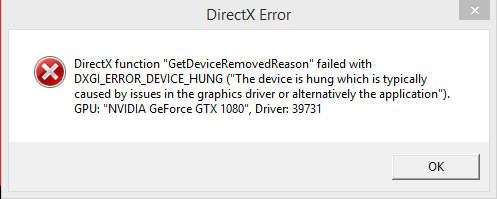
Alright here it is.
Also the Nvidia update did not fix the crash.

EA_Blueberry Community Admin
7 years agoCommunity AdminHey @mwc12000 I see that you're on Windows 8.1. Do you have these installed? (Others had a similar issue in Apex regarding errors and this solution fixed it. I've seen others have success rolling back their GPU driver too on Windows 8.1)
https://answers.ea.com/t5/Technical-Issues/fix-r5apex-exe-win-8-1/m-p/7435727#M4449
- 7 years ago
Thank you for the reply. Both of those windows updates were already installed. During January of 2018 I did switch my graphics card from a 970 to a 1080. I don't remember if I played any BF4 between Jan 2018 and when it started crashing in April 2018, but I did test BF1 and I don't remember it crashing mid game, I still doubt that's the problem as Star Wars Battlefront 2 runs fine and I have had no crashes any of my other games (including Apex Legends). The only two games plagued with this crash are Battlefield 4 and Battlefield 1. My copy of BF1 had always crashed with a virtual memory error (I made a post about it a while back https://answers.ea.com/t5/Technical-Issues/DirectX-Error-Virtual-Memory-PC/td-p/5861910) however it would only crash on loading screens up until i started getting these device hung errors in BF4 which now both games crash mid game.
- EA_Blueberry7 years ago
Are you able to play the game in an older OS by running it in compatibility mode?
Featured Places