Forum Discussion

KabobTheGreat's avatar
KabobTheGreat
Seasoned Rookie
10 months ago
Solved

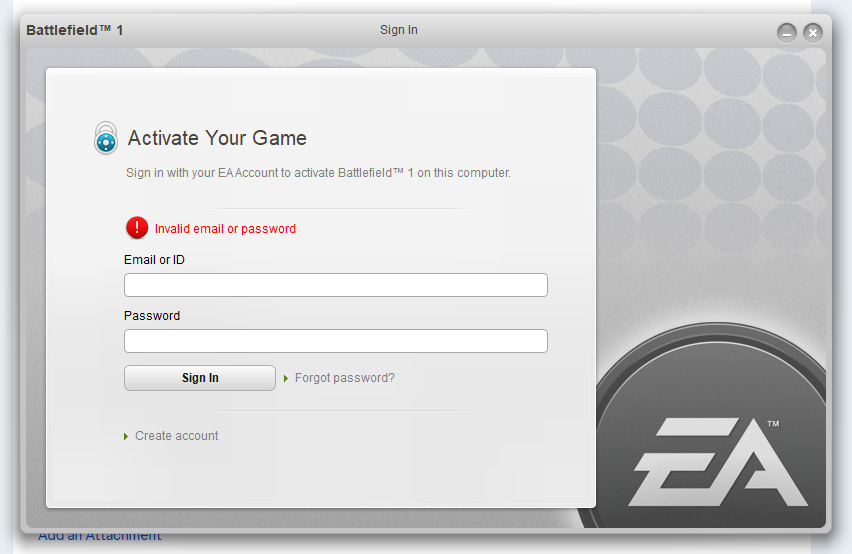
sign in with your ea account to activate battlefield 1 on this computer

Launching battlefield 1 the second time gets me this window, where I enter my email and password (and I'm 100% sure these are correct - double-checked by logging out and in on ea.com with the same account I have on the EA app), but as a result it somehow says "Invalid email or password" and doesn't let me in.

I have played BF1 a lot before and have never even seen any windows asking to log in AFTER you launch the game from Origin and the now existing EA App.

Nobody seems to have a solution on EA Forums or online, but similar discussions have led me to try:

  1. Creating a "Origin Games" folder under C:\Program Files (x86)
  2. Deleting the cache of the EA App
  3. Deleting the folder "EA App" under C:\ProgramData

The only thing that helped is uninstalling the EA App and BF1 and reinstalling again, but it helped for only 1 game launch. The 2nd launch gets me to this screen, which doesn't accept my email+password.

  • I may have found a solution while having the same issue with Battlefield Hardline.

    I think apparently the old "ActivationUI.exe" does not like to deal with symbols in the password OR with a long password, so I've changed it to be a password with only 10 characters and consisting only of numbers and letters (NO CHARACTERS LIKE *!,.': etc, just numbers and letters) - and bam! It worked!

    I will try it on BF1 later when I re-install it.

17 Replies

  • FaulesMurmeltier's avatar
    FaulesMurmeltier
    Seasoned Newcomer
    10 months ago

    Yeah now I remember too. Aragathor 

    I updated my Bios and changed my cpu. After that I reinstalled Windows. Unfortunately I can't remember if I have played Battlefield 1 after the Bios Update. Which motherboard do you have? Mine is a Gigabyte lga 1700 b760 gaming X.

  • I'm in the same boat. My issues started after a BIOS update. Which should not have affected anything, but here I am.

    I'm not optimistic about the solution.


  • I just want to say that I have the same Problem. You are not alone :0

    But unfortunately I can't help you. I hope someone finds a good solution to this. Interestingly this happend after I reinstalled Windows in my Computer. Maybe it is somehow connected to that.

    And thank you for the temporary fix. This works for me too.

  • Ok I have found a temporary solution:

    1. Go to C:\ProgramData\Electronic Arts\EA Services\License
    2. Delete any files with 
    3. Repair the game
    4. Launch the game

    This consistently works for one (1!) game launch, but after that I have to repeat the process.

  • Ok a little update here:
    If I instead of my email input my EA account username and the same password, I instead am getting into the next step that says:
    "We're sorry, an error has occurred. We are unable to connect to EA servers to activate Battlefield 1 on this computer using your account. Please try again later."