Forum Discussion

KabobTheGreat's avatar
KabobTheGreat
Seasoned Rookie
10 months ago
Solved

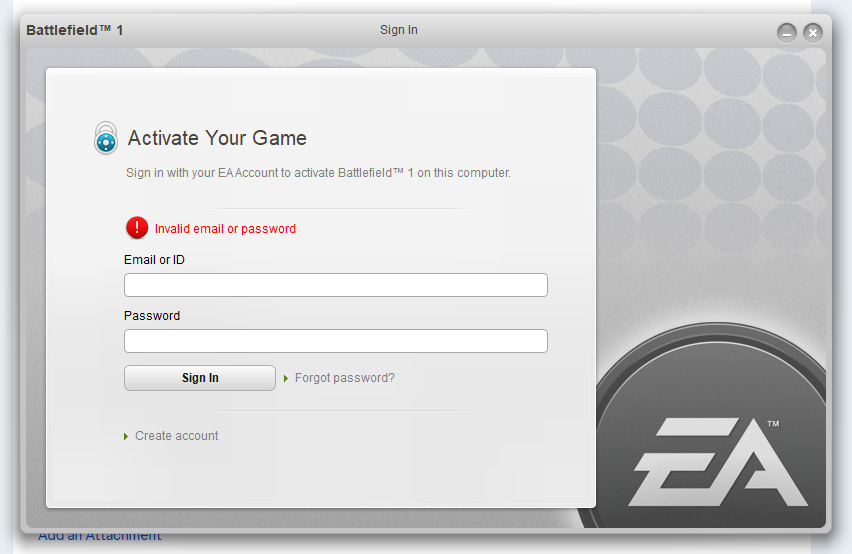
sign in with your ea account to activate battlefield 1 on this computer

Launching battlefield 1 the second time gets me this window, where I enter my email and password (and I'm 100% sure these are correct - double-checked by logging out and in on ea.com with the same account I have on the EA app), but as a result it somehow says "Invalid email or password" and doesn't let me in.

I have played BF1 a lot before and have never even seen any windows asking to log in AFTER you launch the game from Origin and the now existing EA App.

Nobody seems to have a solution on EA Forums or online, but similar discussions have led me to try:

  1. Creating a "Origin Games" folder under C:\Program Files (x86)
  2. Deleting the cache of the EA App
  3. Deleting the folder "EA App" under C:\ProgramData

The only thing that helped is uninstalling the EA App and BF1 and reinstalling again, but it helped for only 1 game launch. The 2nd launch gets me to this screen, which doesn't accept my email+password.

  • I may have found a solution while having the same issue with Battlefield Hardline.

    I think apparently the old "ActivationUI.exe" does not like to deal with symbols in the password OR with a long password, so I've changed it to be a password with only 10 characters and consisting only of numbers and letters (NO CHARACTERS LIKE *!,.': etc, just numbers and letters) - and bam! It worked!

    I will try it on BF1 later when I re-install it.

17 Replies

  • KabobTheGreat's avatar
    KabobTheGreat
    Seasoned Rookie
    10 months ago

    By default, unless you are using antiviruses like Kaspersky or NOD32 or Malwarebytes, you don't have any HIPS on your windows 10-11 machine, which does not make sense to me since I still face the issue. The only thing I might try is to add the whole battlefield 1 folder into exclusions list of windows security (the default anitvirus software on Windows 11).

    I will try and reply here with resuls.
    UPD: It didnt work :( 

  • I may have found a solution while having the same issue with Battlefield Hardline.

    I think apparently the old "ActivationUI.exe" does not like to deal with symbols in the password OR with a long password, so I've changed it to be a password with only 10 characters and consisting only of numbers and letters (NO CHARACTERS LIKE *!,.': etc, just numbers and letters) - and bam! It worked!

    I will try it on BF1 later when I re-install it.

  • yoyo980op's avatar
    yoyo980op
    Rising Newcomer
    5 months ago

    brother this sounds like a solid fix, do you have a tutorial on how to add it to the acceptance list?

  • SiddD3rs's avatar
    SiddD3rs
    Seasoned Newcomer
    1 month ago

    Can't believe EA doesn't like special characters after a graphics card change and an EA App update... WTF!!
    But KabobTheGreat​ , changing the password to one with letters and numbers only worked a treat!! Thank you man - you're a legend!

  • StealthWalker-A1's avatar
    StealthWalker-A1
    New Novice
    13 days ago

    I eventually got all my games to work. You need to change your password to something simple. No special characters. Just words and numbers. Then you need to repair all the games involved. Once this is complete launch. Enter in your email and password and the games work.

    It work for me for 

    Battlefield 4

    Battlefield 1

    Battlefield V


    EA needs to address this issue. From what I can gather they are running the new authentication system over the old one and it's causing problems. Your old password would work for years then all of a sudden it tries to validate and you have an issue.