EA_David Community Admin
Community AdminCommunity AdminIf you go to your My Documents then open up the BFV > Settings folder, how many files can you see?
Can you try renaming PROFSAVE_tmp to PROFSAVE and see if that has any effect?
Thank you.
I only had the battlefield 5 open beta folder :O I deleted it and i'll see if it creates new one

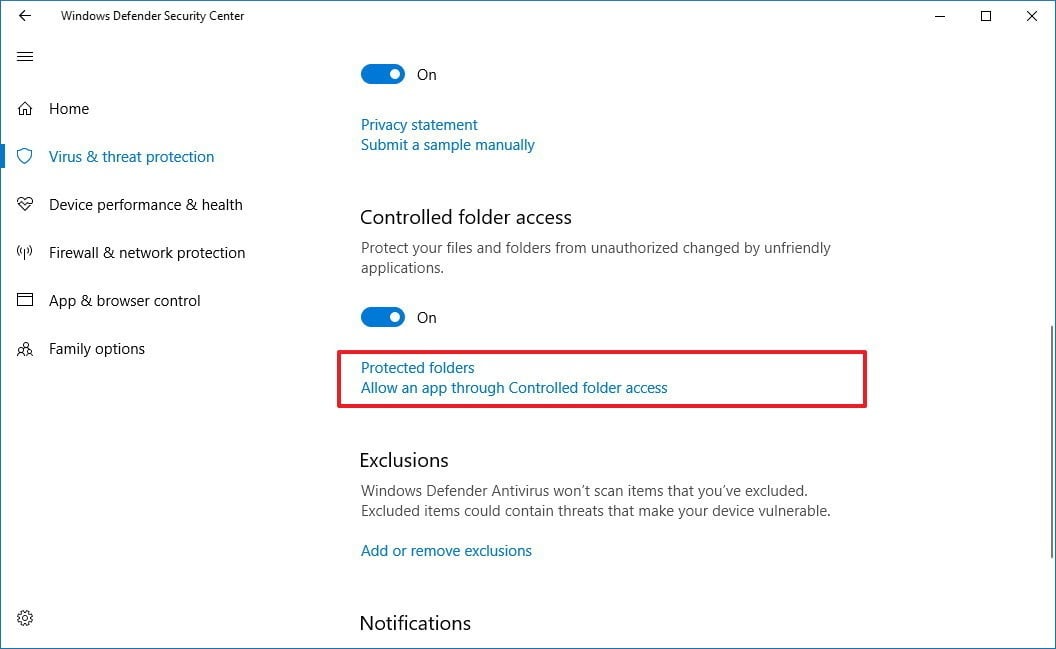
Battlefield V saves the settings in the Documents\BattlefieldV folder. Antivirus, security programs or user settings can all block the access for BFV to create or edit these files. The most typical one is the Windows 10 setting --> "Controlled folder access":
You want it to be off or allow Origin and BFV through.
i done this and still have an issue is bloody frustrating
@Kayraaaaaaaaaa wrote:
I added origin in protected folders and my settings saved.But Im watching prolouge again ...........................
You will want to add bfv.exe and bfvtrial.exe in the Battlefield V installation location as well.
Carbonic omg thank you so much! It worked, i added full control for those .exe's and i finally got the game launched properly, without the freakin' prologue. FINALLYYYY THANKS CAPTAIN!
@mikikulesza wrote:
Carbonic omg thank you so much! It worked, i added full control for those .exe's and i finally got the game launched properly, without the freakin' prologue. FINALLYYYY THANKS CAPTAIN!
Glad to hear it worked out 🙂
Also, for the rest of you, OneDrive is known to interfere with files in the documents folder, so you might want to try to make a second local Windows account as a troubleshooting step.
*UPDATE* 8/10*
Adding this info:
This could happen to players that upload all their data to the Microsoft OneDrive and then delete everything in the local document folder. Windows would replace the local document folder with a shortcut to the OneDrive document.
EDIT: This is a workaround, it treats the symptom but not the cause of the error. I suggest trying the other things I proposed as solutions in the thread first.
Oh, I almost forgot, in the beta there was also reported the following workaround:
Once you go exit the game after having set your settings, try going to:
Documents\Battlefield V\settings
and if it's there delete the:
"_tmp" part
of the
"PROFSAVE_tmp" file.
This might also do it.
If this is your issue then this would have to be repeated every time you change settings.

thank a lot that worked for me too you the real mvp :D
@Oweor wrote:
thank a lot that worked for me too you the real mvp :D
Glad it worked out 🙂 Which one worked for you?
My friend had same issue I can confirm that is is a solution. To solve this you need to delete few symbols from file's name (watch screen). And yes, check if Windows allows to rewrite files in that folder.
@Kauzer_RF wrote:
My friend had same issue I can confirm that is is a solution. To solve this you need to delete few symbols from file's name (watch screen). And yes, check if Windows allows to rewrite files in that folder.
Yes, I mentioned that one above as well, just be aware that I believe that solution to treat a symptom but not fix the cause of the issue.
Something is basically blocking the game for handling the files properly and this solution is manually doing what the game wasn't allowed to do.
Same problem here - protected files are not used and Documents folder isn't within OneDrive (and not protected at all) as I use folder redirection (with thanks to Windows Server Essentials).
I had to delete Battlefield V folder within Documents and play the prologue mission to avoid to play it again and again each time I start the game. It was the only solution for me after several Investigation but it didn't solve that PROFSAVE file isn't updated - all files within settings folder are updated except PROFSAVE.
The current workaround for me is to copy and rename PROFSAVE_tmp to avoid that I have to reenter the Arsenal to mark "new" weapons as seen.
I hope DICE will provide a fix as this issue was already reported during beta and for BF 1 in the past. Fortunately, I don't have this issue with BF1 on the same computer, so finally there is a chance to get a solution.

I tried it and still problem persists, tried all from this topic and still got prologue again and again...

Also i have the same problem cause i play from a microsoft online account on my PC but when i switch to local user account no problems what so ever
@FriedChurchs wrote:
finally,i know how to fix it. Turn off one drive, and Restore your Document path
You had moved the documents folder to another drive?
You used the "restore default" function?
If you use one drive before, it might not work, it might show Folder redirection failed. So, the better way is
windows+R
regedit
find
HKEY_CURRENT_USER\Software\Microsoft\Windows\CurrentVersion\Explorer\Shell Folders
and
HKEY_CURRENT_USER\Software\Microsoft\Windows\CurrentVersion\Explorer\User Shell Folders
personal is Document
right click change path to the right one. (you can use restore to default to find the right path)
restart your PC
important notice: you need to back up all Documents before you change the path in regedit. because after use regedit it will automaticly delete your documents in onedrive
Yeah EA needs to fix it. And there have other games also have the same problem with one driven, but they fix it already. also about your problem, I think its Permission got limited, you can try close antivirus software or right click ,property ,securit. Then see how many groups have Permissions to archive. Regularly, it should have three groups that have Permissions to archive(system, your username . admin) . if one of them miss, you need to click advanced , and Add to groups. after that you need to edit all groups to allow them to have full Permissions. then it might help some.
I've tried everything without any luck. My PROFSAVE file gets updated but prologue is still playing and can't find the "_temp" some mention.
Oh, I almost forgot, in the beta there was also reported the following workaround:
Once you go exit the game after having set your settings, try going to:
Documents\Battlefield V\settings
and if it's there delete the:
"_tmp" part
of the
"PROFSAVE_tmp" file.
This might also do it.
If this is your issue then this would have to be repeated every time you change settings.
That works for me. But my gear is always shown as new gear after every BF start.
Im having the same issues as everyone else here.
I have tried all the "solutions" here without any luck and this is really getting a bit frustrating now.
Bought the premium version and it cost me a lot of money.
Frustrating to have to play through the intro game every time you start the game. ☹️