Dragon Age Inquisition Unable To Load Saved Data Error
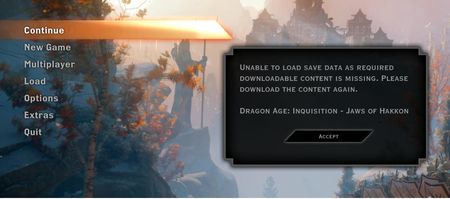


Oh, and I tried at the Dragon Age forums... there's no support forum. No bug forum. Just a generic message board.
https://forums.ea.com/discussions/dragon-age-franchise-discussion-en/cant-play-because-no-jaws-of-hakkon-/4984828
Uninstalled. I have no desire to play the game anymore because EA does not think of me as a valued customer. I'm done.

JonahFalcon wrote:
EA "Support" non-existent and liars
This is an oxymoron.
It can be one or the other, but not both. 😛
The "Dragon Age forums" you talk about is brand new, as in a few days old and provide technical support only for "Dragon Age the Veilguard".
Both forums, AHQ and this new Forum are moderated Player help Player forums.
The Bug forum for DAi is long closed, the game is 10 years old and is not getting Patches any longer.
For EA support itself, it is very hard for them to correct a problem that is probably on your machine.
If you still interested in fixing this, just reinstalling the game will probably do that. 😉
I tried that. Didn't work. All it did was reduce my play hours from 286 hours to 1 minute.
"For EA support itself, it is very hard for them to correct a problem that is probably on your machine."
On my machine? It ran fine then when I came back to it, it didn't. Same hardware. Same source.
I don't see how it could claim I didn't have the DLC when I clearly did, and not only did I, but it was the EA Play version which comes with all the DLC.

 Community Manager
@JonahFalcon Hey, i took a look at your account to make sure there were no changes and I see nothing that would reflect an issue. Typically with this error, something locally changed or became corrupted.
In most cases, it's a profile file, or something happened with the DLC folder. So, with that being said I need to know the following:
Fully uninstalled the game:
Has another EA account logged into your PC:
Do you have more than one drive on your PC:
Do you have the EA app, game, and DLC installed in the default location:
Delete ALL DLC folders from C:\Program Files\Dragon Age Inquisition\__Installer\DLC - OR current location in your PC
Delete DAI Profile File:
Delete all temp Windows files:
Performed a reg clean-up:





