Forum Discussion
4 Replies
 KLWhit1 year agoNot applicable
@holger1405 wrote:Is "Reason code = Missing DLL [MSVCP110.dll]" the exact error massage you receive?
Thanks for the question. It was, yes... The full error message was:
Invalid License: Reason Code = Missing DLL: [MSVCP110.dll] Error: 0x7F
But I have done some further troubleshooting since then based on other threads I found on here.
I found these files in the Dragon Age Inquisition \ Core directory and then copied them into the base Dragon Age Inquisition directory where the .exe file is.
msvcp100.dll
msvcp110.dll
msvcr100.dll
msvcr110.dll
That did nothing. Same error.
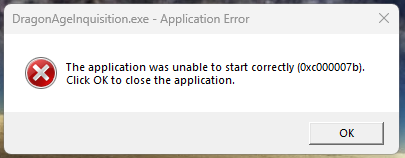
Then I copied the same 4 dll files into the Windows \ System32 folder. Restarted the computer and tried to launch the game. Different behavior this time. I get this error:
The application was unable to start correctly (0xc000007b).
Click OK to close the application.
But still not able to launch the game.
 holger14051 year agoHero+
- Go here: https://www.microsoft.com/en-us/download/details.aspx?id=30679
- Download the "VSU_4\vcredist_x64.exe" and the "VSU_4\vcredist_x86.exe"
- Run the "VSU_4\vcredist_x64.exe" as Administrator (Right klick the EXE > Run as Administrator.)
- Restart the PC.
- Run the "VSU_4\vcredist_x86.exe" as Administrator (Right klick the EXE > Run as Administrator.)
- Restart the PC.
- Test
- KLWhit1 year agoNot applicable
Thanks again for the detailed steps, but no luck.
Here are the troubleshooting steps I took.
- Downloaded vcRedist_x64.exe and vcRedist_x86.exe from the site you linked.
- Ran vcRedist_x64 as administrator. Gave me options to repair or uninstall. I clicked repair and let that process complete.
- Restarted.
- Ran vcRedist_x86 as administrator. Gave me options to repair or uninstall. I clicked repair and let that process complete.
- Restarted.
Tested. Same error as last time: The application was unable to start correctly (0xc000007b).
- Then did the same steps but clicked uninstall for both. Restarted in between each update.
- Ran vcRedist_x64 as administrator.
- Installed the package.
- Restarted.
- Ran vcRedist_x86 as administrator. Gave me options to repair or uninstall (I guess since I installed the x64 version?) I cancelled out of this.
Tested. Same issue.
- Ran vcRedist_x86 as administrator. Gave me options to repair or uninstall. I clicked repair and let that process complete.
- Restarted.
Tested. Same issue.
☹️
- holger14051 year agoHero+
Featured Places