Forum Discussion

20 Replies
- @Bluebellflora It hasn't dissapeared, the app just refuses to start. I keep getting an error code and I talked to an EA rep and they told me to simply wait until they fix it...
- @SKIDDODLES
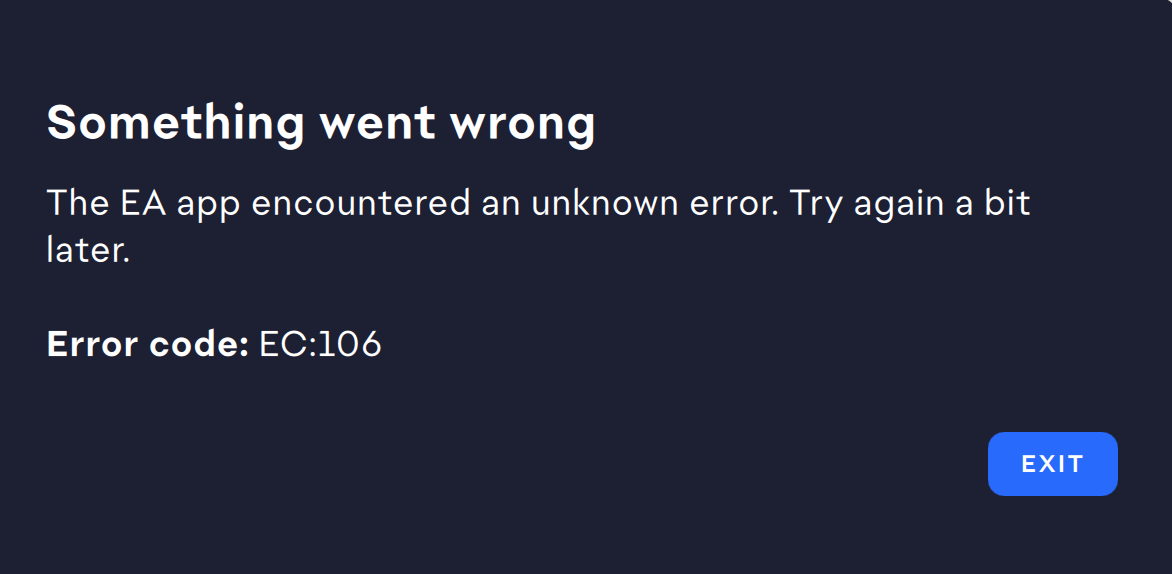
What is the error message? Can you post a screenshot please. Plenty of Mac users are managing to use the App so it seems unfair customer support would tell you just to wait.... Sure! I'll send it over. But yeah that's what costumer support told me to do. Just...wait. lol
- @SKIDDODLES
☹️ Could you follow these instructions to reset EA App https://bluebellflora.com/2024/04/04/ea-app-recovery-for-mac-reset-ea-app-by-clearing-cache-and-other-files-manually/ when you relaunch the app make sure you allow the changes and access that macOS prompts for. Let me know how you get on..... @BluebellfloraJust went through my mac's library folder and deleted all the folders in that article's list and I tried opening the app and...same thing keeps happening, the same image pops up I sent previously.
- @SKIDDODLES
Urgh. Thanks for trying. Do you have any antivirus running that may be interfering and blocking it launching? Either on your Mac or anything installed at router level on your network. Could you try a different WiFi network to see if it’s a connection issue?
(OS dependant) I don’t think this is the cause but if you go into System Settings > Privacy and Security > Full Disk Access is EA App in the list and is the toggle enabled? If not enable it.
Which version of macOS are you running? I just added EA to the Full disk access and toggled it on. Didn't change anything haha. And I am using the latest MacOS Sonoma 14.4.1, it's updated. I'm telling you haha I think I'll just have to wait at this point ☹️
Can you tell me how to fix this issue?
@Bluebellflora wrote:
@SKIDDODLES
If your user data (content in the Documents > Electronic Arts > The Sims 4 folder) disappears it is nothing to do with EA App or Origin. It often happens after a game update too. Please check your iCloud settings. hildaols1 year agoNew Novice
EC 106
- @Bluebellflora omg this seems to be working for me. I’m able to open the ea app and my sims game is downloading finally after over a week of not being able to figure out how to fix it!!!
🙂 What worked for you?
When does the error occur (opening the app, logging into the app, or launching a game): Opening the app, my iMac wants me to enter admin password, because EA App wants to make changes, I allow it and the App Crashes with Error 106.
Your Mac model name: Macbook Air 13', 2020
What version of macOS are you using: Sonoma 14.5
Timestamp when the issue first occurred (date/time): 17 May 2024
What is the current version of your EA app: App won't open, but downloaded it the last time on 22. May 2024
Tried to generate a ticket to report it, but got an error as well >.<
 billyella1 year agoSeasoned Novice
can you tell us what you did to make it work??
CIAO!!
Non so se può aiutare qualcuno, per un mese non sono riuscito ad aprire l'app EA a causa di questo errore (EC 106), oggi ho seguito i passaggi di questa conversazione, aggiungendo l'accesso completo al disco all'app EA , poi ho disinstallato e reinstallato l'app dal sito ufficiale (dopo aver effettuato l'accesso) e ora funziona.
Ho un MacBook Pro del 2016 e MacOs Monterey 12.7.5 (l'ultimo disponibile per questo computer in questo momento). Forse è stata solo fortuna, ma spero che possa aiutare qualcuno (mi scuso per il mio inglese, non è la mia prima lingua).Bonjour, j'ai déjà donné l'accès complet au disque dur, mais cela n'a rien changé...Toujours "L'application a planté de manière inattendue et ensuite erreur EC:106" ! pfff. Cela dure depuis 3 mois. Je désespère !!!
what do i do if it disappeared??
Has anyone found a solution or workaround on this? I'm experiencing the same issue with requesting username and password, but even though I'm 100% sure it's accurate, it's saying it's not. Also, interestingly enough, when I download the EA app, it shows as an eject able disk, even though I've moved it to my applications. So frustrated. EA support was not at all helpful.
 kappesante1 year agoSeasoned Newcomer
months and months, ec 106 everyday.
you really want me to pirate the games i've bought,
- kappesante1 year agoSeasoned Newcomer@kappesante Last login: Fri Oct 25 17:00:42 on ttys001
user@computer ~ % /path/to_app/EA\ app.app/Contents/MacOS/EADesktop ; exit;
QNetworkDiskCache:😛repare() unable to open temporary file
WARNING: All log messages before absl::InitializeLog() is called are written to STDERR
E0000 00:00:1729868453.163020 989601 log.cc:145] This function is deprecated. This function will be deleted in the next gRPC release. You may create a new absl LogSink with similar functionality. gRFC: https://github.com/grpc/proposal/pull/425
E0000 00:00:1729868453.163056 989601 log.cc:102] This will not be set. Please set this via absl log level settings.
objc[34977]: Class WebSwapCGLLayer is implemented in both /System/Library/Frameworks/WebKit.framework/Versions/A/Frameworks/WebCore.framework/Versions/A/Frameworks/libANGLE-shared.dylib (0x284375ce8) and /path/to_app/EA app.app/Contents/Frameworks/Chromium Embedded Framework.framework/Libraries/libGLESv2.dylib (0x10a65fb30). One of the two will be used. Which one is undefined.
2024-10-25 17:00:57.165 EADesktop[34972:989601] +[IMKClient subclass]: chose IMKClient_Legacy
2024-10-25 17:00:57.165 EADesktop[34972:989601] +[IMKInputSession subclass]: chose IMKInputSession_Legacy
2024-10-25 17:00:57.887 EADesktop[34972:989906] VERBOSE>EnvironmentService>Set environment identifier to (PROD) from source(4), overriding (UNKNOWN) from source(0).
2024-10-25 17:00:57.887 EADesktop[34972:989906] DEBUG>PlatformUserUpdateServiceImpl>detectPlatformUserList()
2024-10-25 17:00:57.887 EADesktop[34972:989906] VERBOSE>EnvironmentService>No configuration file at path /path/to_app/EA app.app/Contents/MacOS/eadpsdk.json
2024-10-25 17:00:57.887 EADesktop[34972:989906] VERBOSE>EnvironmentService>No configuration file at alternative path /path/to_app/EA app.app/Contents/MacOS/../Resources/eadpsdk.json
2024-10-25 17:00:57.887 EADesktop[34972:989906] WARN>EnvironmentService>Cannot find the configuration file.
2024-10-25 17:00:57.887 EADesktop[34972:989906] INFO>EadpFoundation>module version=1.28.0
2024-10-25 17:00:57.887 EADesktop[34972:989906] VERBOSE>EnvironmentService>Cannot find configuration value for key 'environmentIdentifier', fall back to platform value.
2024-10-25 17:00:57.887 EADesktop[34972:989906] VERBOSE>EnvironmentService>Cannot find configuration value for key 'devicePlatform'.
2024-10-25 17:01:57.029 EADesktop[34972:989906] ERROR>DirtySDKConnectDetectionJob>Timeout, DirtySDK is not at online, offline or trying to connect at the time of job timeout.
E0000 00:00:1729868621.020690 989601 log.cc:145] This function is deprecated. This function will be deleted in the next gRPC release. You may create a new absl LogSink with similar functionality. gRFC: https://github.com/grpc/proposal/pull/425
Saving session...
...copying shared history...
...saving history...truncating history files...
...completed.
let us use origin again, meanwhile i'll go pirate my own library now because i cannot play games since may.
good job. Hi, this is happening with my game too for the past few days, did you get a solution for this?


Featured Places