Forum Discussion

soynyaa's avatar
soynyaa
Seasoned Newcomer
1 year ago
Solved

Unable to Install The Sims 4 After Account Recovery

Hello,

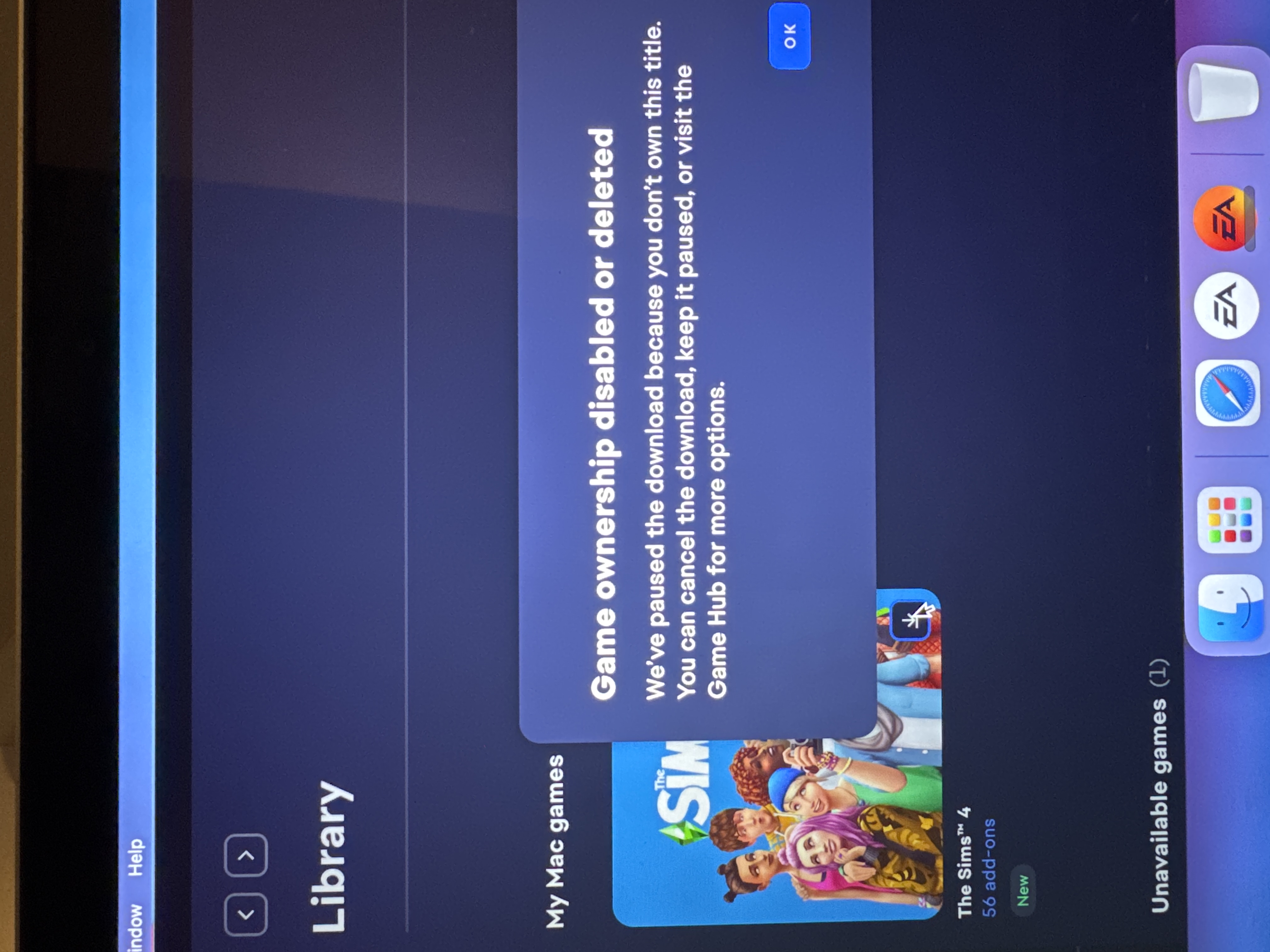
A few days ago, my account was hacked, and I lost all my games. My library was completely empty. Thankfully, with the help of customer support, my games were restored. However, every time I try to install The Sims 4, I receive an error message. This issue doesn’t make sense because The Sims 4 base game is free.

Troubleshooting steps I have already tried:
  • Installing the game from another account on the same PC – it works correctly.
  • Installing the game on my account on another PC – it does not work.
  • Clearing the cache.
  • Uninstalling the EA App and running it as an administrator.
  • Performing a clean boot of Windows.

Support has not provided me with any additional solutions, and I have over 3,000 hours in this game. I really don’t want to lose access to it because of a hack. Please help me resolve this issue.

I have attached an image of the error message for reference.

  • Hi there,

    Please first clear the cache on the EA app with the steps here.

    If you're still seeing this error, you'll want to get in contact with live support so they can review your account details a bit further and see what's causing this for you. You can submit a help request by following these steps.

76 Replies

  • Ebonymills1's avatar
    Ebonymills1
    New Novice
    1 year ago

    Hi thank you, i did do a live chat and they told me to post on here and that i’d get assistance from their game team as they were unable to do anything :( 

  • ElliotLH's avatar
    ElliotLH
    Hero+
    1 year ago

    Hi Ebonymills1

    If you're signed into your usual account and you're getting this message, it's probably worthwhile opening a case or having a live chat over at help.ea.com. They should be able to investigate this for you.

  • when trying to update my sims 4 game it gives me the notification saying “game ownership disabled or deleted” even though i was playing the day before.

  •  I own The Sims 4 on EA PLAY, also 99 addons to it, while starting the game from desktop message "Game ownership disabled or deleted" appears. I've already tried everything: clearing my app cache, and every possible step in provided help article and NOTHING WORKS.

    Every add-on and also the game was purchased via EA Play.

    I can't download or even repair the game. 

    The only "fix" that works for me is logging on another EA account, repair the base game and then logginb back to my main account (that I have all DLC's). It's frustrating because I bought the game in 2014 on release date and now it seems that I don't have the base game on my library.

    Please, help me.

  • So I've been an avid Sims 2-4 player, but lately I've been having some problems with my game.

    A few months ago it was acting up, the only (apparently temp) solution was to install it from Steam and launch there. Fine, it worked for a few months then last Friday I had this problem again.

    For context, it'll give me this or say "Game ownership error" I've contacted EA multiple times, NOTHING. I have 92 addons, so you can see why this would be frustrating. I've uninstalled and reinstalled. Please help a fellow simmer out!


  • EA_Solaire's avatar
    EA_Solaire
    Icon for Community Manager rankCommunity Manager
    1 year ago

    Hi there,

    Please first clear the cache on the EA app with the steps here.

    If you're still seeing this error, you'll want to get in contact with live support so they can review your account details a bit further and see what's causing this for you. You can submit a help request by following these steps.

Featured Places

Node avatar for EA app Technical Issues & Bugs

EA app Technical Issues & Bugs

Having issues with the EA app? Join us to report bugs, and find help with downloads, DLCs, purchases, and login errors.Latest Activity: 6 months ago
8,716 Posts