Forum Discussion

alyysherif's avatar
alyysherif
Newcomer
5 months ago
Solved

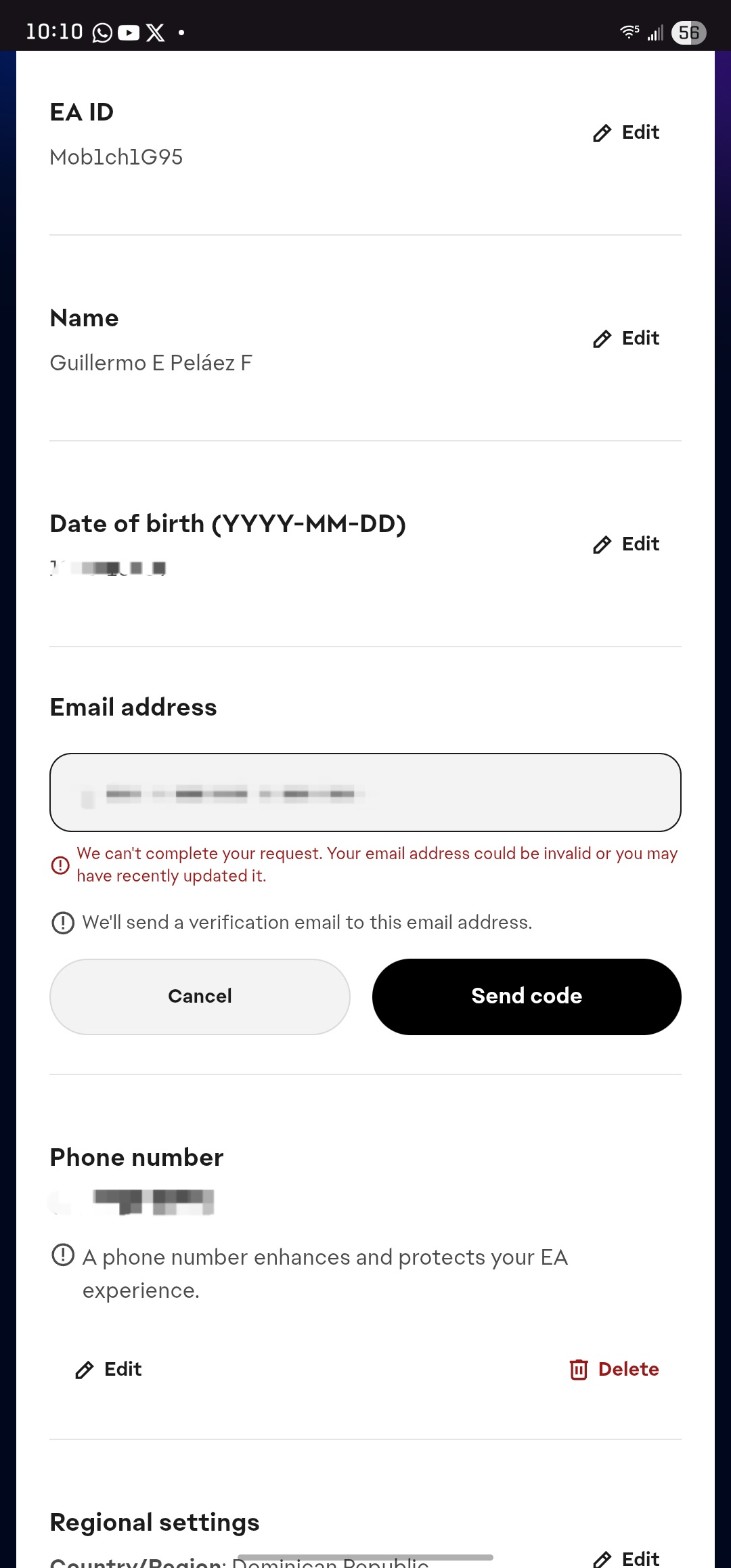
Can't change my email

I want to change the email account 

  • Hi alyysherif​

    Thank you for sharing that screenshot. I see the error message you're running into. This can appear for a few reasons: 

    • Recently Updated Email: You can only update your EA Accounts email every 30 days. If the email address was recently changed within the last 30 days, the system would limit another update until that timer passes. This is to help keep your EA account safe from compromise.
    • Invalid Email Address: You can only register an active, valid email that isn't being used for another EA account. If you're getting that error message, the email you're entering may have a formatting error; typos, extra spaces, special characters, etc. For example, instead of '@gmail.com', an invalid email would be '#gmail.com'. 


    If these don't apply in your case, you'll need to our support teams help in updating the EA account information. Please use these steps to reach them:

    • Open the EA Help website
    • Click “Help by Topic” followed by 'EA Account': You'll find this at the top left-hand side of the EA Help homepage.
    • Then choose 'How to update your EA Account': This will open a guide that will share some tips.
    • Scroll to the Bottom: At the end of the guide, you’ll find the “Contact Us” button. Click to start your support request
    • Login or Continue as Guest: The next step will ask you to log in to your EA account. If you can't log in, you'll also see the option to continue as a guest.
    • Fill Out Your Info: Enter your details, select from the available topic options, and give a description of the issue. If the topics available don't match your issue, that's ok. The context you add to the description field will help clear things up.
    • Submit Your Ticket: After filling out the form, hit “Submit Ticket.” 
    • Choose Your Contact Option: Pick from the available contact options, and our support team will be ready to help.


    They'll do their best to help you recover your EA account.

    - EA_Lanna


2 Replies

  • I have waited 37 days then i contacted ea again and they are saying for some security issues they are unable to change it. now they are saying to wait a few days more..but its risky to keep the ea account on that mail. any help in that issue? i have the case number as well

  • EA_Lanna's avatar
    EA_Lanna
    Icon for Community Manager rankCommunity Manager
    5 months ago

    Hi alyysherif​

    Thank you for sharing that screenshot. I see the error message you're running into. This can appear for a few reasons: 

    • Recently Updated Email: You can only update your EA Accounts email every 30 days. If the email address was recently changed within the last 30 days, the system would limit another update until that timer passes. This is to help keep your EA account safe from compromise.
    • Invalid Email Address: You can only register an active, valid email that isn't being used for another EA account. If you're getting that error message, the email you're entering may have a formatting error; typos, extra spaces, special characters, etc. For example, instead of '@gmail.com', an invalid email would be '#gmail.com'. 


    If these don't apply in your case, you'll need to our support teams help in updating the EA account information. Please use these steps to reach them:

    • Open the EA Help website
    • Click “Help by Topic” followed by 'EA Account': You'll find this at the top left-hand side of the EA Help homepage.
    • Then choose 'How to update your EA Account': This will open a guide that will share some tips.
    • Scroll to the Bottom: At the end of the guide, you’ll find the “Contact Us” button. Click to start your support request
    • Login or Continue as Guest: The next step will ask you to log in to your EA account. If you can't log in, you'll also see the option to continue as a guest.
    • Fill Out Your Info: Enter your details, select from the available topic options, and give a description of the issue. If the topics available don't match your issue, that's ok. The context you add to the description field will help clear things up.
    • Submit Your Ticket: After filling out the form, hit “Submit Ticket.” 
    • Choose Your Contact Option: Pick from the available contact options, and our support team will be ready to help.


    They'll do their best to help you recover your EA account.

    - EA_Lanna