Forum Discussion

17 Replies
 mariohomoh2 years agoHero (Retired)@chubsterdubster Not necessarily weird.
Your console has a finite amount of computing power for rendering the graphics, computing all the calculations the engine needs, and executing all the tasks the game asks.
To sort it out and offer a good compromise, considering that the resource consumption is always fluctuating, one trick devs use is the dynamic resolution feature.
On high demanding scenarios, e.g. race start with a full grid or when the car in front of you hit the barrier and the system needs to work out all the physics and debris and visual effects, the app will kick in a lower resolution for a few assets, requiring less power from the console.
So it's very likely that the game has a 4k, a 2k, a FHD, a 720 and perhaps even a 480p texture for most assets you see on screen. Cars, track and scenario objects, etc.
Looks like the game thinks it needs to ease off on the resource consumption at those moments you took a screenshot, so it had a lower res texture of that particular livery being rendered by your console.
Why? Was it indeed a very power hungry instance, with plenty tasks being run by the console on the background? If so, then maybe functioned correctly, and it needed that lower res texture to keep your framerate stable at 60fps.
But what if that was not the case, what if you were on time trial or on a session with most cars still in the garage and very few tasks running in the background for the console to deal with? What if your system still had plenty of juice to render the 4k version of that livery?
We don't know 🤷
And that's precisely why session report codes are needed, as well as a rundown of settings etc. So that the devs can check if the dynamic resolution feature was indeed working as intended, or it needs some tweaking. Perhaps it just so happens that that particular 1080/720/480 whatever version of that particular livery is just not that good, and the design team can redo it better, with less perceivable compression artifacts or the like?
🤷- @mariohomoh Right ok I get what you’re saying. Do you think I should put something on the technical problems page?
- mariohomoh2 years agoHero (Retired)@chubsterdubster That will definitely be helpful, pal!
When you click on the create a new thread button, a form will appear. Just fill it up the best you can, having in mind that it is a step-by-step guide for the devs to reproduce the problem and investigate. Some fields may not make complete sense, but most of them are actually pretty useful.
Heh, imagine if there's an issue with a texture not loading up correctly that only happens on My Team in the Hungaroring. Then people report it without many details, the devs load it up on a Time Trial session on whatever track, and it all looks ok? The issue would understandably fall in the "can't reproduce, let's wait" hypothetical bin.
Anyway, hope it gets sorted out. That triple crown livery is looks Good! 💞👑💞  homesvslupin2 years agoSeasoned Veteran
I would like to mention this issue once more.
FOM livery is very low quality on XBOX Series X 4K@60p.
@mariohomohHonestly it just looks more like a low pixel graphical design, created that will only look good if shrunk down. Then they had to blow it up to a larger size to fit the halo than originally intended, created the low rez effect. It's all mickey mouse in the quality department. Example take a look at the word "Gulf" on the halo of the new 800 Williams livery. The word looks slightly crooked and the "G" is partly cut off. These things have nothing to do with restraints of hardware power, give me a break! Your explanation is way over complicating the real issue!!
- mariohomoh2 years agoHero (Retired)
@Halpen4 Did I ever preclude other reasons for the low quality visuals? Does your "low pixel graphical design" hypothesis preclude mine?
Was the "new 800 Williams livery" even revealed when I made that post?
You can gave as many breaks as you want from me, pal. We're clearly not even on the same page, your animosity is misdirected 😉
@mariohomohNo animosity here, why would there be? I don't even know you. my reaction was simply to the fact your explanation was 6 paragraphs long. We both want the same thing at the end of the day. I only made my possible suggestion of the problem what I said, based on the fact I work in a digital printing facility. People do it all the time, when they look at an image on a computer screen, and it looks high quality... Until they want it used to put on a shirt or poster, and only then is the image suddenly all pixilated and awful. Never mind the fact I've had that Williams Gulf livery since the week before the Silverstone race, so like for 2 or 3 weeks. Seriously, I wasn't checking with when you commented and comparing the date of the 800 livery, but... That is pretty funny for you to say!!
- mariohomoh2 years agoHero (Retired)
By "animosity" I was referring to this part:
@Halpen4 wrote:These things have nothing to do with restraints of hardware power, give me a break! Your explanation is way over complicating the real issue!!
Didn't sound chill in my book.
Anyway, that's beside the point. By dynamic resolution and "hardware power" I was referring to this:
Specifically what Linus refers to when he goes on to talk about MIP Mapping at the 2:40 mark. Not exactly what the game is using, but you get the gist.
Dynamic resolution is a commonplace technique these days and Digital Foundry shows on their review:
If it was only a matter of a "low pixel graphical design" from the get go, shouldn't those textures look pixelated as shown by OP all the time?
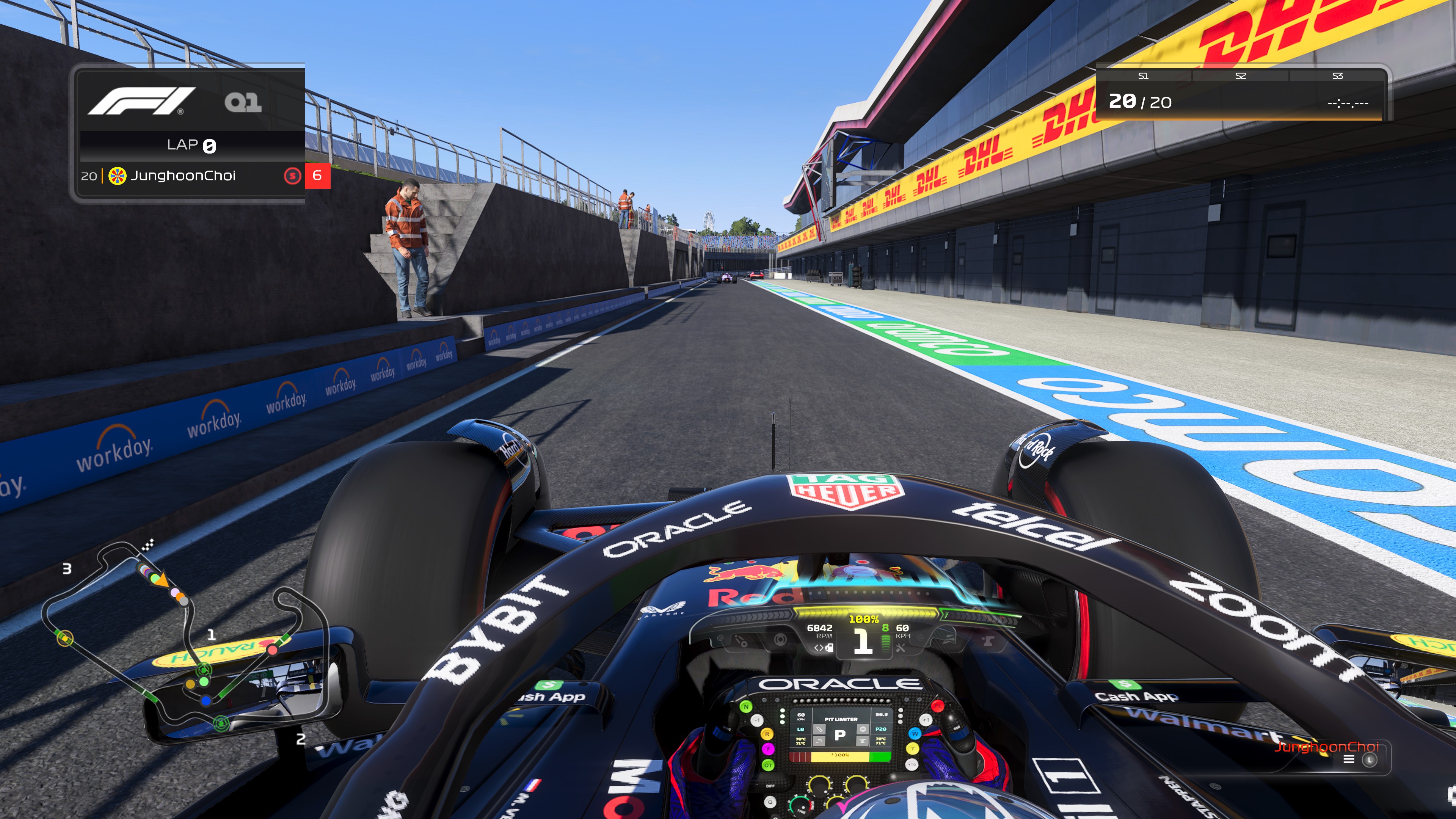
That's not the case. My Red Bull decals on the halo looks like this (pic below), nowhere near as bad as OP's, and I'm on PS5:
And it's not like I have different texture files as him.
Hence my mentioning of the lower res versions of those textures not being up to par, or the dynamic res being too aggressive and kicking in even when the game can still hit its performance benchmarks.
So it's like the game prints the thumbnail version of the graphic because it thinks the performance will drop if it keeps the full res version on.
- @mariohomoh what you took personally as animosity was me stating a fact, that if the problem IS in fact as simple as I described it... Then I stand behind my statement! That's all, it would seem to me at this point you're reading into things a little too far. Either that man, or you have real thin skin to think I was coming at you with animosity! Geez, you should see me when I do use animosity then, lol... Lighten up! Oops... You'll probably take "lighten up" the wrong way too. It's not an insult, just a suggestion to relax!!
- mariohomoh2 years agoHero (Retired)@Halpen4 Are you going to get back on track and discuss the topic again or just waste paragraphs on the personal stuff?
The post after the "anyway" (aka everything after the first two opening short sentences) are specially about the issue at hand and you left it all hanging 🤷♂️ @mariohomohOh and for the record can you explain with your theory why is evey livery on the halo in perfect high quality, with the only exception being all of the newly added liveries? So ya, my red bull livery looks good too, but not if it's the added "Miami" red bull livery! Guess what my McLaren in game released livery looks great, hmmm, but not the newly added McLaren triple crown livery! Huh, so what does all this have to do with game hardware? No really... It can choose to make older liveries look really good, but just not any newly added ones?
@mariohomohAlready responded back to you? But, which red bull halo livery did you picture? Regular version from game release or the "Miami" red bull? Plus, your theory still doesn't make up a reason to explain why the word "Gulf" on the 800 Williams is cut off and each letter looks slightly angled crooked, hardware issue too? To me these new livery images are, poor quality to begin with.
- mariohomoh2 years agoHero (Retired)
Now you're putting me in a pickle. Everything I said on the 1st page still applies 100% to the scenario you're putting forward here, and explaining again how dynamic resolution works would be now the third time I give it a shot. Sorry buddy, but I'm not going to do that again specially when it seems you didn't even give the material I linked a fair go. I'll take this (not being able to break down how the tech works for you) as a loss.
Just to not leave you with nothing, I gave this prompt to Chat GPT:
I'm not tech savvy. Can you explain to me how dynamic resolution techniques in videogames can make it so that some textures look pixelated sometimes even when they look pristine and high resolution when the system is not under a heavy load?
And it gave us this:
Of course! Dynamic resolution techniques in video games are used to maintain a consistent level of performance while maximizing visual fidelity on a given gaming system. These techniques are particularly useful for consoles and lower-end hardware, where maintaining a stable frame rate and avoiding performance drops are crucial for a smooth gaming experience.
The concept of dynamic resolution revolves around adjusting the rendering resolution of the game on the fly based on the current workload of the system. When the system is not under heavy load, it can render the game at a higher resolution, resulting in crisp and high-quality visuals. However, when the system starts to struggle, either due to complex scenes or intense action on the screen, the resolution is dynamically reduced to lessen the processing demand and maintain a playable frame rate.
Here's how it works:
1. Normal Situation: Let's say your gaming system is capable of rendering the game at 1080p (1920x1080) resolution, and under normal circumstances, it runs smoothly at this resolution.
2. Heavy Load: During intense gameplay moments or graphically demanding scenes, the system's GPU and CPU may be overwhelmed, causing frame rate drops. If the frame rate drops too much, the game's performance becomes noticeably choppy and less enjoyable.
3. Dynamic Resolution Adjustment: To avoid these performance drops, the game dynamically reduces the rendering resolution. For example, it might drop from 1080p to 900p or 720p temporarily. At the lower resolution, the GPU and CPU have less work to do, making it easier to maintain a smoother frame rate.
4. Pixelation: When the game's resolution is lowered, the number of pixels available to display the game world decreases. As a result, the image can appear less sharp and pixelated, especially if you're playing on a larger screen or sitting closer to the display. Details in textures and distant objects might look a bit blurry or jagged.
5. Performance Boost: The benefit of this approach is that, while the visuals may look pixelated temporarily, it helps ensure the game remains playable and responsive, avoiding frustrating frame rate drops or slowdowns. As soon as the system's workload reduces, it will increase the resolution back to the original setting, leading to a pristine and high-resolution display again.
This dynamic resolution adjustment is often done seamlessly in the background, without the player noticing significant changes in real-time. It's a trade-off between visual fidelity and performance, and it allows games to be more flexible in adapting to the capabilities of different gaming systems.
Keep in mind that dynamic resolution is just one of several techniques used to optimize video game performance. Developers may combine it with other methods like adaptive quality settings, level of detail adjustments, or dynamic shadow resolution to achieve the best balance between visuals and performance on various gaming platforms.
Long winded, I know. So I asked it to shorten it up to a single paragraph:
Dynamic resolution techniques in video games adjust the rendering resolution on the fly based on system workload to maintain performance. When the system is not under heavy load, the game looks crisp and high-resolution, but during intense moments, it dynamically reduces the resolution to prevent frame rate drops and ensure smooth gameplay. This reduction can lead to pixelated textures temporarily, but it allows the game to remain playable and responsive. Once the workload decreases, the resolution increases again, balancing visual fidelity and performance seamlessly.
If you take it on yourself to provide a reference screenshot for us to carry on, I may give it another shot. Otherwise I'm out of my depth here rephrasing the same thing over and over again.
By reference I mean this, taking OP's original screenshots to compare to what it looks like on similar hardware on my end (PS5):
That's it, pal. I'm confident you can see how some flavor of dynamic res would explain it. Either:
- The low res version of the texture is low quality and the game looks bad when dynamic res kicks in
- Dynamic res is kicking in too aggressively for whatever reason to the point where some cannot spot that pixelated look whereas others have it quite noticeable.
Now if it were simply an issue of the original textures being low quality from the start as you suggest, how come would it look crisp on PS5? My version of the game does not have different assets and textures files, that's for sure.
Peace 🫶
- @mariohomoh So unfortunately your answer wasn't what my question was? Hmm? None of this explains the Gulf 800 Williams livery? Hmm, I'll take it... You're going off track to avoid what I was really asking, fine!!!
- @mariohomoh The actual pixilated word in either of your diagrams is not "BYBIT", it's the "racing" word which isn't even showing... Except in the low rez version, lol...
@mariohomohPlus, I'll add... It's interesting that any car model texture with last yrs game on just the car model viewing screen would pop in or out. So no racing involved, no extra dynamic effects, or lighting and weather visuals. Just one car to rotate and zoom in to look at. Sometimes that whole livery would appear pixilated and sometimes on a later viewing same car and livery would appear fine. Which without needing another one of your lengthy explanations, would seem to prove what you're thinking! I know for a fact, in last yrs game certain F2 cars team names in the viewing screen were always pixilated. While all the other were always clear. So that reason I don't understand, why only was it the same team name "Trident" pixilated and never any of the others?
- mariohomoh2 years agoHero (Retired)
@Halpen4 wrote:
@mariohomohThe actual pixilated word in either of your diagrams is not "BYBIT", it's the "racing" word which isn't even showing... Except in the low rez version, lol...Right click on the image > Open image in new tab for the full resolution of the image. There you'll see just how pixelated the BYBIT looked on OP's image.
Don't go about printing the miniaturized version you see here on this page on your t-shirts 😂
For a more direct comparison, OP's screenshot vs how it looks on PS5:
Again, right click on it and open in a new tab.
Consider attaching your own images so that we can have a reference for what you're talking about on those crooked graphics you mention.
Have you understood how dynamic res generally works, and how it can affect what OP is experiencing?


Featured Places