Forum Discussion

27 Replies
 EA_Darko1 year ago
Community Manager
Lotr of issues and errors there @Nokats so the best thing to do is go ahead and run System File Checker tool to repair missing or corrupted system files:https://support.microsoft.com/en-ie/help/929833/use-the-system-file-checker-tool-to-repair-missing-o...
If the issue continues please make a new Windows Admin account and try there.
Let us know how you get on.
Darko Nokats1 year agoSeasoned Rookie@EA_Darko I did the system file checker.
 NaN3rx1 year agoNew Rookie
@EA_Darko I've got the same problem, system file checker said i don't have any corrupted file on my pc. Game/ea app installed/uninstalled, nvidia driver always updated, also lagging on new admin account.
Only playable on 60fps/60hz but i still notice speed up laggs and it's so frustrating when im playing rivals/champs.
- EA_Darko1 year ago
Hey @NaN3rx can you share your DxDiag in English
Darko
- NaN3rx1 year agoNew Rookie
Thanks for the reply @EA_Darko
I can't change the dxdiag language, because my pc main language is hungarian.
EDIT: Im gonna translate the diagnostic part of the dxdiag by hand, and upload that separately.
- EA_Darko1 year ago
If you set your system language to English you can rerun it @NaN3rx and then set it back to what you prefer.
Darko - NaN3rx1 year agoNew Rookie
Here is the english version!
- Nokats1 year agoSeasoned Rookie
This is new and still no fix.Are you BOT or what like.Its been almost a month and still no fix
- EA_Darko1 year ago
Seeing a lot of issues and errors there @NaN3rx, can you try the steps I shared above in running the check and trying on a new Windows admin account.
Darko - EA_Darko1 year ago
Still showing the same issues and errors @Nokats. And it's not been a month, just a little over a week and that's no fault of mine.
What happened on the new Windows admin account when you tested it?
Darko - NaN3rx1 year agoNew Rookie
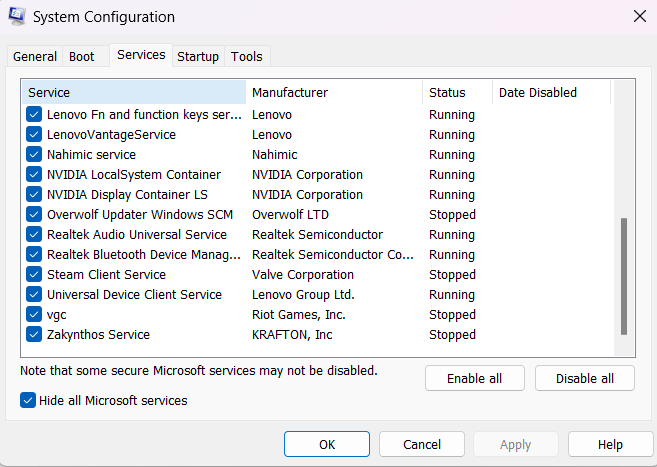
I found a solution yesterday night, i turned off almost every other anticheat services (except EA) on my pc and now im not lagging, so now the game runs fine.
- Nokats1 year agoSeasoned Rookie@NaN3rx How did you do that
- Nokats1 year agoSeasoned Rookie@EA_Darko I already did the control panel thing and it said it was successful
- NaN3rx1 year agoNew Rookie
System configuration -> Services -> Check the "Hide all microsoft services" box and disable manually anticheat services, click apply then ok and restart ur computer
- Nokats1 year agoSeasoned Rookie@NaN3rx Theres alot of services and only 2 anticheat services.And it didnt work for me
- NaN3rx1 year agoNew Rookie
Then I have no other idea, sorry.
- Nokats1 year agoSeasoned Rookie
Can u tell me what more i need to disable
- Nokats1 year agoSeasoned Rookie
Now i cant even open my game.
- NaN3rx1 year agoNew Rookie
This page can help you.
EDIT: Your steam client service is not running.. If you bought your game trough steam.
- EA_Darko1 year ago
Great to hear it @NaN3rx
Darko - Nokats1 year agoSeasoned Rookie@NaN3rx Yeah i tried it.Dosent work for me sadly
- Nokats1 year agoSeasoned Rookie@EA_Darko Yeah you still havent found any solution yeah.You are actual joke my guy
- EA_Darko1 year ago
Your DxDiag still shows issues @Nokats.
I can only work with info I have and your's continues to feature numerous issues and errors.
Darko
 jackmckenzie71 year agoRising Rookie
@EA_Darko Please reply to my thread i created about lag.
- EA_Darko1 year ago
Please don't try to hijack threads in this manner @jackmckenzie7 as it's not something that we allow.
Darko
Featured Places