Forum Discussion

TheRealJopy's avatar
TheRealJopy
Seasoned Newcomer
5 days ago

Persistent DXGI_ERROR_DEVICE_HUNG Crash on Intel Arc A750 - EA SPORTS FC 27

Hello EA Support Team,

I am writing to report a persistent, reproducible crash in EA SPORTS FC 27 that occurs specifically on Intel Arc A750 graphics cards. The game crashes to desktop with a DirectX error during gameplay.

I can't enter any match in any mode(offline and online)because before it begins the screen blacks out and the error which i wrote below appears.


System Specifications:


· GPU: Intel Arc A750

· GPU Driver Version: 32.0.101.9030 (Also tested on 32.0.101.9033)

· CPU: Intel Core i3-12100F

· Motherboard: ASRock B660M Pro RS (BIOS updated to latest version 16.01)

· RAM: 16GB DDR4 3600MHz (XMP enabled)

· OS: Windows 11 (64-bit)

· Storage: Kingston NV2 1TB NVMe SSD


Error Details:

The game crashes with the following DirectX error pop-up:

DirectX function "GetDeviceRemovedReason" failed with DXGI_ERROR_DEVICE_HUNG ("The GPU will not respond to more commands"). GPU: "Intel(R) Arc(TM) A750 Graphics", Driver: 32.0.101.9030. This error is usually caused by the graphics driver crashing; try installing the latest drivers. DeviceRemovedReason: DXGI_ERROR_DEVICE_HUNG.


Troubleshooting Steps Already Taken (Without Success):


1. Clean Driver Installation: Used Display Driver Uninstaller (DDU) in Safe Mode to completely wipe all old Intel drivers. Reinstalled the latest official Intel Arc drivers (32.0.101.9030 and 32.0.101.9033).

2. BIOS Update: Updated the motherboard BIOS from version 14.05 to 16.01.

3. BIOS Settings: Verified that Resizable BAR (C.A.M.) is enabled in the BIOS. Also disabled CPU C-States to rule out power delivery issues.

4. Game File Integrity: Verified game files via Steam. Ran the game in DirectX 11 mode using the -dx11 launch option.

5. Cache Clearing: Cleared the DirectX Shader Cache via Windows Disk Cleanup and deleted in-game profile settings to force a rebuild.

6. Hardware Checks: Confirmed no thermal throttling (CPU and GPU temps are normal under load).

Thanks,TheRealJopy

8 Replies

  • Bosch-PKS-66-AF's avatar
    Bosch-PKS-66-AF
    Rising Newcomer
    1 day ago

    I have the same problem anyone with fixes or is it just bc of the intel driver update

  • Swascho's avatar
    Swascho
    Seasoned Newcomer
    1 day ago

    Same issue

    R5 5600G and ARC A750

  • CruZuFyyy's avatar
    CruZuFyyy
    New Novice
    2 days ago

    Also having this atleast once every 3 or 4 games, unplayable. **bleep** game

  • NExoTiko_26's avatar
    NExoTiko_26
    Seasoned Newcomer
    2 days ago

    Going through same issue my specs:
    GPU: Intel ARC A750
    CPU: AMD5600g
    RAM: G.Skill 2400mhz(8GB*2)
    The game starts but whenever I try to start a match it gives Directx error and crashes it's frustrating atp. 

  • Bad_Life00's avatar
    Bad_Life00
    Seasoned Newcomer
    3 days ago

    Hi, I'm having a recurring crash when trying to start a match in FC 27 on PC. The game launches normally and I can navigate through the menus, but when I start a match it crashes with a DirectX error.

    Hi, I'm having a recurring crash when trying to start a match in FC 27 on PC. The game launches normally and I can navigate through the menus, but when I start a match it crashes with a DirectX error.

    Other games, including Fortnite, GoW Ragnarock and FC 26, work normally on my PC.

  • Bad_Life00's avatar
    Bad_Life00
    Seasoned Newcomer
    3 days ago

    Hello,

    I am experiencing a recurring DirectX crash in EA SPORTS FC 27 on my PC with an Intel Arc A770 16GB.

    The game launches normally and I can navigate through the menus without any problems. However, when I try to start a match, the game crashes and displays a DirectX error.

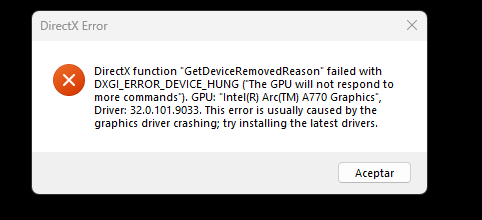
    The error is:

    DXGI_ERROR_DEVICE_HUNG (The GPU will not respond to more commands)

    At one point I also received:

    DXGI_ERROR_DEVICE_REMOVED

    The error identifies my GPU as:

    Intel(R) Arc(TM) A770 Graphics
    Driver: 32.0.101.9033

    PC specifications

    • GPU: Intel Arc A770 16GB
    • CPU: Intel Core i5-13500
    • RAM: 32GB DDR4
    • OS: Windows 11
    • DirectX: DirectX 12
    • Resizable BAR: Enabled
    • GPU temperature: around 52°C during normal use

    What I have tried

    I have already tried the following:

    1. Updated the Intel Arc driver.
    2. The initial driver update failed and FC 27 started giving the DirectX error afterwards.
    3. Completely removed the Intel graphics driver using Display Driver Uninstaller (DDU) in Safe Mode.
    4. Reinstalled the Intel Arc driver 32.0.101.9033 using the Clean Installation option.
    5. Cleared the Windows DirectX Shader Cache.
    6. Cleared the Intel Shader Cache.
    7. Repaired the FC 27 installation through the EA App.
    8. Disabled overlays and unnecessary background applications.
    9. Tested the game with lower graphics settings, 1080p, 60 FPS and V-Sync enabled.
    10. Checked that Windows is assigning FC 27 to the Intel Arc A770.
    11. Checked Resizable BAR, which is enabled.
    12. Checked the GPU with GPU-Z. The GPU is correctly detected, PCIe is running at x16 4.0, and the GPU temperature is normal.
    13. Performed a normal Windows restart after the driver installation.

    Despite all of this, FC 27 still crashes with DXGI_ERROR_DEVICE_HUNG when trying to enter a match.

    I have also tested other games on the same PC, including Fortnite and Golf It, and they work normally without crashes. This makes me think the issue may be specifically related to FC 27 + Intel Arc + DirectX 12 rather than a general GPU problem.

    I would appreciate any help or confirmation if this is a known issue with Intel Arc GPUs in FC 27.

    I can also provide DxDiag, EA Error Reporter logs, GPU-Z information or screenshots of the DirectX error if needed.

    Thank you.

  • Hello,

    I am having a specific compatibility issue with EA SPORTS FC 27 on my laptop with an Intel Arc A530M GPU.

    With Intel graphics driver 32.0.101.9030, FC 27 shows a graphics/driver error and I cannot play the game.

    I have already reinstalled Windows and reinstalled the Intel graphics drivers. The problem remains.

    When I install an older Intel driver, FC 27 launches, but the game is extremely laggy, including in the menus.

    This makes me believe there may be a compatibility issue between FC 27, the Intel Arc A530M and the current Intel graphics driver.

    Could you please confirm whether this issue is known and whether EA is investigating a fix?

    I can provide the exact error screenshot, DxDiag and system information if needed.

    Thank you.


  • TheRealJopy's avatar
    TheRealJopy
    Seasoned Newcomer
    5 days ago

    When I enter a match right before it begins the screen blacks out and the game crashes and this error appears:DirectX function "GetDeviceRemovedReason" failed with DXGI_ERROR_DEVICE_HUNG ("The GPU will not respond to more commands"). GPU: "Intel(R) Arc(TM) A750 Graphics", Driver: 32.0.101.9030. This error is usually caused by the graphics driver crashing; try installing the latest drivers. DeviceRemovedReason: DXGI_ERROR_DEVICE_HUNG.

    GPU: Intel Arc A750

    Troubleshooting already taken:

    -DDU cleaned all old drivers and installed the latest drive

    -BIOS update, BAR enabled

    -Ran game in DirectX 11

    -Cache clearing: DirectX Shader Cache

    -Checked the temperatures of the GPU and CPU