8 years ago
Graphics Settings Rec?
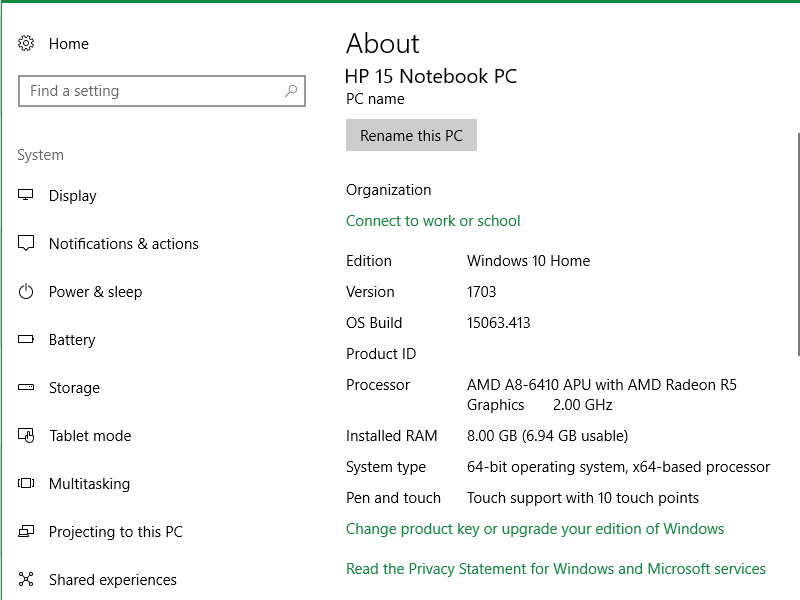
So I just recently got ME:A on the Origin Sale, but I've been having issues with getting an in-game appearance that I like but still being able to run the game. My laptop is a little older than most,...
Well my computer is way worse 64bit Windows 10, AMD A8-5500 quad 3.2GHz, 16GB Ram, Radeon 7870 2GB video card.
It's like a give/ take thing, up some settings while lower other stuff for balance. I used this guide which kinda explains what impacts what:
But this is the best i could pull off for quality and keep performance going pretty smooth at the same time
What do you mean worse?
Your CPU has more GHz, you have double the RAM he has and probably better graphics cards although I'm not so familiar with Radeon cards.
Yeah but it still cannot handle the game. My pc is from 2012. I Always used nVidia and i regret switching to Radeon. 🤔
Even so, when i started playing Andromeda, i was like "OOPS" my computer cannot handle this game. 15-20 fps is never a good sign LOL
Was pretty bad and got worse every time i turned or looked around, game would freeze or drop to 2-5 fps. Unplayable.
I ended up tweaking settings like crazy and was able to get to 30-40 fps. But even now, game still staggers, its not smooth, fps still drops to 10-15 specially inside Tempest.
And i also like some better image quality, which i Can't get... or i won't be able to play it.
Oh I hear you on that. I was able to upgrade my pc this year so I've got an i7 7700K 4.3Ghz CPU, GTX1070 GPU and 16GB RAM and I use SSD hard drives.
It's certainly not a super machine but it's pretty good and I run the game at 1440p at the moment. I actually tweaked the graphics settings a bit and the game really looks good I have to say. Still, with upgrades also including a new motherboard it set me back over 1000 bucks total.
When I see that they are going to run 4k graphics on the new Xbox for 499 bucks, I have to admit I feel taken the * out of a bit as a PC gamer. I really would like one of these Xbox One X machines that I can play my PC games on with mouse and keyboard....hell, for 499 it's a steal really for 4k graphics. I still have to upgrade to a better graphics card to run 4k graphics on my PC and that graphics card alone costs more than the new Xbox.
Still, I'm sure PC's will still be able to get the edge on it but man, for 499 bucks it's an amazing deal. I just never did like those controllers much.
It's rough time though I think for PC gamers. The hardware is not cheap at the moment and the transition to 4k is especially expensive. I'm lucky where I can afford a bit more perhaps but I know most people aren't that lucky. I suppose that's why I was a little surprised at BioWare's focus on higher resolutions in this game. ME:A with some graphics power (and after some patches) really does look the part. I was playing it earlier as I said and the game does deliver on the graphics for me now.
They just need to give me mission tracking for multiple quests and really the big thing that ME:A still needs is a variety of audio fixes but the game really is shaping up. It does seem though that you need to run at least 1920x1080p with high settings to really start seeing the beauty of the game, at least that's my experience now.
WOW that's fabulous! I badly need a new one too. I can't play smoothly at all on most of recent games. I'm still shopping around and deciding lol
I kind of liked this Ready Gaming Desktop PC with Intel i7-7700 3.6GHz CPU, 8GB DDR4, NVIDIA GTX 1060 3GB, 64-Bit at $1.100.
But your processor is waaaay better. Not familiar with GTX though.
I'm not familiar with the Xbox One X u mention. I never used Xbox, only PC. I'll have to google that, because it sounds worthy just by the way u describe it. That's a good info u posted there. Thanks for that !
And yes these graphic transitions become a bump, i'm running ME:A at 1920x1080 ... but.... lol .... barely. All i could do for smooth play is trade between graphic settings. :eahigh_file:
@draqonin AMD GPUs are quite slow at rendering the tessellation in this game and there's no quality setting for that in the game's options, so be sure to tweak that in your Radeon settings. I override with 4 samples. This doubled my framerate.
@Fred_vdp wrote:@draqonin AMD GPUs are quite slow at rendering the tessellation in this game and there's no quality setting for that in the game's options, so be sure to tweak that in your Radeon settings. I override with 4 samples. This doubled my framerate.
Thanks so much for the heads up! I will have to look into that some more since i don't see Tesselation in the Radeon settings. All i could find is some info on the web that says :
> Tesselation is active only if your VGA can handle this technology, if it can set it to “AMD Optimized“.< :eahigh_file: