8 years ago
Graphics Settings Rec?
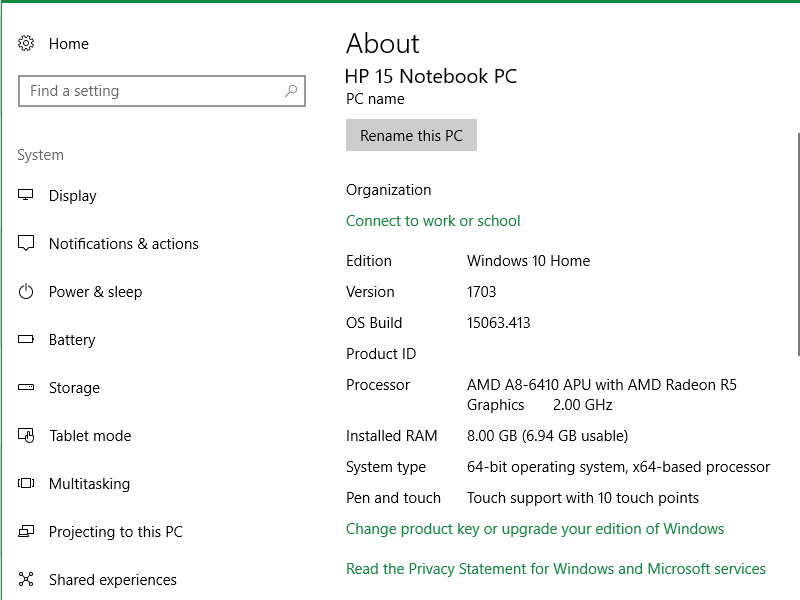
So I just recently got ME:A on the Origin Sale, but I've been having issues with getting an in-game appearance that I like but still being able to run the game. My laptop is a little older than most,...
Yeah but it still cannot handle the game. My pc is from 2012. I Always used nVidia and i regret switching to Radeon. 🤔
Even so, when i started playing Andromeda, i was like "OOPS" my computer cannot handle this game. 15-20 fps is never a good sign LOL
Was pretty bad and got worse every time i turned or looked around, game would freeze or drop to 2-5 fps. Unplayable.
I ended up tweaking settings like crazy and was able to get to 30-40 fps. But even now, game still staggers, its not smooth, fps still drops to 10-15 specially inside Tempest.
And i also like some better image quality, which i Can't get... or i won't be able to play it.
@draqonin AMD GPUs are quite slow at rendering the tessellation in this game and there's no quality setting for that in the game's options, so be sure to tweak that in your Radeon settings. I override with 4 samples. This doubled my framerate.
@Fred_vdp wrote:@draqonin AMD GPUs are quite slow at rendering the tessellation in this game and there's no quality setting for that in the game's options, so be sure to tweak that in your Radeon settings. I override with 4 samples. This doubled my framerate.
Thanks so much for the heads up! I will have to look into that some more since i don't see Tesselation in the Radeon settings. All i could find is some info on the web that says :
> Tesselation is active only if your VGA can handle this technology, if it can set it to “AMD Optimized“.< :eahigh_file: