Forum Discussion

12 Replies
Thank you this did help! Appreciate it.
NP, have fun gaming!
Hello. I have this exactly same problem but verifying doesnt fix the problem. Game still keeps crashing after that.
The game keeps crashing at the exactly same point?
Do you use any mods?
Do you have the game on Steam or on Origin?
Create a DxDiag in text file format and post it with your next reply. You can do that with the "Choose file" button at the bottom right corner of the reply window.
Hi. Im not using any mods and game is from steam.
There is no MELE specific error in the DxDiag.
Please preform a clean boot and test the Game in clean boot mode.
Make sure your virus scanner and other security software and also Afterburner and similar software is disabled.
Make also sure that your GPU & CPU are not overclocked.
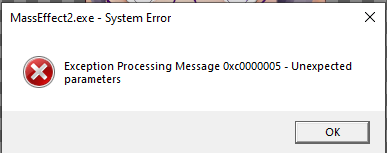
still the crashing issue holds but now it even gave me error announcement. also im now stuck with jack loyalty missions last video when she is blowing up the facility. crashes after the scene ends and restarting starts movie again and again never letting me leave from it.
Go to your Reliability monitor > Press the Windows key and "R" at the same time and copy and paste or type "perfmon /rel" (without the quotes) in the new Window > hit “ENTER” and look if it has entries for MELE ME2, "Origin.exe" or "Steam.exe".
If yes double click at the last entry for the game executable, copy the info to the clipboard, and save it to a text file.You can attach the DxDiag text file you created (and the “Reliability monitor” text file as well) to your post in the “Reply” window with the “Choose File” button.
There is a newer version of the NVIDIA Driver available: Link
- Follow this manual to the letter to cleanly uninstall all NVIDIA components.
- Install the graphics driver and GFE. > Go online.
- Test.
Hi. I updated the drivers, but it didn't fix the problem. It made it worse. Now game also crashes when I try to go to the engineering. :'D


Featured Places