Forum Discussion


6 years ago
Electronic Arts provided four solutions, which I applied all, but which didn't work on long-term, maybe it worked until I rebooted my Xbox One, if I remember well.
Spoiler
DELETE CLOUD SAVES
1. On Home, pull the right trigger, and then press A to open My games and apps.
2. Highlight the game, press the Menu button on your controller, and then select Manage game.
3. Scroll to the right, highlight the saved data for your gamertag under Saved Data, and then press A on your controller.
4. Choose Delete everywhere.
5. Restart Console
CLEAR PERSISTENT STORAGE
If console is wired connected, remove Ethernet cable. If console is wireless, Go to Settings > Network > Select their Network > Disconnect.
Once it is back on, press Menu button > Settings > Blu Ray & Disc > Persistent Storage > Clear Persistent Storage three times.
POWERCYCLE XBOX ONE
Follow these steps to power cycle your Xbox One Console:
1. While the console is on, press and hold the console's Xbox button for 5 seconds.
2. The console will power down.
3. Wait 30 seconds, and then turn your console back on by again pressing the Xbox button.
CHANGE PRIVACY SETTINGS
1. From the Home Screen, using the controller scroll left to the navigation pane.
2. Scroll down to Settings Icon.
3. In the Setting menu scroll down to Account.
4. Under Account, select Family.
5. Enter the password or passkey.
6. Select the account that you want to update.
7. Select the category of settings you want to update, such as Privacy & online safety.
8. Select the Adult defaults.
9. Toggle back to Child defaults and then finally back to Adult defaults once more.
10. Powercyle the console to complete the troubleshooting.
1. On Home, pull the right trigger, and then press A to open My games and apps.
2. Highlight the game, press the Menu button on your controller, and then select Manage game.
3. Scroll to the right, highlight the saved data for your gamertag under Saved Data, and then press A on your controller.
4. Choose Delete everywhere.
5. Restart Console
CLEAR PERSISTENT STORAGE
If console is wired connected, remove Ethernet cable. If console is wireless, Go to Settings > Network > Select their Network > Disconnect.
Once it is back on, press Menu button > Settings > Blu Ray & Disc > Persistent Storage > Clear Persistent Storage three times.
POWERCYCLE XBOX ONE
Follow these steps to power cycle your Xbox One Console:
1. While the console is on, press and hold the console's Xbox button for 5 seconds.
2. The console will power down.
3. Wait 30 seconds, and then turn your console back on by again pressing the Xbox button.
CHANGE PRIVACY SETTINGS
1. From the Home Screen, using the controller scroll left to the navigation pane.
2. Scroll down to Settings Icon.
3. In the Setting menu scroll down to Account.
4. Under Account, select Family.
5. Enter the password or passkey.
6. Select the account that you want to update.
7. Select the category of settings you want to update, such as Privacy & online safety.
8. Select the Adult defaults.
9. Toggle back to Child defaults and then finally back to Adult defaults once more.
10. Powercyle the console to complete the troubleshooting.
-But for long term, better to use an integrated solution; my NAT (Network Area Translation) having been moderate only, and UPnP not available, what is not optimal, despite a Gold-Live subscription.
-I finally found the solution, after 2 months, I think, and it is really simple..:
- In the operating system screen, its welcome screen, click on your account avatar;
- Go three times on the right, and one time under: In the Settings;
- About Account, click on the 3rd option: Privacy & Online safety;
- Then 1st option: Xbox Live;
- -I had the child defaults. But: Click Custom. If applicable, then: View details.
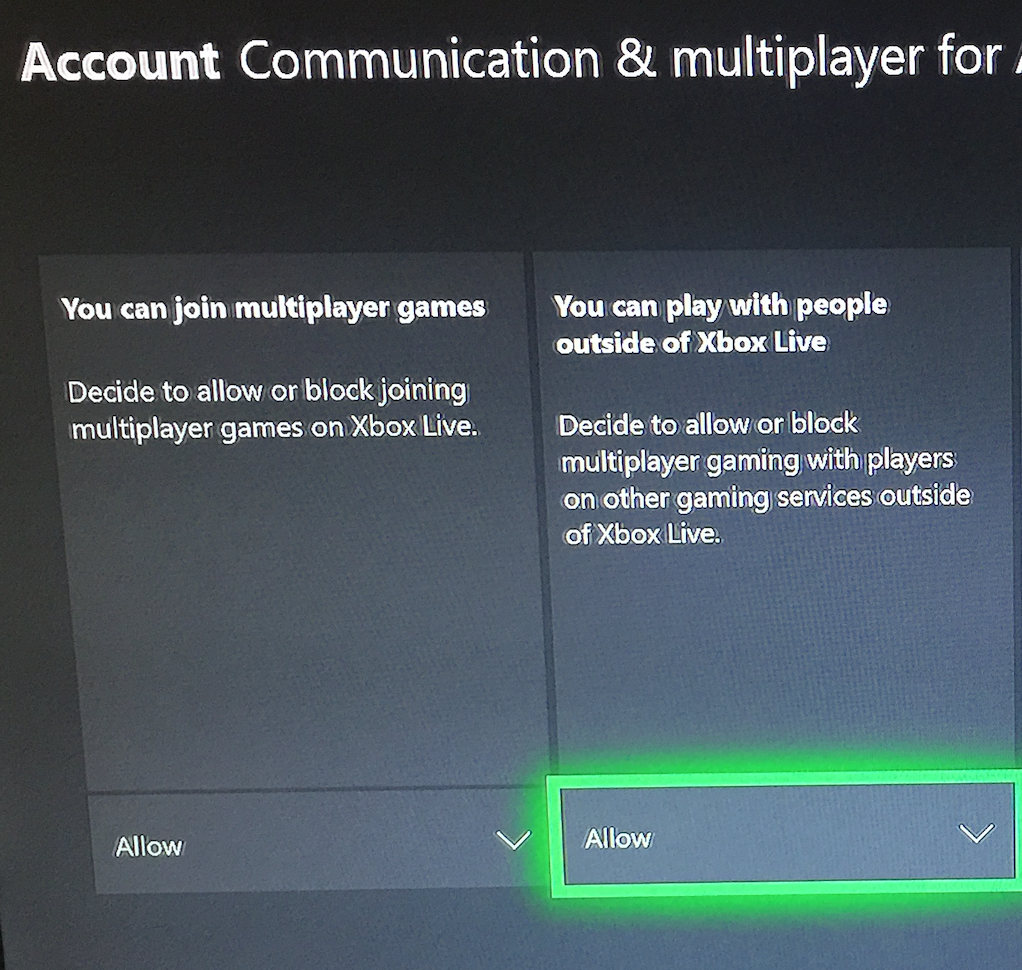
- Then 4th option: Communication & Multi-player.
- Normally, the 1st option: Multi-player on Xbox Live should be allowed (and your subscription: active); but here, additionally, the second option: Play with people outside of Xbox Live: Allow, (instead of "block"), shall be active, in order to promote the multi-player, including on the Electronic Arts servers.
- Then 4th option: Communication & Multi-player.
- About Account, click on the 3rd option: Privacy & Online safety;
Normally, it fixes the problem; if you go in Settings --> Network --> Network settings: The NAT becomes Open, what is good for play abilities, and all the services, including UPnP, should be rendered available.
Normally, this makes the players pass the prologue easily for on-line game on long-term. This worked, for me.
(I did not try to play without Live subscription, but normally, Live subscription is additionally required).
 6 years ago
Doesn't matter what you did. You got lucky. It is a EA server issue has nothing to do with xbox live. Did you ready the comments
- 6 years ago
@BossDad4Life442 Your inference is false. As if a defective server has nothing to do with the internet connection, but also that you have not set your Wi-Fi on, I guess the internet connection has to be set first. In this way, since the Microsoft subscription for online playing is said by the company to be required, I guess that it acts as a first barrier.
I don't really know what does your last sentence mean; it seems that you made your comment un-ready; your last sentence shall take a dot, as any other sentence.
 6 years ago
@ARocksanneSwiss I'm sorry but your explanation of a "possible" solution doesn't really make sense. Those settings your saying to change are already set like that by default for most people, but since your account settings was set to a child's account you wouldn't have known that. Like @jcriver442 said you got lucky, but I doubt it will last.
- 6 years ago
@xboxbabe70 I am not interested in what makes sense in matter of working hardware - but in what works. I did not want of plays outside Live, because I wanted the most restrictive (and "thus" secure) system.
The fact that most people have set to adult account does not mean that this is these people who are having the problem of this thread, but the ones who have not understood. Moreover, as far as I remember, the adult account may have not the plays active outside Live - but I concede not-to-be sure of this last specific point.
- 6 years ago
@ARocksanneSwiss wrote:@xboxbabe70 I am not interested in what makes sense in matter of working hardware - but in what works. I did not want of plays outside Live, because I wanted the most restrictive (and "thus" secure) system.
The fact that most people have set to adult account does not mean that this is these people who are having the problem of this thread, but the ones who have not understood. Moreover, as far as I remember, the adult account may have not the plays active outside Live - but I concede not-to-be sure of this last specific point.
@ARocksanneSwiss Had you read ALL the posts/comments for this thread you would have understood why me and @BossDad4Life442 know it's the servers, but let me try and explain this an easier way for you:
1) EA owns NFS Rivals, and the EA servers that make NFS Rivals work online, NOT Microsoft or Xbox live!2) Microsoft owns XBOX LIVE! Xbox live is a subscription that allows you to play online with other people, THAT"S IT!
3) The game (NFS RIvals works without issues OFFLINE! That means it does not require Xbox live or an internet connection to work, (UNLESS you want to play multiplayer online against other players)
4) PROOF that it's EA Servers: the issue is across ALL PLATFORMS!!!
Which means its impossible that the issue is caused by Xbox live, Xbox settings, or anyone's internet connection, end of discussion!
Featured Places