Forum Discussion

Anonymous
10 years agoHey,
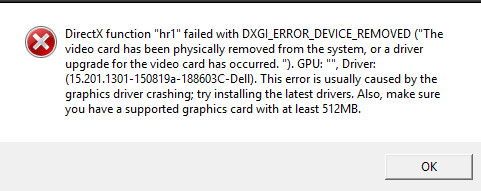
What are your PC specifications? As it seems from the error that you have a problem with your DirectX, try to update to 11.02 DirectX, if you get the same error try to install DirectX 10 then update to the latest.
- ApprovedAnonymous10 years ago
Hey i have Windows 10 64bit, amd radeon hd 6570 2gb, xeon e5430, 4gb ram and have directx 11.2 installed
- ApprovedAnonymous10 years ago
Hey,
Coming back to the error DirectX gave you, be sure that your GPU card is well placed in the motherboard, there's a chance it isn't (?).
If the error still persists, try for a manual installation of DirectX, you can find it here: https://support.microsoft.com/en-us/kb/179113 below "
Manual installation the latest version of DirectX". Start from the bottom to the top.
After you fix this problem, you will have another. Your PC has only 4gb of RAM, which is below the minimum requirement. Try to upgrade your PC or at least your RAM, go for a 8gb/16gb Vengeance RAM kit with 1866 frequency, not that expensive and it works like a charm 🙂.
Also, as Vapr0lexR said, make sure your graphics card drivers are up to date. You can also try to run the game with compatibility mode with Windows 7 or 8.1 .
- ApprovedAnonymous10 years ago
Hey, No there isnt any chance of my card disconnecting. I have done all directx things u sad. I have got DDR2 so thats why i have only that much ram. My graphics card driver is updated with newest amd beta update crimson edition. And now it freezes on start blackscreen. I tried compatibility settings and windowed too. Now ill try to redownload and reinstall it.
Featured Places