Forum Discussion

Psytros's avatar
5 years ago
Solved

Performance went down the drain after June update

Hi

I bought NFS Heat on Steam last Sunday.
Played for 14 hours and had some good fun, beside of broken audio in cutscenes (I don't care), had no issues with the game.

Since the June update hit yesterday, the performance went down the drain.

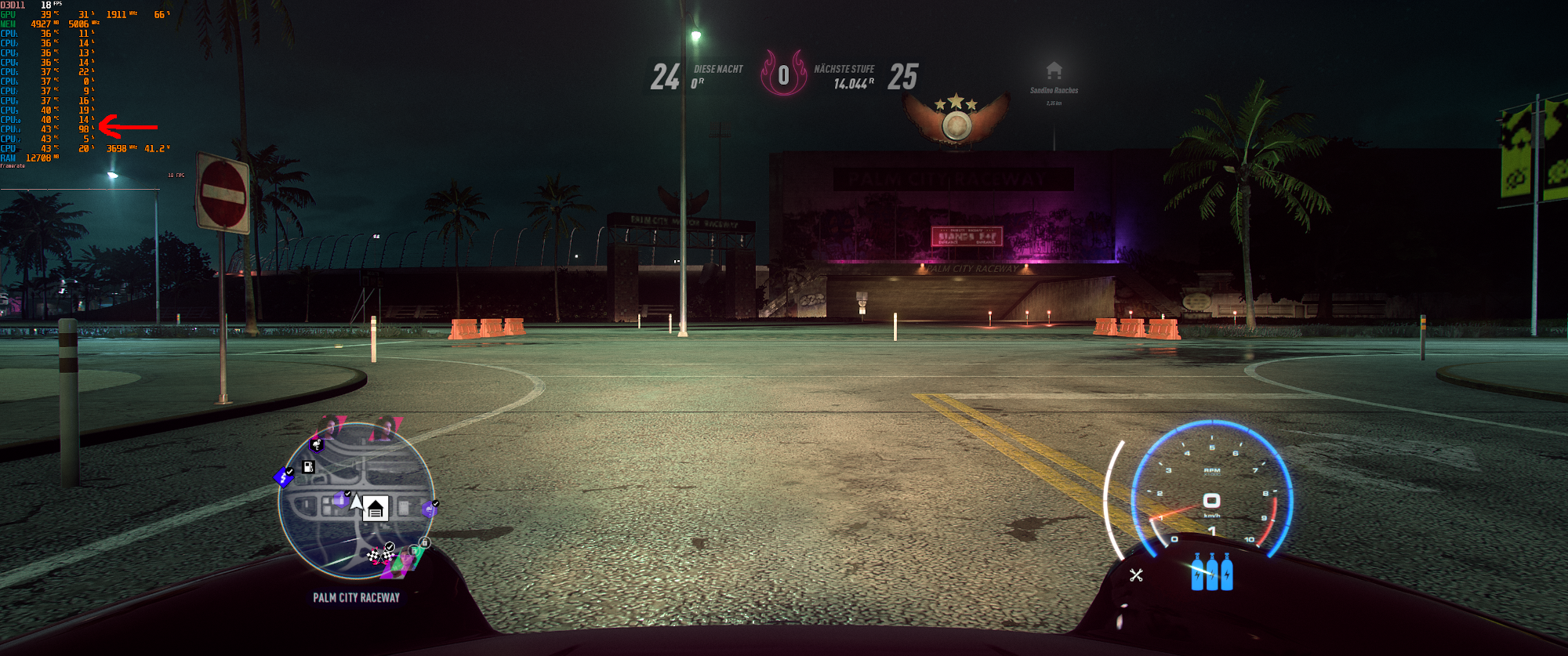
Now the game just utilize one thread of my CPU, what hits the GPU preformance pretty hard. The frames per second are now constant just between 14 and 21.
I attached a print screen with MSI Afterburner data.

What I tried so far:

  • Clean the Origin cache (https://help.ea.com/en-us/help/faq/clear-cache-to-fix-problems-with-your-games/)
  • Deactivated the overlay of Steam and Origin
  • Validated the game files via Steam
  • Reinstalled the game (full delete including savegames and settings)
  • Change graphic settings in game (Full screen, windowed, Vsync, HDR, motion blur, set to auto, low, normal, high, ultra and custom) -> no impact on the game, FPS stay the same
  • Created "user.cfg" according to my CPU -> No impact on the game
  • Updated Nvidia driver -> No impact
  • Played around with Nvidia control setting -> No impact

I have a second rig with the same hardware, it shows the exact same issue.

Im am 100% sure that this update caused this issue, any other game I tested so far is running fine as usual.

My hardware:
- ASUS RAMPAGE V (LGA 2011-v3, Intel X99)
- Intel Core i7 6850K (3.60GHz, 6 Core)
- Corsair Dominator Platinum (4x, 8GB, DDR4-3000)
- MSI GTX 1080

  • Psytros's avatar
    Psytros
    5 years ago

    Hi David

    Thank you for your support.

    I did such a clean boot, following the instructions. Started Steam and went streight into NFS Heat.

    It seem's fine like this, the game running smooth again.

    Yes, I wiped the full folder. Also disabled cloud save to really get a clean install.

    My user.cfg contains this (according to my CPU):

    Thread.ProcessorCount 6
    Thread.MaxProcessorCount 6
    Thread.MinFreeProcessorCount 0
    Thread.JobThreadPriority 0
    GstRender.Thread.MaxProcessorCount 12

    Sound like I will have to go thru each service and the autostart to pin point what is causing the issue :-/


7 Replies

  • EA_David's avatar
    EA_David
    Icon for Community Admin rankCommunity Admin
    5 years ago

    Thank you for the post. Can you see if anything changes if you restart with a Clean Boot, including keeping Afterburner disabled?

    https://help.ea.com/en-ca/help/faq/how-to-clean-boot-your-pc/

    Just to check, did you wipe everything in C:\Users\yourusername\Documents\Need for Speed Heat? It sounds like you did. 

    Was this the user.cfg data you used?

    Thread.ProcessorCount 4
    Thread.MaxProcessorCount 4
    Thread.MinFreeProcessorCount 0
    Thread.JobThreadPriority 0
    GstRender.Thread.MaxProcessorCount 8

  • Psytros's avatar
    Psytros
    5 years ago

    Hi David

    Thank you for your support.

    I did such a clean boot, following the instructions. Started Steam and went streight into NFS Heat.

    It seem's fine like this, the game running smooth again.

    Yes, I wiped the full folder. Also disabled cloud save to really get a clean install.

    My user.cfg contains this (according to my CPU):

    Thread.ProcessorCount 6
    Thread.MaxProcessorCount 6
    Thread.MinFreeProcessorCount 0
    Thread.JobThreadPriority 0
    GstRender.Thread.MaxProcessorCount 12

    Sound like I will have to go thru each service and the autostart to pin point what is causing the issue :-/

  • Hi together

    I found what causing the issues 🙂

    I have Acronis True Image 2019 installed as backup solution.

    It come with a feature called "Acronis Active Protection", kind of a Anti-Virus, to protect that malware encrypts the drives or change the backups.

    I added now the NFS Heat executable "NeedForSpeedHeat.exe" to the process list of Acronis Active Protection and allowed it to be freely executed.

    Solved, game runs again with 50+ FPS at night races.

    Thank you David to help my find the source.

  • I had the same issue with the 2020 version. Thank god that setting was turned of by coincidence because I had to delete old back-up files. Yesterday I had the same issue and was planning to shelf the game till I got a better graphics card. Seems acronis was the problem

  • Also wanted to pointout this game is saved on two clouds, Origin's and Steam's, things can get also really screwy if you use Onedrive default for windows 10 depending how you have things setup if all three are active they love to seem to fight each other I found turning off Origins Cloud save and (for me uninstalling One drive guides online) really helped with issues the Cloud section fixes the save issues or old file version mismatch as Origin and Steam tend to fight each other on the cloud saves. But the one drive will overwrite the profilesettings and the save game without warning even with older versions.

Featured Places

Node avatar for NEED FOR SPEED™ Franchise Discussion

NEED FOR SPEED™ Franchise Discussion

Have you played any other Need for Speed games in the franchise? Tell us about your experience on the community forum.Latest Activity: 42 minutes ago
30,494 Posts