Forum Discussion

Re: NFS UNbound - Error F03 / FOD "Inventory could not be loaded"

Let me preface this by saying that this is the second time a full on game breaking bug has happened, previously (https://answers.ea.com/t5/Technical-Issues/NEED-FOR-SPEED-UNBOUND-NOT-SAVING-PROGRESS-ON-PC/m-p/12137315#M1869) I was affected by the game suddenly deciding to wipe my progress and entire save for no apparent reason, which never received any official closure or compensation and thus I had to replay everything again.

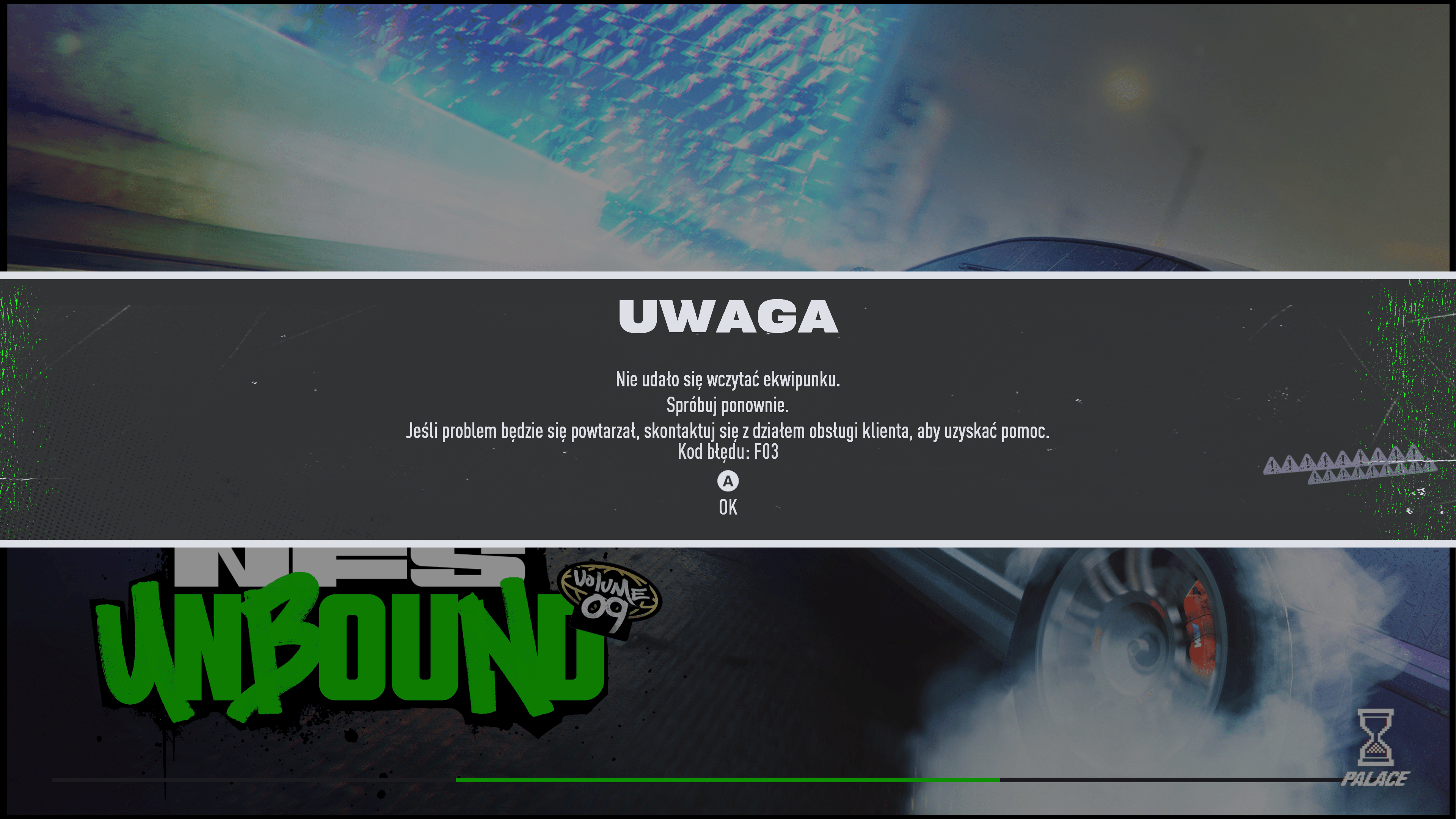
This time around, I had left the game running in the background and got kicked out of the session for inactivity, I went back into multiplayer after being sent to the main menu and the F03 error started to appear. Absolutely nothing that is recommended to fix it has worked for me. I cannot change any parts, sell or buy cars, let alone play online. The recommended fixes were as follows:

"sell your cars" impossible, game does not do anything once you attempt to sell them (does not matter whether its in SP or MP)
"uninstall your DLC, start the game, get to a menu, close the game, reinstall them and it should work" tried this twice to no avail, reinstalling and verifying game files does not work either

I am incredibly disheartened by this problem, as someone who has been playing the game since day one, having pre-ordered it and deciding that even though it wiped my progress I was going to play it again, only to be affected by another problem that practically does not let me play the game anymore is a low blow.

Hopefully there is a fix for this, since the game recognizes my progress, my save and everything, but does not allow me to do anything.

Proper format for a report so that time is not wasted by replies asking to follow that format 


Product: Need for Speed: Unbound
Platform: PC, Steam
Summarize your bug Error F03 appears every time trying to load in, thus not allowing me to do anything in the menus, change parts, sell or buy cars and most importantly I cannot enter Multiplayer games
How often does the bug occur? Every time (100%)
Steps: How can we find the bug ourselves? You tell me? Bug started to appear after being kicked for being idle in a multiplayer session, I have no idea what causes it
What happens when the bug occurs? Cannot install parts, sell or buy cars, enter multiplayer sessions
What do you expect to see? A fix? The progress is still there, the game recognizes the savegame and the inventory, yet the problem seems to just be a stroke of bad luck

15 Replies

  • Usagi-034's avatar
    Usagi-034
    1 year ago

    Literally the dumbest solution, but it worked?

    Went into singleplayer while connected, shut off my ethernet, bought and sold things to make the game react, left for the main menu (still not connected" and then pressed on multiplayer mode, suddenly it works now? I really do not understand this game

  • Usagi-034's avatar
    Usagi-034
    1 year ago

    This worked for a while, but now I cannot join friends without getting hit by this. Hope the hotfix fixes this

  • Usagi-034's avatar
    Usagi-034
    1 year ago

    This somehow mutated into Error FTCL5001, had to sell off some cars for the game to work again. Inventory issue seems to have gone away after doing this

  • Usagi-034's avatar
    Usagi-034
    1 year ago

    Now I am getting BOTH errors, no idea why the thread is marked as fixed

  • ermhs317's avatar
    ermhs317
    1 year ago

    The seim error cod on ps5 i kant pley the geim in 4 deis 

  • EA_Illium's avatar
    EA_Illium
    Icon for EA Staff (Retired) rankEA Staff (Retired)
    1 year ago

    Hey @Usagi-034 

    It looks like you're getting different error messages when trying to play unbound. 

    For Error Code F03, you can try the following:

    Spoiler
    a temporary work around for this issue if you have any DLC/ Packs installed is to uninstall one of them, reload in and this should resync the inventory. Launch the game and go to free roam. If this works, then close off everything and install the DLC again and it should work from then on.

    For information check out larger threads, and if this continues provide the requested information.

    Thanks and hope to catch you in free roam!

  • Usagi-034's avatar
    Usagi-034
    1 year ago

    @EA_IlliumThank you for the reply. But, as specified, the recommended fix for Error Code F03 ("a temporary work around for this issue if you have any DLC/ Packs installed is to uninstall one of them, reload in and this should resync the inventory. Launch the game and go to free roam. If this works, then close off everything and install the DLC again and it should work from then on.") does not work, right now my game is in a state where it wants to work whenever it feels like it, but Error F03 seems to be the main catalyst for everything going wrong.

  • EA_Illium's avatar
    EA_Illium
    Icon for EA Staff (Retired) rankEA Staff (Retired)
    1 year ago
    Hi @Usagi-034, If that did not work for us, or you don't have any DLC installed. To check do you know how approximately how many wraps and cars you have unlocked?

  • Usagi-034's avatar
    Usagi-034
    1 year ago

    Unlocked cars I must have at least 100, although I have only 3 in my SP garage and 115 in my MP one. As per wraps, I don't think that I have any more than 45

  • Usagi-034's avatar
    Usagi-034
    1 year ago

    Keeps kicking me out of MP even if neither Error F03 or FTCL5001 appear, extensively synchronizes the inventory every time I reconnect (it disconnects me from EA once it kicks me back to the main menu), and now even the progress bar broke?

  • Jboogg123's avatar
    Jboogg123
    1 year ago

    I keep getting this error every time I try and join free roam or pvp after I used an Xbox that didn’t have the speed pass for vol.8 

  • EA_Illium's avatar
    EA_Illium
    Icon for EA Staff (Retired) rankEA Staff (Retired)
    1 year ago

    Hi @Usagi-034 @Jboogg123 

    Passing this on for the team to be aware of, if the steps we've previously shared are not we may need to wait for a future update. 

  • Simarino54's avatar
    Simarino54
    Rising Traveler
    1 year ago

    Tried that workaround with the DLCs, didn't work. It just keeps syncing until 14/16 (literally skipping to the intro instead of getting to 15/16). Actually, the closest I got was 15/16, but never 16/16. That Ultimate Edition Upgrade is way more broken than I thought, killing my save which worked for so long before Vol.9 came out. Tried even power cycling the console and reinstalling the base game and every DLC, no effect. Oh well, instead of enjoying the new update, I guess I'll just uninstall it all and never touch it again instead.

    (Played on Xbox Series X, on wired connection, GT the same as my username here)

    This is how it keeps going 99.9% of the time (sorry for the quality, had to use my phone because the Xbox doesn't capture the inventory sync for whatever reason): https://1drv.ms/v/c/a629c2c70943a2e0/EXkVCNc3Eq5IlgGiv3PkvvABMoGMTdE8u0n3k3ltbapzWg

Featured Places

Node avatar for NFS Unbound Technical Issues & Bugs

NFS Unbound Technical Issues & Bugs

Need support with tech, game or connectivity issues in Need for Speed™ Unbound? Join us to discuss troubleshooting.Latest Activity: 1 hour ago
2,371 Posts