Forum Discussion


Freggi-Liz
11 years agoHero+
Hi @Johnthedragon,
Make sure that Spore runs in compatibility mode
1. Right click on the Spore icon and exe
2.Properties
3. Choose compatibility tab
4. Choose a Windows Version
And set a flag in “Run this program as an administrator”
5. Say okay
http://windows.microsoft.com/en-us/windows-8/older-programs-compatible-version-windows
Delete the the Graphic Cache, they often cause problems if they are too large
https://forum.spore.com/jforum/posts/list/4721.page
Good luck
\Liz

11 years ago
Basically, after a while of "Updating content database" I will get a "SPORE has stopped working" error, and it will immediately close.
- Freggi-Liz11 years agoHero+
This error can mean anything.
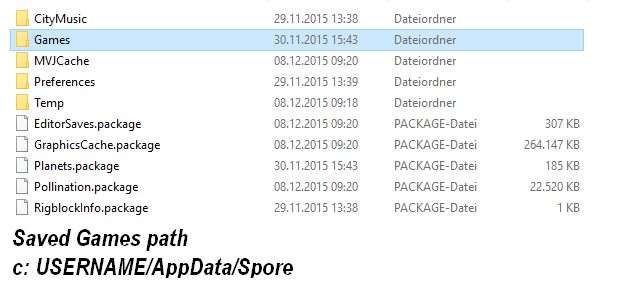
# A defective Save Games or a defective creation in the game
# Also fast hardware can cause this
Spore is a 32 bit game, more like 8 GB it can‘t manage
If you have 12 GB, your computer is too fast for this game
What can you do
Remove your old Saved Games and start the game again (Move only the "files" on your desktop, so that both folders are blank)
If it runs without any crashes,then caused your old Saved Games these errors
Exactly the same thing you do with your creations folder. This is the best way to testing out where the defect is located
More helpful tips you'll find here.
http://spore.wikia.com/wiki/Glitches/Major_Glitches
Don't forget and write me your rig.
Featured Places