DirectX Error - PGA Tour PC
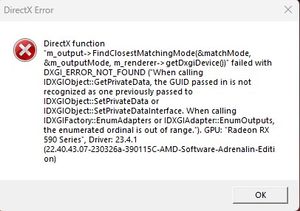


Every time I play I have the same directx's error. You can see it in the file attached.
I tried to change the configuration but all it's the same.
Please, help!
Thanks in advanced

 EA Staff (Retired)
Hi @Seve_est_1965 when you have a moment can we try the following steps?
Well, I did the two first steps (EA App) and I've played 36 holes without errors. So (crossed fingers) I think the problem it's solved.
Thank you very much!

I am constantly getting the DirectX error. Sometimes I can play for a couple hours without issue, while at other times it will happen every few holes. I've tried the suggestions above and all was well for 24 holes. Upon shutting down the game and playing again later, the error reoccurred within 1 hole.
UPDATE: I've noticed that when this bug happens, it almost always occurs when the ball has just impacted the ground after a shot.


